MCA-C3 Test Procedure
Page 58 of 77
Audio and Page Sense
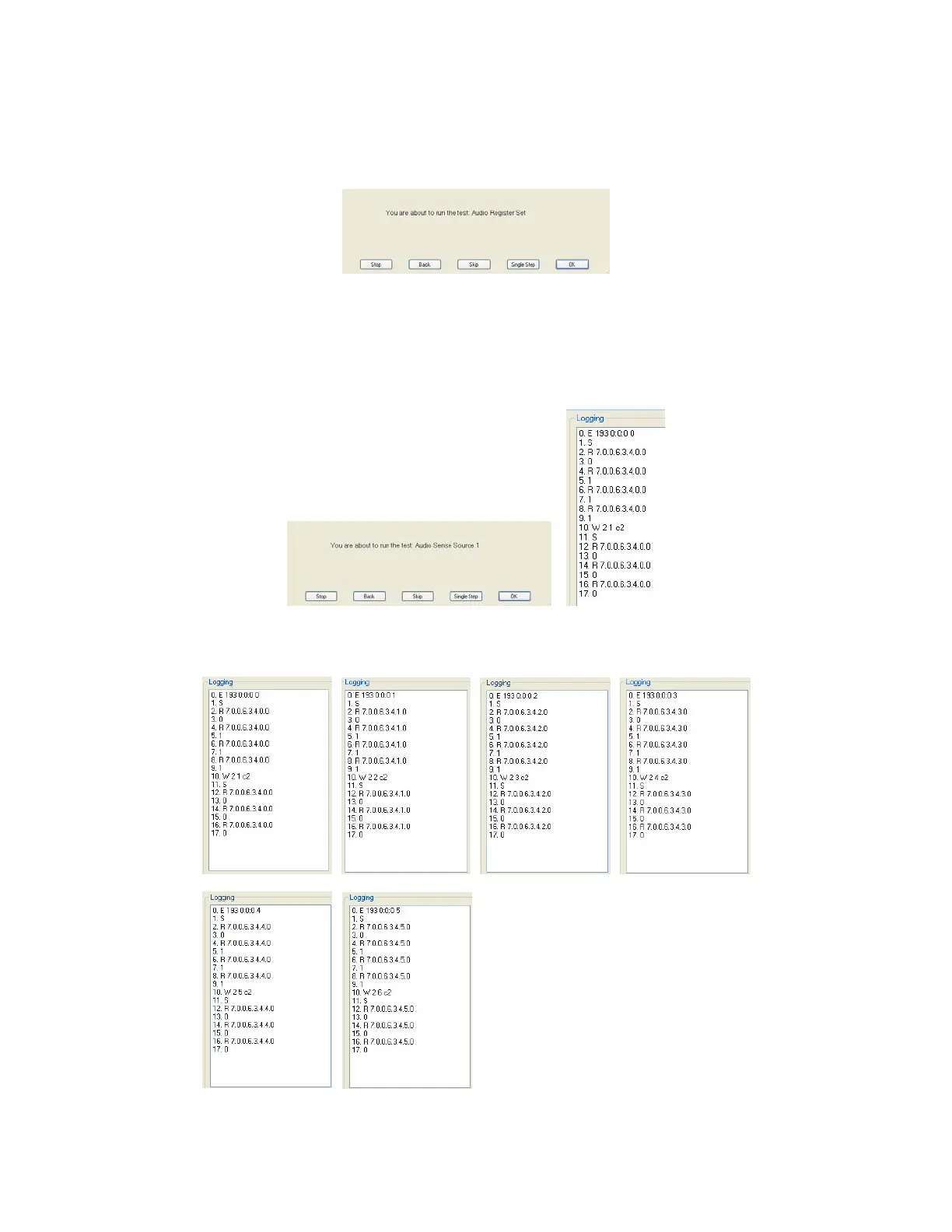
1. Press the space bar at the “Audio Register Set” script.
2. Press space bar at the “Audio Sense Source 1” dialog.
The Logging window will display like the picture on the right.
Lines 5, 7, and 9 will return a value of 1.
Lines 13, 15, and 17 will return a value of 0.
Audio Sense Source 1 passes when all values above are correct.
3. Press the Space bar for each Audio Sense Source. Each of the 6 Sources
will appear as below in order to pass the Audio Sense Source Test.
Source 1 Passed Source 2 Passed Source 3 Passed Source 4 Passed
Source 5 Passed Source 6 Passed
Lines 5, 7, and 9 will
return a value of 1.
Lines 13, 15, and 17 will
return a value of 0.
Confirm this occurs for
each Source Tested


 To Next Page