HighLinePlayer
TimeSettings
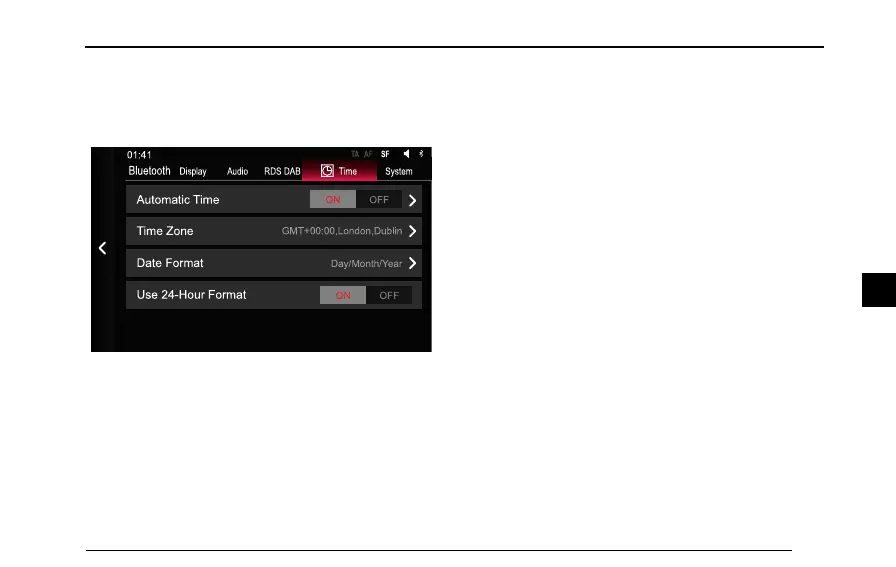
Inthesettingsinterface,tap[Time]toenterthetimeand
datesettingsinterface.
Display Audio SystemTime
S FAFTA
Bluetooth
RDS DAB
01:41
ON OF F
ON OF F
Automatic Time
Time Zone
Date Format
Use 24-Hour Format
Day/Month/Ye ar
GMT+00:00,London,Dublin
AutomaticTime
Y oucanturnon/offthefunctionofautomaticsettingof
dateandtimeasrequired,whenOFFisred,thefunction
isturnedoff,thetimeanddatecanbesetbythedriver .
WhenONisred,thefunctionisturnedon,andthesystem
willautomaticallysetthedateandtime.
TimeZone
T ap[TimeZone]toselectthetimedisplayfordifferent
placesindifferenttimezonesaccordingtoyourpreference.
DateFormat
T ap[DateFormat]toselectthesystemdateformat,
Day-Month-Year,Month-Day-Y earandY ear-Month-Day.
Use24–HourFormat
T ap[Use24–HourFormat],andselecttoturnon/off24
hoursformataccordingtoyourpreference.
11 1
4



 To Next Page