HighLinePlayer
BluetoothMusic
T oplaymusicviaBluetooth,rstlyconnecttheBluetooth
device.(Seethe‘Bluetoothpairingandconnection’section
fordetails)
AftertheBluetoothdeviceisconnectedwiththesystem,
enterthehomepage,tapthemultimediawidget,andthen
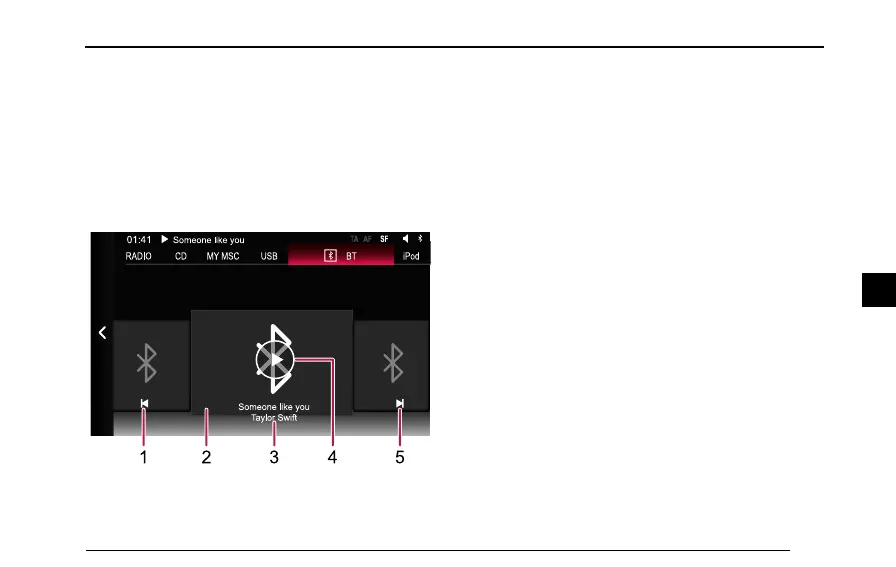
tap[BT]toentertheBluetoothmusicplaybackinterface.
1SwitchtoPreviousSong
2BluetoothMusicDefaultImage
3SongTitle/Artist
4Play/Pause
5SwitchtoNextSong
IntheBluetoothmusicplaybackinterface,pressMENUon
thesystemcontrolpanel,andtheBluetoothSettingsand
AudioSettingsfunctionbuttonsappearontheinterface.
T ap[BluetoothSettings],thesystemskipstotheBluetooth
Settingsinterface.
T ap[AudioSettings],thesystemskipstotheAudioSettings
interface.
129
4



 To Next Page