EasyManua.ls Logo

Santerno Sinus M - 10.2 Jog operation; Terminal JOG FX;RX operation

Santerno Sinus M
219 pages
Print Icon
To Next Page IconTo Next Page
To Previous Page IconTo Previous Page
Loading...
10-4
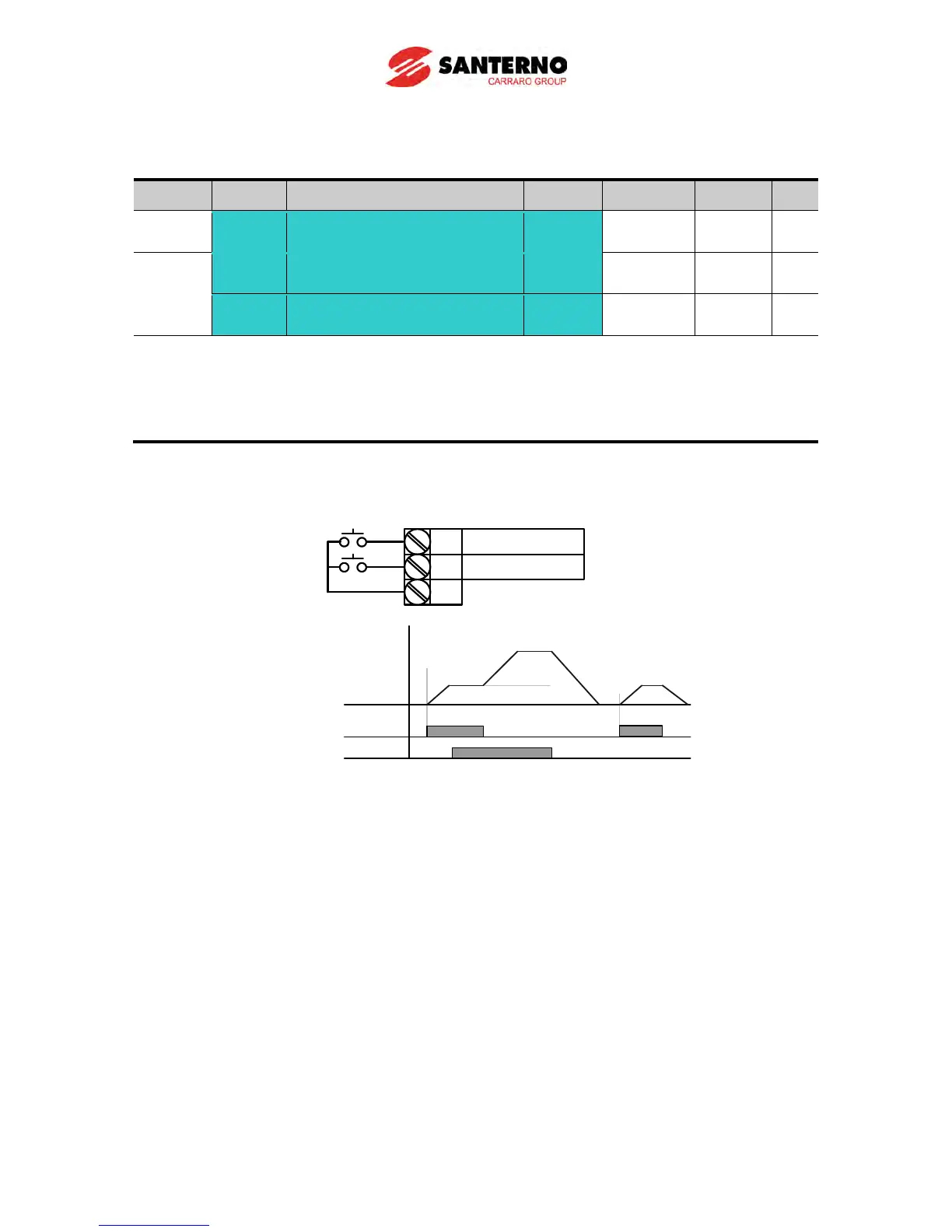
Terminal JOG FX/RX operation
Group Display Parameter Name Setting Range Default Unit
Function
group 1
F20 [Jog frequency] -
0 ~ 400 10.00 Hz
I/O
group
I23
[Multi-function input
terminal P7 define]
26
0 ~ 29 6
I24
[Multi-function input
terminal P8 define]
27
0 ~ 29 7
Set the desired jog frequency in F20.
Select multifunction input terminal P7 or P8 for this setting.
If P7 is set for Jog operation, set I23 to 26 {Jog}.
Jog frequency‘s setting range can be set between Max. frequency (F21) and start frequency (F23).
The following diagram is an example of when the reference frequency is 30Hz and the Jog frequency
is 10 Hz.
P1
P7
CM
FX : I 17 = 0
JOG : I23=26
P 7 (
JOG-FX
)
Drive
commend(FX)
Frequency
F20
30Hz

Table of Contents

Other manuals for Santerno Sinus M