Up-down mode select
Group Display Parameter Name Setting Range Default Unit
Frq [Frequency setting method] 8
0~8 0
I/O
group
I17
[Multi-function input
terminal P1 define]
[Multi-function input
terminal P7 define]
[Multi-function input
terminal P8 define]
Select 8 in Frq code of drive group
Select the terminal which is used as up-down drive among multi-function inputs (P1~P8)
Operates in selected mode as a step frequency set in F66.
The up-down mode is selected as follows:
F65 Up/down select
0
The reference frequency is increased according to
Max./Min. frequency (Initial value)
Increased as much as step frequency (F66) according to
edge input
2 Combination of 0 and 1
F66 Step frequency Frequency increased according to edge input
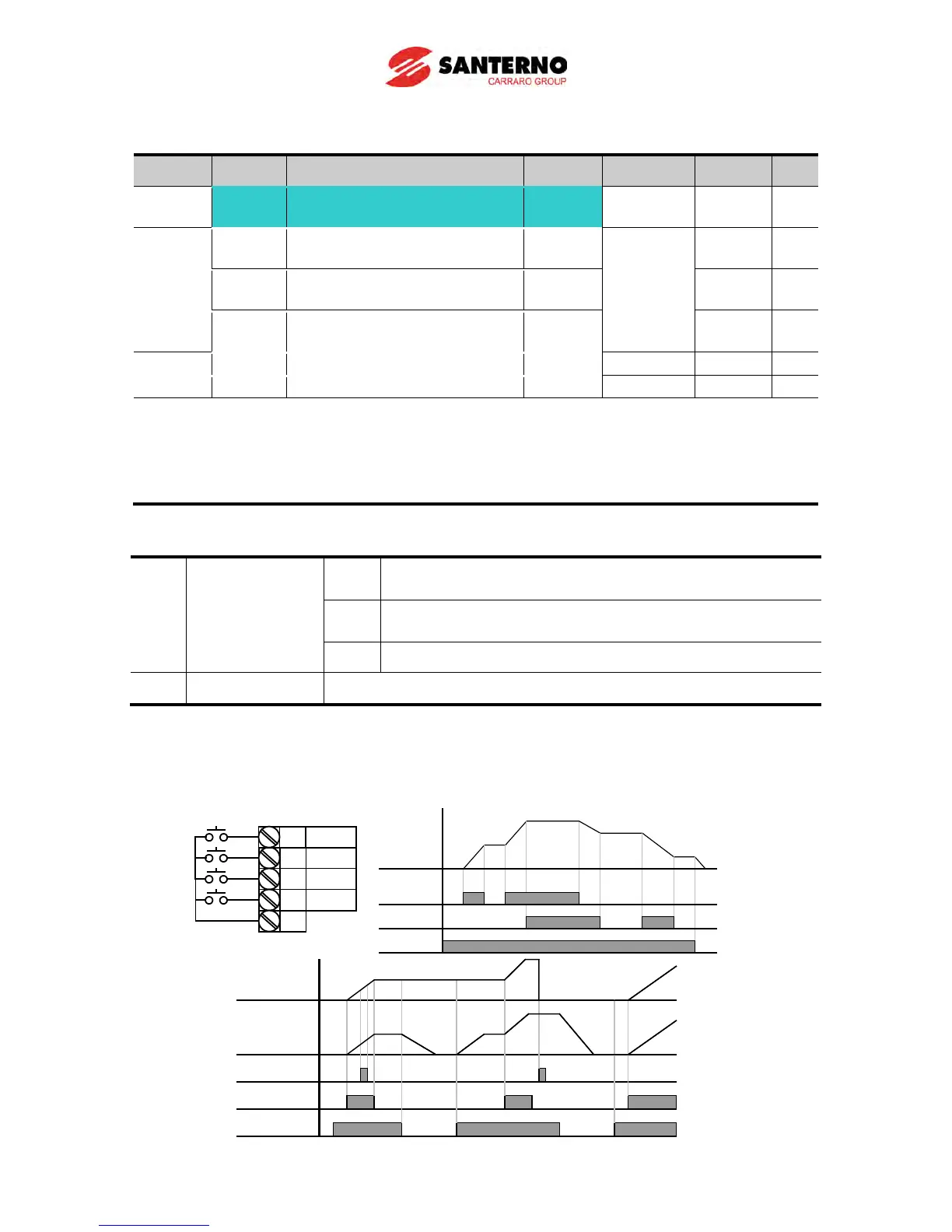
When F65 is 0: If you press UP, it is increased up to Max. frequency as a speed value set in the above.
(If a frequency limit exists, speed is increased up to upper limit.) If you press DOWN, it is decreased as
the speed value set in the above regardless of the stop method. (If a frequency limit exists, speed is
decreased up to lower limit.)
P6
P7
P8
I22 = 25
I23 = 15
CM
I24 = 16
P1 I17 = 0
P7 (UP)
P6(CLEAR)
Output
Frequency
Drive
commend (FX)
Saved
Frequency
P7 (UP)
P8 (DOWN)
Frequency
Run
command(FX)



 To Next Page