Translation of Original Operating Instructions
Airport Sweeper / Airport Stand Cleaner
2017-02-02 74
8.5.3 Putting the suction unit into operation
TIP
If other equipment, e.g., the suction unit or cylindrical
brushes, is already in use:
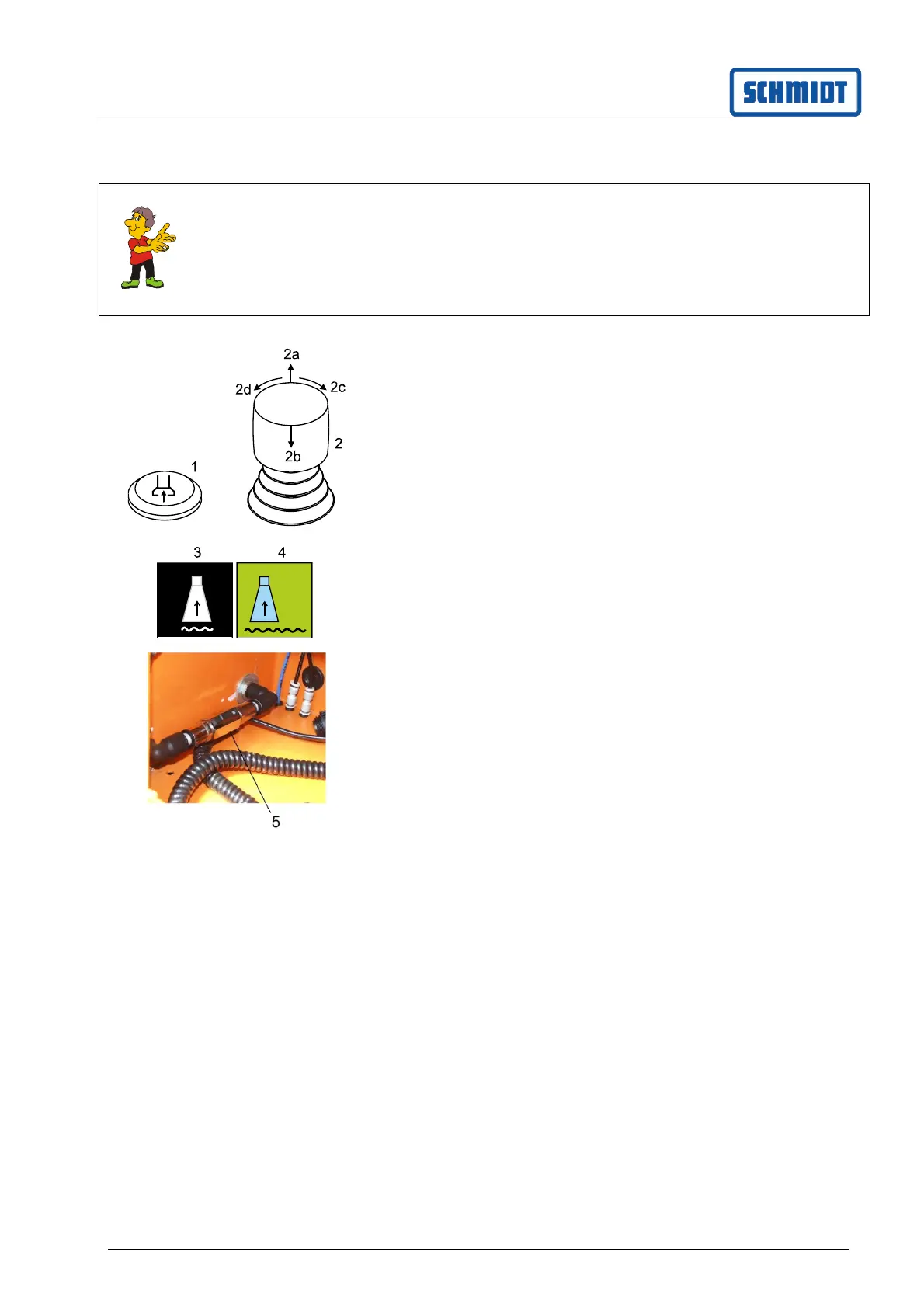
Press the button (1); the disc brush lowers into
the working position and switches on
Press the button (1) again; the disc brush rises
into the working position and switches off
Button (1) is preselected or press.
Suction unit is preselected
Set the motor speed by turning the joystick in the
direction of (2c/2d). The blower is activated from
a speed of 1,300 rpm and above.
Move the joystick (2) to the direction of (2b).
The sweeper is lowered and switched on.
Water is supplied to the water spray unit in the suction
nozzle and to the path marker. If the water supply for
the path marker is interrupted, the stopcock (5) in the
hopper box is to be closed.
The rear suction unit functions are displayed with symbols
on the display
Suction unit off (3)
Suction unit on (4)
Switching off the suction unit
Move the joystick (2) to the direction of (2a).
All working devices are moved to the transport
position and switched off.
Or
Turn off suction unit with button (1).
Only the suction unit is raised in transport position and
switched off.



 To Next Page