Date Code 20181001 SEL-3031 Instruction Manual
Settings and Commands
Settings
4.11
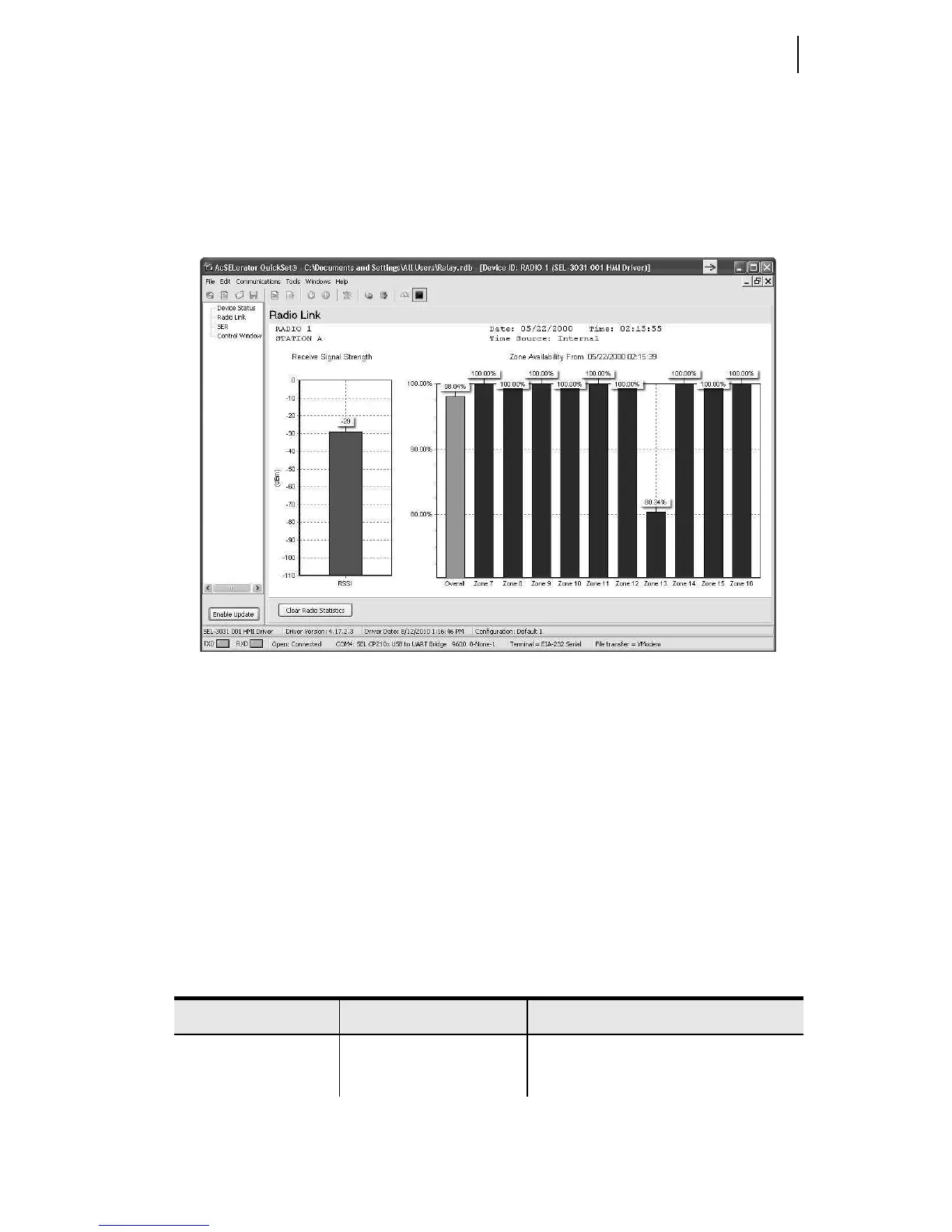
Select the Radio Status screen to view the radio statistics. Included is the RSSI value
that displays the current strength of the receive signal. This will aid in properly aiming
the antenna for maximum signal strength. The “Availability” displays the overall
channel availability of the link. The “Zone Availability” gives the availability of each
of the 10 zones. See Monitoring Radio Performance on page 5.1 for more information
on optimizing the radio link.
Figure 4.9 Radio Strength and Channel Availability
The SER window displays the same information as the ASCII SER commands. The
Control Window allows you to clear the SER, synchronize with IRIG, and set the time
and date.
Global Settings
Under the Global group settings category, set the device and host identifiers settings.
The SEL-3031 displays the Device and Host Identifier strings at the top of the serial
port commands responses, identifying messages from individual devices. Enter as
many as 30 characters, including capital letters A–Z, numbers 0–9, periods, and
dashes. Table 4.3 shows the device and host identifier settings.
Table 4.3 Global Settings (Sheet 1 of 2)
Setting Prompt Setting Range Setting Name := Factory Default
Device Identifier 30 characters DID
Host Identifier 12 characters (no spaces) HID



 To Next Page