Panoramic View
The vehicle is equipped with a panoramic view function
that can display the surrounding environment in real-time.
In complex road conditions, such as narrow roads or a
high pedestrian presence, it helps reduce the driver's
visual blind spots and enhances driving safety.
• The intention of the panoramic view system is to
provide assistant during parking or low-speed
driving, but this system cannot replace your
attention and judgment.
• The camera has blind spots, where it cannot
detect objects or people around or near the
vehicle.
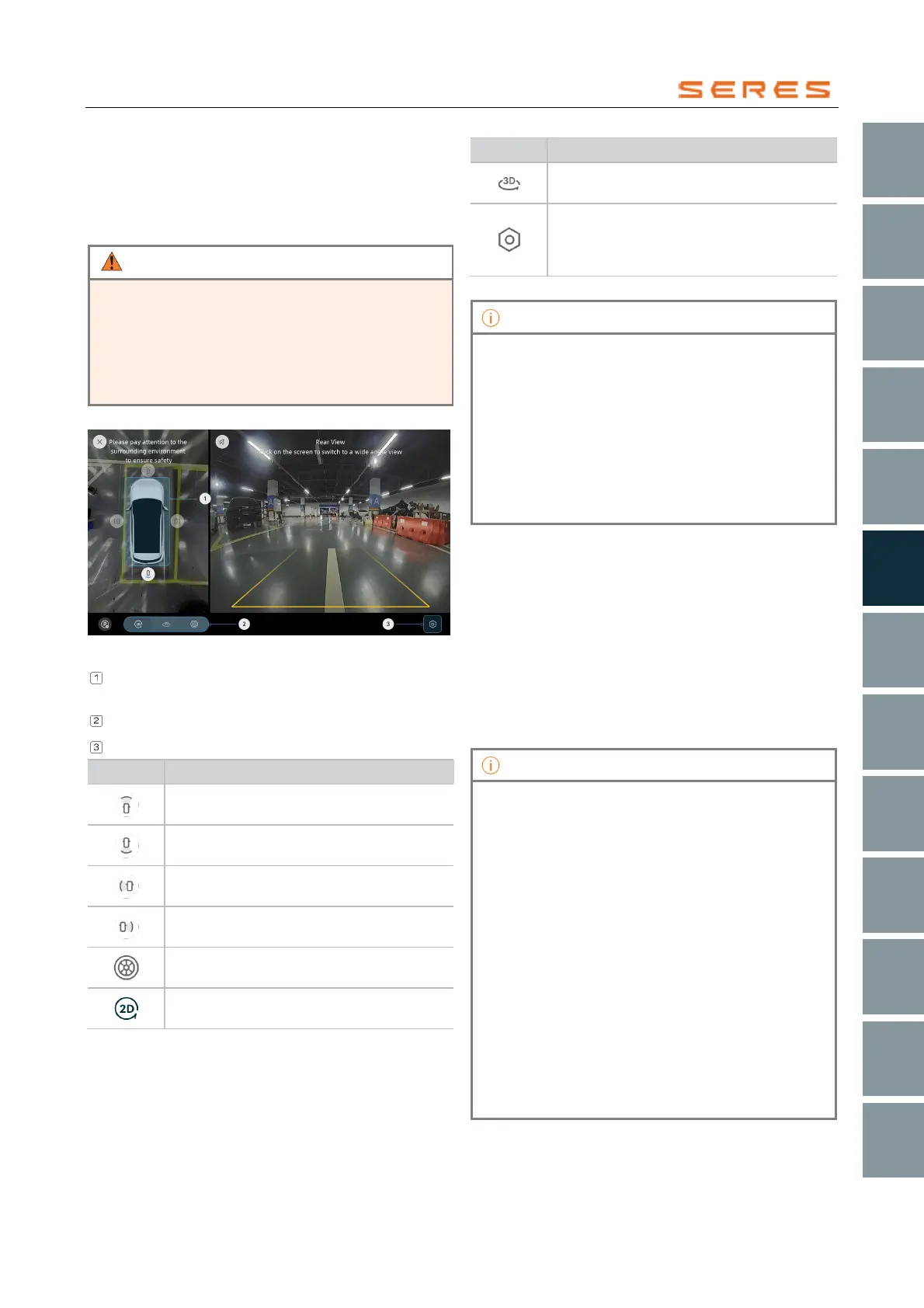
Panoramic View Interface
* The image is for reference only; please refer to the actual
product
Image display area switching and approaching
obstacle reminders
Switch between 2D, 3D, and hub view
Settings
2D Front View: Click on the front-side dot of
the vehicle model
2D Rearview: Click on the rear-side dot of
the vehicle model
2D Left View: Click on the left-side dot of
the vehicle model
2D Right View: Click on the right-side dot of
the vehicle model
Hub View: Click on the top dot of the
vehicle model
2D View: Switch between different
perspectives
3D View: Rotate perspective keys to switch
between different views
The settings button can be used to
enable/disable low-speed steering
assistant, transparent vehicle body, and
scene reconstruction functions.
• When switching to reverse gear (R) to enter the
panoramic parking function, the central control
screen's other interfaces (e.g., status or Climate
controls control interface) cannot be displayed or
operated.
• After activating the transparent vehicle model
function, the central control screen displays a
semi-transparent vehicle body. While driving, you
can view obstacle information at the bottom of the
vehicle and the positions of all four tires, assisting
you in navigating through complex road surfaces.
Activating Panoramic View
You can activate the panoramic view interface in the
following ways:
● Switch to reverse gear (R).
● Click on the "Applications Center > Panoramic View"
icon on the central control screen.
● Press the "Panoramic View" button on the steering
wheel.
● When the vehicle is on a slope and obstacles are
detected by the system.
● In the parking interface, click the "Panoramic View"
switch.
• Exit the function when switching from reverse gear
(R Gear) to drive gear (D Gear) and the vehicle
speed exceeds 10 km/h.
• Automatically exit when the forward speed
exceeds 30 km/h.
• Exit the function when the vehicle switches to the
parking gear (P Gear) from any position.
• When the panoramic view is activated by the turn
signal indicator lights, exit the function when the
turn signal indicator lights returns to the normal
position without performing other view-switching
operations.
• Unable to enter the panoramic view function once
the vehicle speed exceeds 25 km/h.
• In non-reverse gear (R), you can exit the
panoramic view interface through the main
interface switch on the central control screen.
• Pressing the "Panoramic View" button on the
steering wheel can exit the function.



 To Next Page