39
7. Set value memory function (SM option)
If the SM option (Set value memory number external selection) is added, a maximum of
7 files (14 pieces of data per one file) of data can be memorized.
Control can be performed by selecting the desired file.
One file comprises 14 kinds of set value:
SV, OUT1 proportional band, Integral time, Derivative time, OUT2 proportional band,
Alarm values (A1 to A4), Overlap/Dead band, OUT1 high limit value, OUT1 low limit
value, OUT2 high limit value, OUT2 low limit value
To select the set value memory number (file number), connect terminals 13 to 16 as shown
below (Table 7-1).
Up to 50 units of the FCD-13A can be connected in parallel.
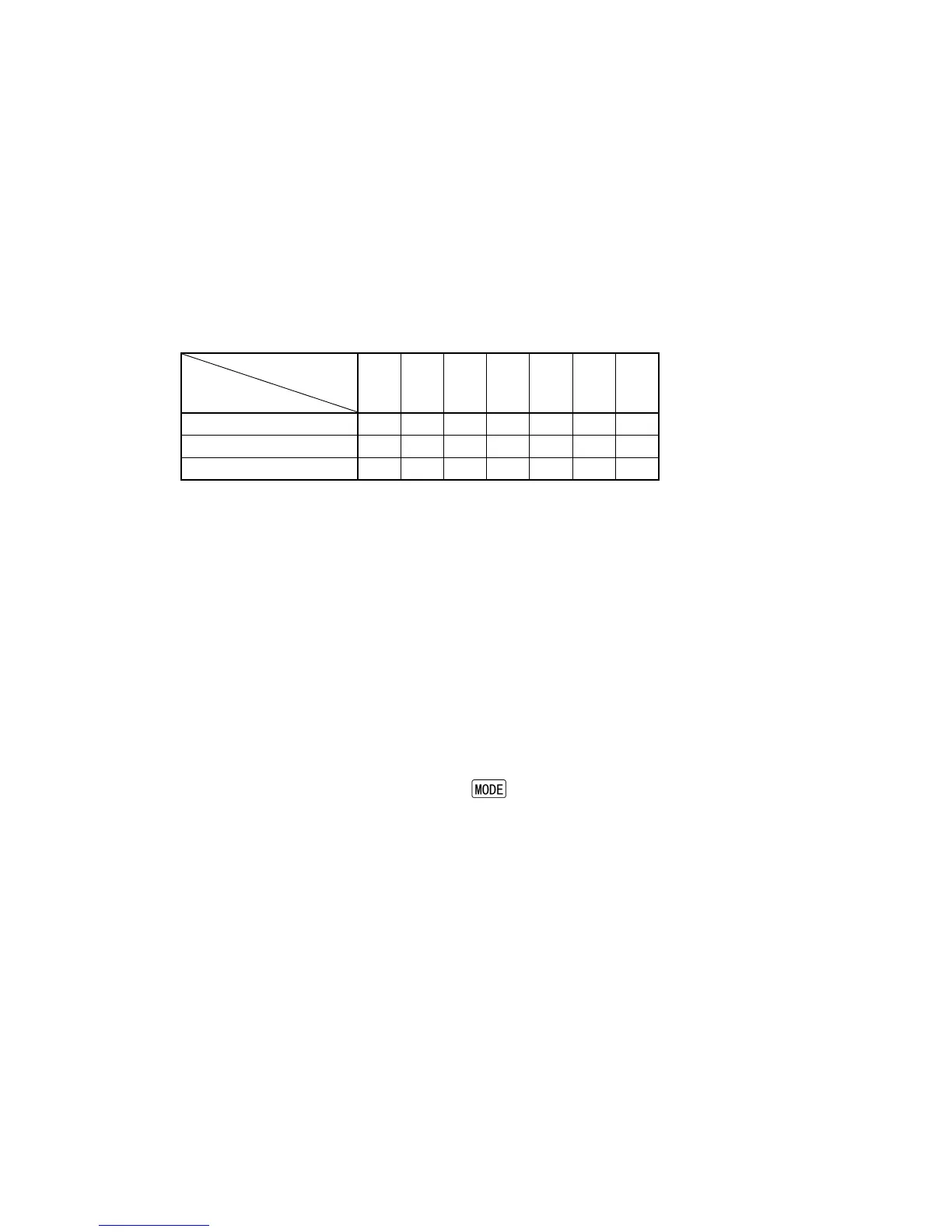
Terminal connection for Set value memory number selection
(Table 7-1)
Set value
memory No.
Connecting
terminals
1 2 3 4 5 6 7
13 - 16 (b0-COM) – O – O – O –
14 - 16 (b1-COM) O – – O O – –
15 - 16 (b2-COM) O O O – – – –
–: Closed O: Open
• If the Set value memory number is selected externally, the number cannot be selected by
front keypad.
• To select the memory number by front keypad, all terminals (b0, b1, b2 and COM) should
be open.
• Set value memory number cannot be changed during setting mode or AT.
Operation procedures for Set value memory function
(1) In the PV/SV display mode, select a set value memory number by connecting
terminals.
(2) In the setting mode, set each value:
SV, OUT1 proportional band, Integral time, Derivative time, OUT2 proportional
band, Alarm values (A1 to A4), Overlap/Dead band, OUT1 high limit value,
OUT1 low limit value, OUT2 high limit value, OUT2 low limit value.
(3) After settings are complete, press the
key to revert to the PV/SV display mode.
Registration
• Each set value is registered in the file of which number is indicated on the MEMO display.
• When any number is retrieved by connecting terminals, the selected number is indicated,
and the control is performed using data (set values) of the indicated file number.
• To change set values, repeat the Operation procedures above.



 To Next Page