24
6.2 Settings
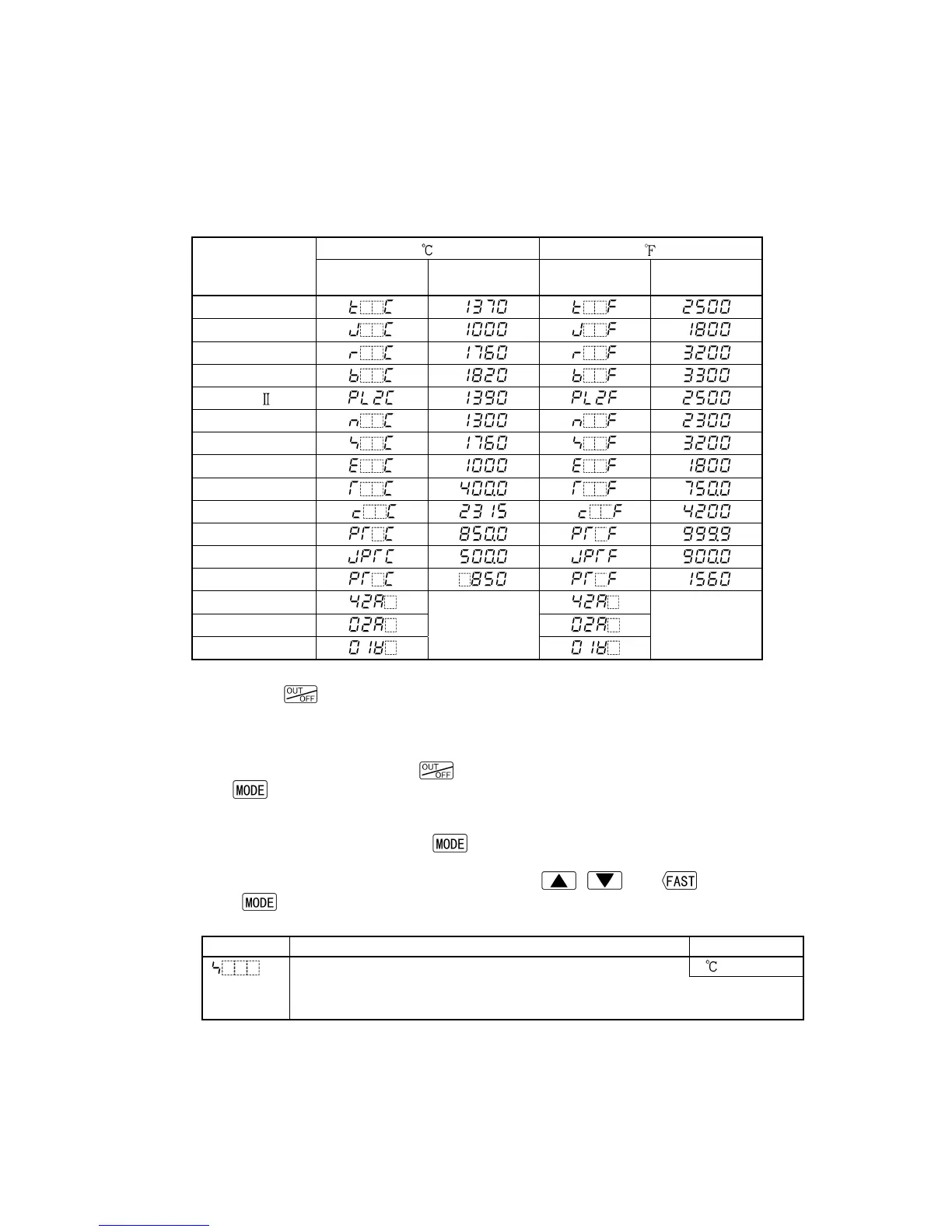
The PV display indicates the Sensor type selected during Sensor input selection, and the
SV/MV/TIME display indicates input range high limit value or Scaling high limit value for
approx. 2 seconds (warm-up status) after power-on.
See (Table 6.2-1).
During this time, all outputs and LED indicators are in OFF status.
Control will then start indicating PV on the PV display and SV on the SV/MV/TIME display.
While control output OFF function is working, the PV display indicates the item selected
during “Indication when control output OFF”.
(Table 6.2-1)
Input
PV display
SV/MV/TIME
display
PV display
SV/MV/TIME
display
K
J
R
B
PL-
N
S
E
T
C(W/Re5-26)
Pt100
JPt100
Pt100
4 to 20mA DC
Scaling high
limit value
Scaling high
limit value
0 to 20mA DC
0 to 1V DC
Notes before key operation
• Pressing the
key for approx. 1 second from any mode enables the control output
OFF function.
Once the control output OFF function is enabled, the function cannot be released even if
the power to the instrument is turned OFF and ON again.
To cancel the function, press the
key again for approx. 1 second.
• If the
is pressed for 3sec, the unit reverts to the PV/SV display mode from any mode.
6.2.1 Main setting mode
In the PV/SV display mode, if the
key is pressed, the mode proceeds to the Main
setting mode.
The SV can be increased or decreased using the , and keys.
If the
key is pressed, the SV will be registered, and the controller will revert to the
PV/SV display mode.
Character Name, Function, Setting range Default value
SV 0
• Sets SV.
• Setting range: SV low limit to SV high limit



 To Next Page