61
<Key operation>
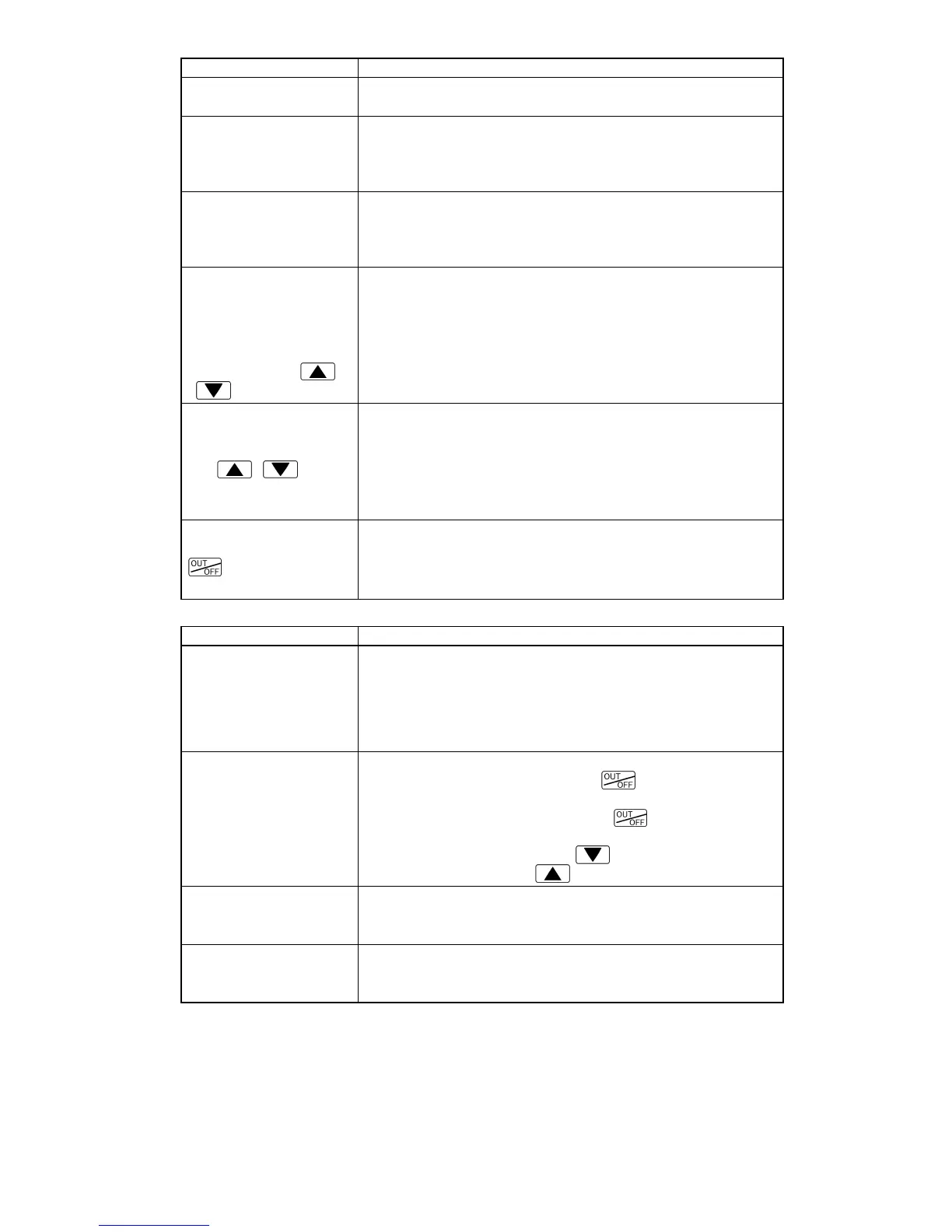
Problem Presumed cause and solution
The setting mode
cannot be selected.
• Manual control is selected.
Change the mode to Automatic control.
The mode cannot be
changed from Manual
control to Automatic
control by keypad.
• The mode has been set to “Manual control” by External
operation.
External operation has priority.
The mode cannot be
changed from Remote
setting to Local setting
by keypad.
• The mode has been set to “Remote setting” by External
operation.
External operation has priority.
• Unable to set the SV,
P, I, D, OUT1
proportional cycle,
alarm value, etc.
• The values do not
change by the
,
keys.
• Set value lock (Lock 1 or Lock 2) is selected.
Release the lock selection.
• AT (Auto-tuning) is performing.
Cancel AT.
The setting indications
do not change within
the input range even if
the
, keys
are pressed, and new
values are unable to be set.
• SV high limit or SV low limit in [Auxiliary function setting
mode 1] may be set at the point where the value does not
change.
Set it to a suitable value during Auxiliary function setting
mode 1.
Program control does
not start even if the
key is pressed
in the Program mode.
• Step time has not been set.
Set the step time.
<Control>
Problem Presumed cause and solution
PV does not rise.
• Thermocouple or RTD is out of order.
Replace the sensor.
• Check whether sensor or control output terminals are securely
connected to the input or output terminals of the instrument.
• Ensure that the wiring of sensor and control output
terminals are correct.
Control is not
performing.
(Only PV display is
indicated)
• Control output OFF function is working.
Cancel the function by pressing the
key for approx.1 sec.
• Program mode is selected.
To start Program control, press the
key.
To perform Fixed value control, select the Fixed value
control mode by pressing the
key for approx. 3sec
while holding down the
key.
OUT1 or OUT2 remains
in an ON status.
• OUT1 low limit value or OUT2 low limit value is set to
100% or higher in Auxiliary function setting mode 2.
Set it to a suitable value.
OUT1 or OUT2 remains
in an OFF status.
• OUT1 high limit value or OUT2 high limit value is set
to 0% or less in Auxiliary function setting mode 2.
Set it to a suitable value.
For all other malfunctions, please contact our main office or dealers.



 To Next Page