Getting Started Muting a Call
1
ShoreTel IP Phone 420 User Guide 15
Muting a Call
To mute a call so that the caller doesn’t hear you, press the button.
The LED on the button is illuminated in red when the mute is active.
To unmute a call so that the caller can hear you, press again.
The button is not illuminated when the mute is not active.
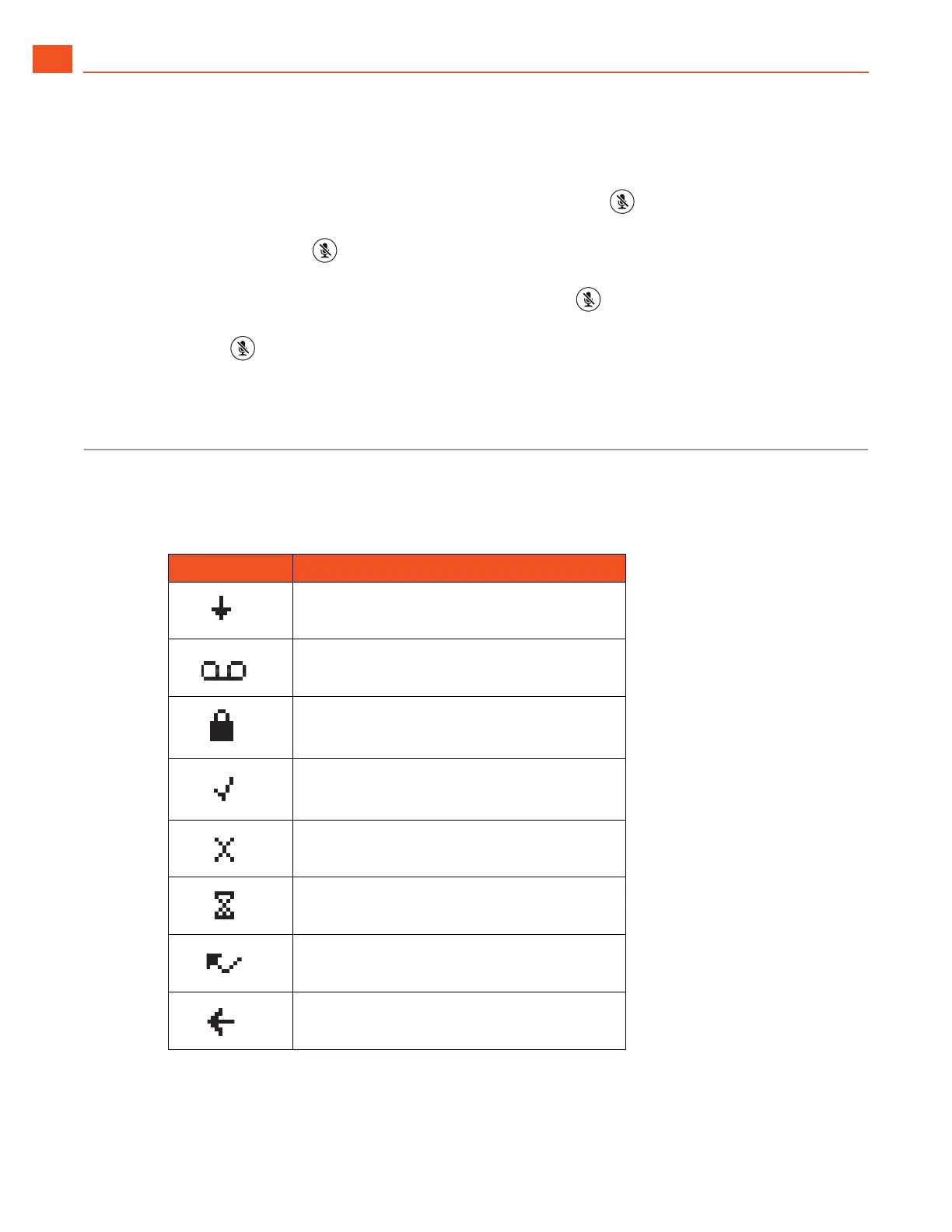
Guide to Status Icons
Your ShoreTel IP Phone 420 displays icons for phone status and calls placed or received. These icons
are shown in Tab le 1.
Table 1: Status Icons
Icon Description
Off-screen inbound call (on main screen)
Voicemail message indicator (on main screen)
Secure call (on main screen)
Workgroup Agent logged in (on main screen)
Workgroup Agent logged out (on main screen)
Workgroup Agent wrap up (on main screen)
Missed call (on main screen and in History)
Inbound call (in History)



 To Next Page