Getting Started Overview of the ShoreTel IP Phone 420
1
ShoreTel IP Phone 420 User Guide 7
Overview of the ShoreTel IP Phone 420
Welcome to your ShoreTel™ IP phone!
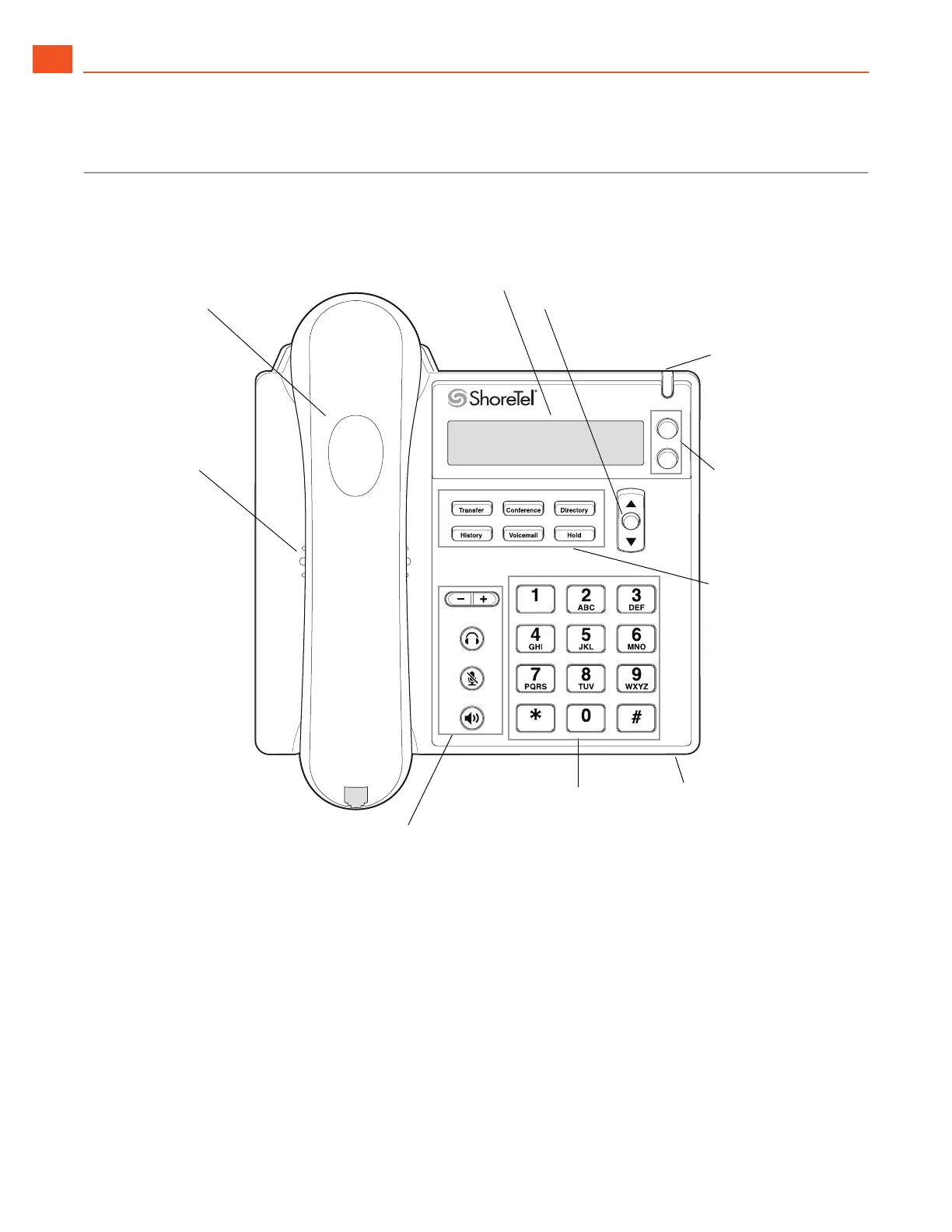
Figure 1 provides an overview of the IP420 phone components.
Figure 1: ShoreTel IP Phone 420 Components
Handset with
finger rest
Speaker
Delivers high-quality
sound
Audio Control Keys
Volume buttons control handset,
headset, speaker, and ring volume.
Headset, Mute, and Speaker buttons
illuminate when functions are active.
Call appearance
buttons
Indicate active,
incoming, or
on-hold calls
Function Keys
Perform core telephony
functions: Transfer,
Conference, Directory,
History, Voicemail, Hold
Dial Pad
Navigation key pad and selector button
Select options in the interface.
Microphone
Indicator LED
Flashing light alerts
you to incoming calls
and unheard voice
messages.
Display area



 To Next Page