To conned en bD gleyer via en RF demoduletor.
Connect the LD player co the RF demodulator,
then connect tbe RF demodulator’s optical or
coaxial dig&I output to the receiver’s jack. When
making this connection, be sure CO set INPUT
MODE manualiy (page 26). The receiver may not
operate correctly if %i‘p’PGT MODE is set to
“AUTO 2CH”. For details on DOLBY DIGITAL
RF hookups, see the operating instructions
sunalicd with your RF demodulator.
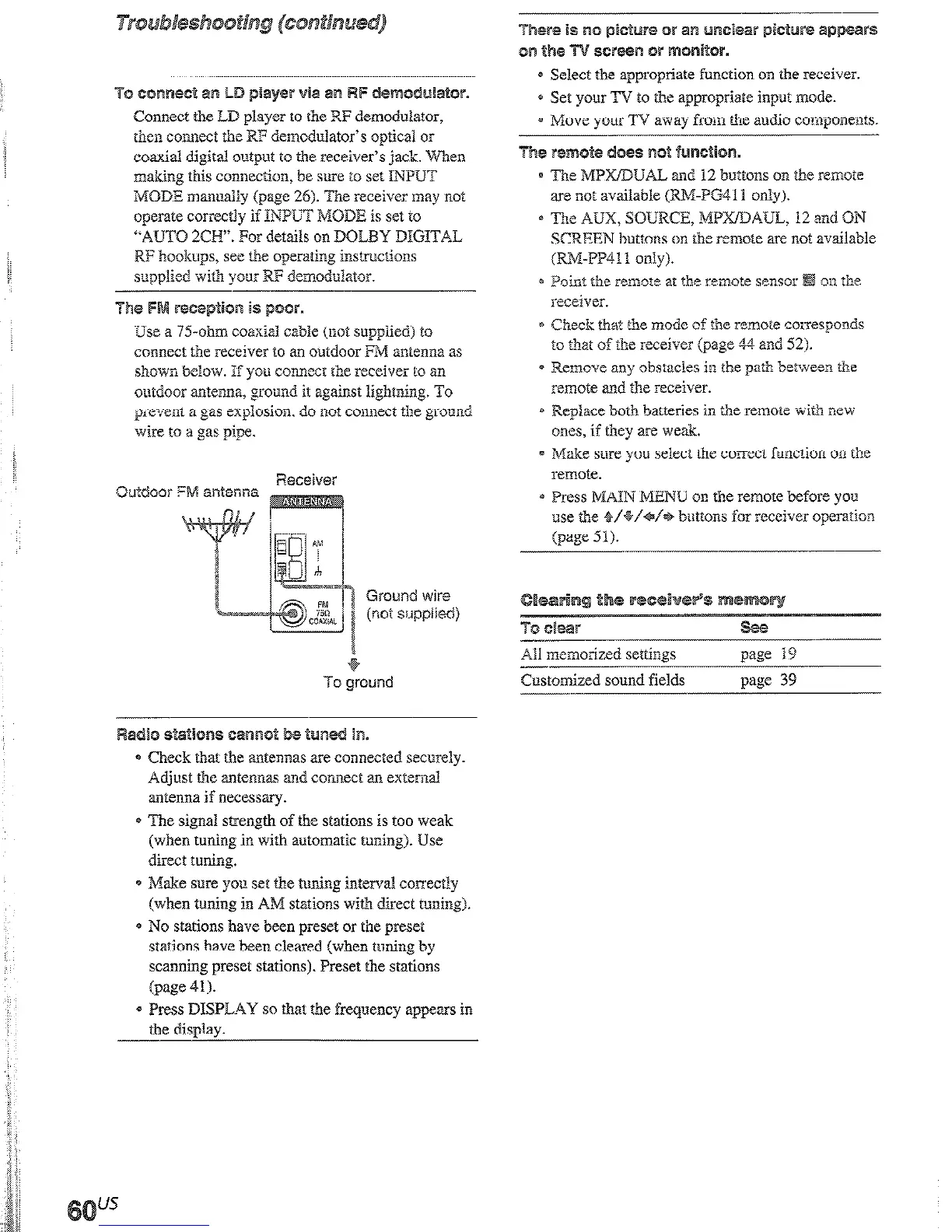
Use a 7%ohm coaxial cable (not supphed) to
connect the receiver to an outdoor FM antenna as
shown beIow. IT you connect the receiver to an
outdoor antenna, ground it against lighming. To
prel:ent a gas expiosion. do not connect the ground
wire to a gas pipe.
Out&or
Ground wire
(not supplied)
Radio e&ctlone cairenot be ‘sun
- Check that the antennas are connected securely.
Adjust the antennas and connect an external
antenna if necessary.
* The signal strength of the stations is too weak
(when tuning in with automatic tuning). Use
direct tuning.
* Make sure you set the tuning interval correctly
(when tuning in AM stations with direct tuning).
* No stations have been preset or the preset
stations have been cleared (when tuning by
scanning preset stations). Preset the stations
(page 41).
* Press DISPL.4Y so that the frequency appears in
the display.
mere is no pwx8re or an m&ear plow@ eppeers
a-2 the
ecr@@n Ok monilor.
4 Select the appropriate function on the receiver.
* Set your TV to the appropriate input mode.
= Move your TV away from the audio components.
Ths remote does: not function.
e Re MPmUAL and 12 buttons OR the remote
are not available (RWPG41 I only).
* The AUX, SOURCE, MPXBAUL, 12 and ON
SCEEN
buttons on tbe
remote are not available
(RWFP411 only).
* Point the remot2 ar the remote sensor
on the
receiver.
* Check that the mode of the remote corresponds
to that of the receiver (page 44 and 52).
* Remove any obstacks in the path between t&e
remote and the receiver.
* Replace both batteries in the remote with new
ones, if they are weak.
a Make sure you select the cotmct function on the
remote.
@ Press MAIN MENU on the remote before you
use the 2/+/+/+ buttons for receiver operation
(page 51).
To clew
Ali menodz2d settings
--
Customized sound fields
see
page 19
page 39
(8 ohms 20 Hz - 20 kwz, TBD 0.09 %)
100W-b 1oow
(8 ohms ! k%. THD 0.7 ‘%)
FRONT? 100 Wlch
CENTEII”: 100 w
SURR”:
100 w/c11
SW BACK”“:
IO0 w
I) Depending on the sound field settings and the
source. there may be no s9und output.
RIAA equalization curve
10.5 dB
MULTI Cpi IN ( 1, 2)2J,
IOMZ-70kHz
CWSACD, TAPI?‘,
+0.5/b2
dB (with sound
MD/DATZ’, MD/
field and equalizer
TAB?’ j TV/SAT,
5YwLD.
VIDEO 1.2.3
bypassed)
..~
Sensitivity: 4 mV
Impedance: 50 kilohms
S/W’: 86 dB (A, 4 mV”)
MULTI CH IN (1,2p
’
CDSACD. TAPEL’,
MDIDAT”, MIX
TAPE3’, TV/SAT,
DVD/LD,
VIDEO 1.2.3
Sensitivity: 250 mV
Impedance: 50 kilohms
SN’: 96 dI3
(A, 250 mV5’)











 To Next Page