70
Level 2 / level 3:
Level 2 and level 3 menus are displayed in tree format
on
the left side of the menu selection area.
You can scroll up/down using a swipe operation or
usi
ng the scrollbar slider.
Select a level 2 menu to display the level 3 menus
i
mmediately below.
Select a level 3 menu to display the corresponding
level 4 an
d level 5 menu buttons.
Level 4 / level 5:
Select level 4 and level 5 menu buttons.
• For the Home menu, you can press the home
button to
display the Home > Shortcut > Top Menu List menu
(10301.11) and select a menu.
For details, see “Selecting a menu from the Top Menu
List menu (Home menu)” (page 70).
• Home > DME menu 4th level/5th level menu buttons
will disp
lay a blue bar at the bottom of the button if a
function is enabled within the menu.
Displaying a menu by entering the menu number
Press the menu number button in the header area.
The numeric keypad window appears. Enter a menu
nu
mber and press [Enter] to display the selected menu.
Selecting a menu from the history
Press the [T] bu
tton or [t] button in the header area.
Press the [T] button to di
splay the previous recalled
menu, or press the [t] button to display the next recalled
menu.
Press and hold the [T] b
utton or [t] button to display a
pull-down list to select and display a menu from the
history.
Selecting a menu from the [Favorites] taskbar
Press the taskbar selection button
and select [Favorites]
from the pull-down list.
Select a menu for display from the menu shortcut buttons
di
splayed in the taskbar.
You can scroll the shortcut butt
on display left/right using
a swipe operation.
Using a mouse, press and hold the left button and then
d
rag to the left or right.
For details, see “Registering Menus as Favorites”
(page 76).
Selecting a menu from the Top Menu List menu
(Home menu)
Press the home button to display the Home > Shortcut >
To
p Menu List menu (10301.11) in the menu display
area.
The Top Menu List menu displays level 2 menu buttons.
Press a menu button to display the last recalled menu
wi
thin the selected level 2 menu.
You can also display the Top Menu List menu by
sel
ecting [Shortcut] in level 2 of the menu selection area.
Displaying a menu by double-pressing control
panel bu
ttons
The control panel has buttons that can display a menu
wh
en double-pressed.
Double-press a button to display the corresponding menu.
For details, see “Menus Recalled by Pressing a Button
Twice” (page 462).
The control panel must be linked with the menu.
For details, see “Linking a Control Panel with the Menu”
(page 76).
Setting Menu Items
Menu items are configured, depending on the item, by
setting operation buttons on/off, selecting values, or
entering values.
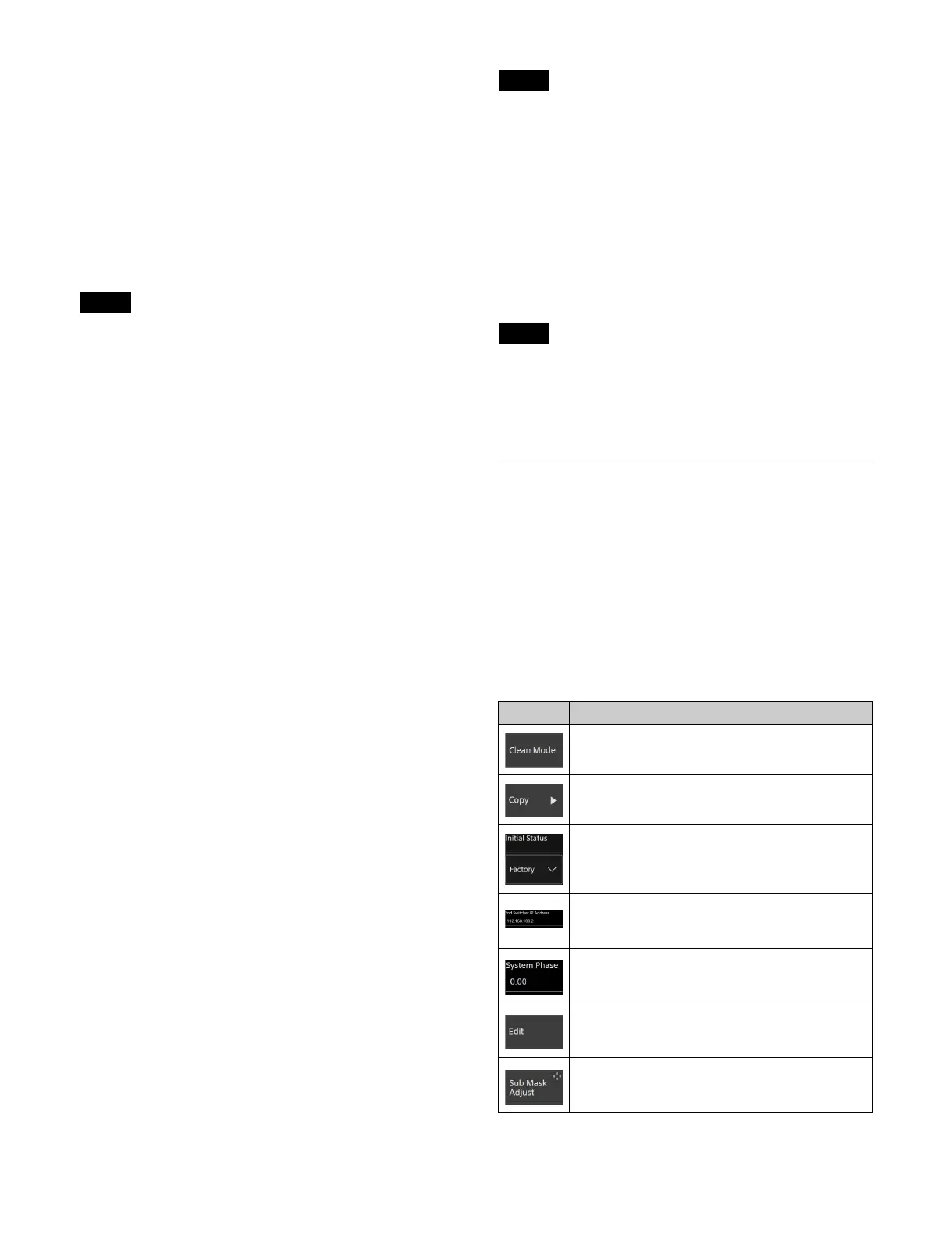
Types of buttons
The action performed when a button is pressed varies
depending on the function assigned to the button.
Depending on the button, mult
iple actions may be
combined (for example, on/off + parameter setting).
Notes
Note
Note
Button Description
On/off button
Turns a function on/off (enable/disable).
Execution button
Executes a function.
Pull-down selection button
Select a value from the pull-down list.
Keyboard input button
Press the input field and enter a character string
usin
g the keyboard.
Numeric keypad input button
Press the input field to display the numeric
keypa
d window and enter a numeric value.
Pop-up display button
Displays a pop-up window for setting/selecting
a fu
nction.
Parameter setting button
Displays the analog controls section for
adj
usting parameters.



 To Next Page