Spectralink IP-DECT Server 6500 Installation and Configuration Guide
14215700 Version 3.0
April, 2014 79
Chapter 12: System Management
This section provides you with information about the web based Administration Page of the
Spectralink IP-DECT Server 6500.
Through the web based Administration Page of the Spectralink IP-DECT Server 6500 it is possible
to define and view different settings of the system, reading statistics, making a backup of
configuration file, updating system software, and resetting the system.
Spectralink IP-DECT Server 6500
Changing System User Name and Password
From the Administration Page it is possible to change the user name and password for the system.
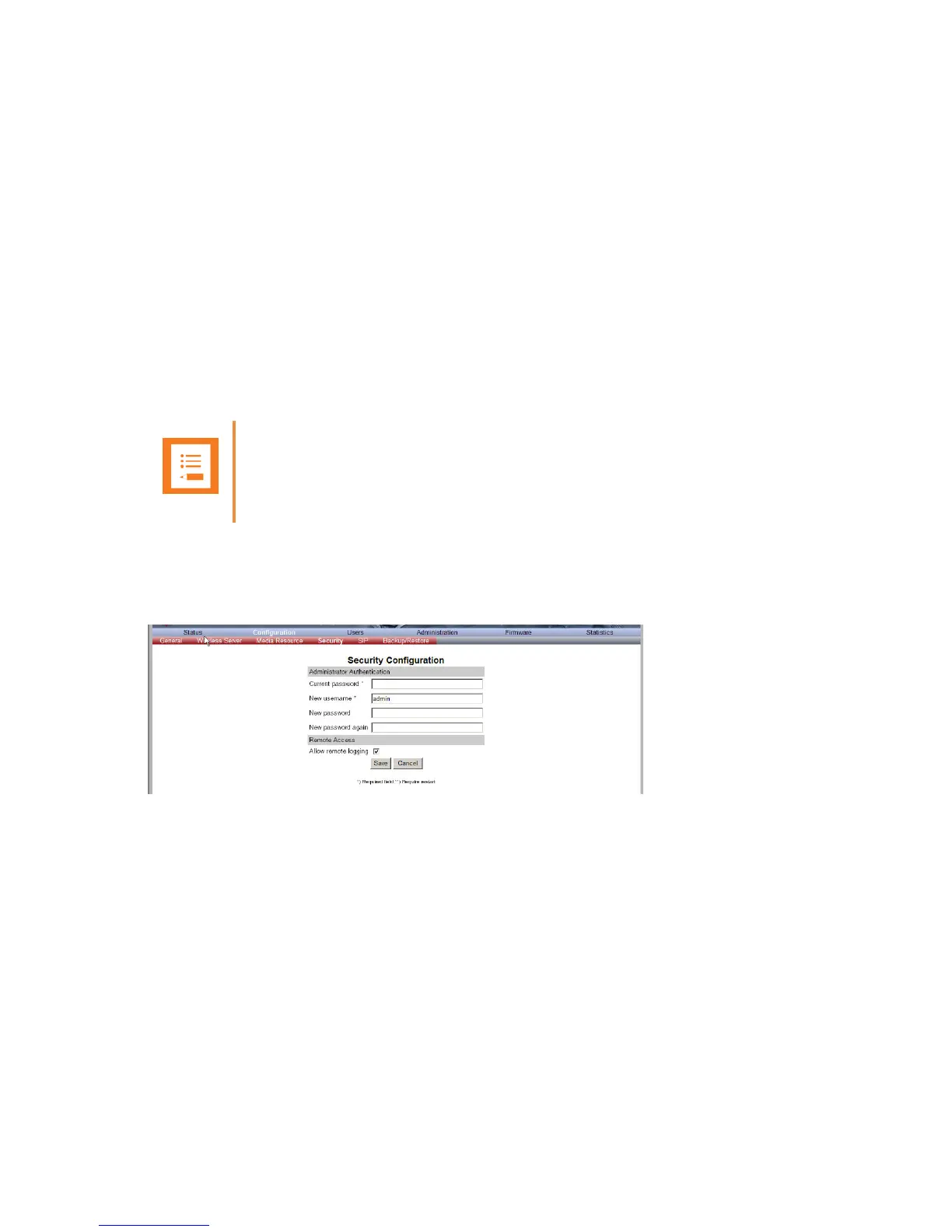
1 Click Configuration, and then click Security.
Figure 62 Adm. Page WS: Configuration/Security page
2 In the Current password field, type the current password.
3 In the New user name field, type a user name.
4 In the New password field, type a new password
5 In the New password again field, type the new password again to confirm it.
6 Click Save to change the password.
Note
It is not possible to import handset registration data already registered in the system.


 To Next Page