spencer 2022A user guide spencerhealthsolutions.c om 11
Loading the Medication Cartridge (Refill) – New Users
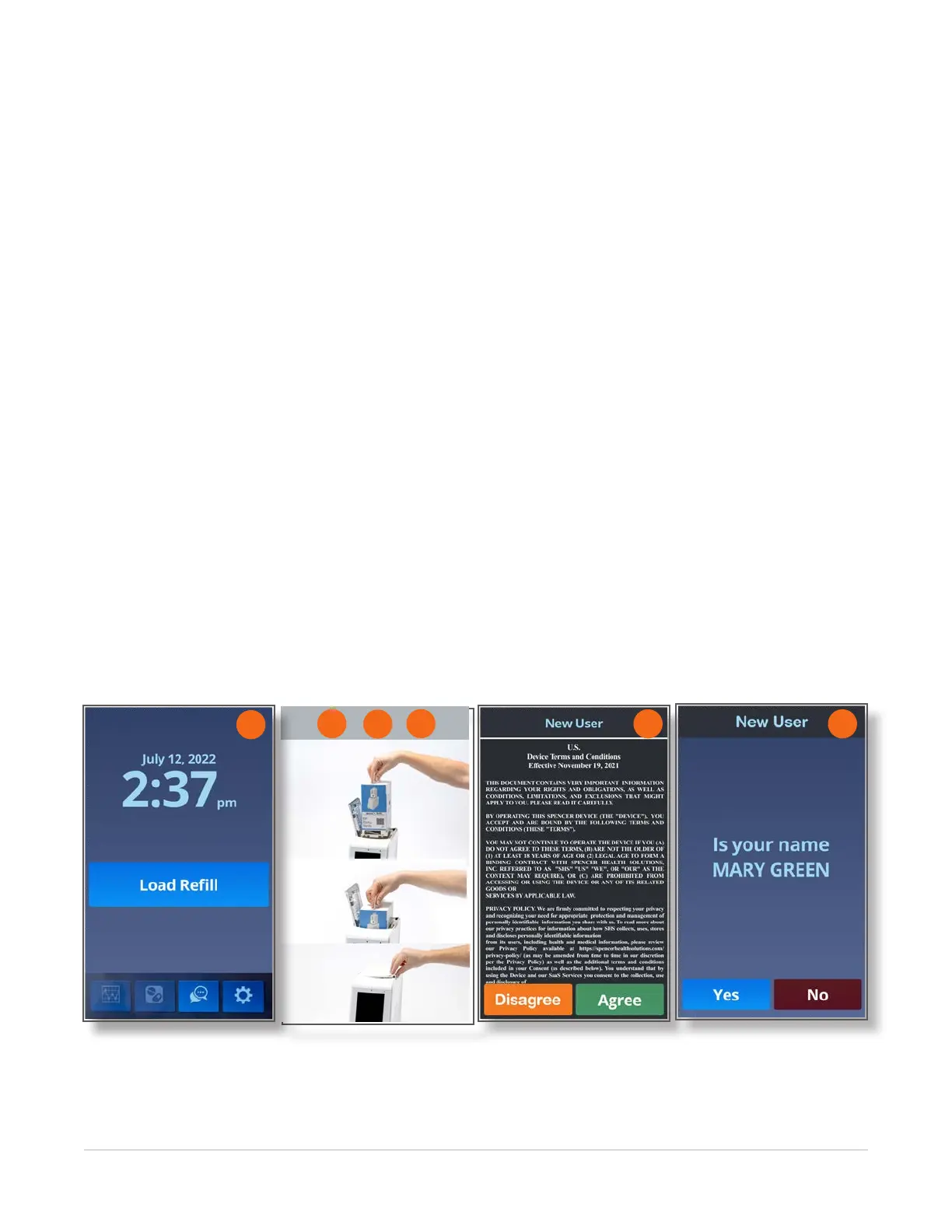
To load the medication cartridge (rell) into your spencer SmartHub, follow these instructions:
1. Touch the Load Rell button.
The lid opens so you can insert the medication cartridge (i.e., the medication rell).
2. Align the front of the medication cartridge (the rell) with the front of the spencer SmartHub.
3. Insert the rell into the rell tub, ensuring that it is seated securely.
4. Gently close the lid until it catches. It will finish closing itself.
The Rell Loading screen displays. When it is nished loading, the New User Agreement screen
displays.
5. Read the information all the way to the end, using your nger to scroll through the information.
6. When you have nished reading the information, touch the Disagree or Agree button.
NOTE: The device will not dispense medication if you choose the Disagree option.
7. Touch the Yes button on both screens to conrm your name.
When it is ready, the Home screen displays.
NOTE: Coding on the label of your rell species your local time zone. If you move spencer to a different
time zone, the Home screen will display the time from the original time zone until your next rell.
If the name or initial time is not correct, contact Spencer Health Solutions Customer Care at 866-971-
3196.
6
1
7
2
3
4



 To Next Page