spencer 2022A user guide spencerhealthsolutions.com 54
Viewing Past Readings
After you connect your devices to spencer, the measurements they take are recorded and viewable
from the Readings screen.
The graphs and viewing options work the same for each of the measurements that spencer can record.
This section shows you how to see the details for a day, as well as the readings for the current week
and previous weeks.
If the most current value for a reading was recorded within the last seven days, it displays on the
Readings screen. If the last value is more than seven days old, the reading for that measurement is
blank.
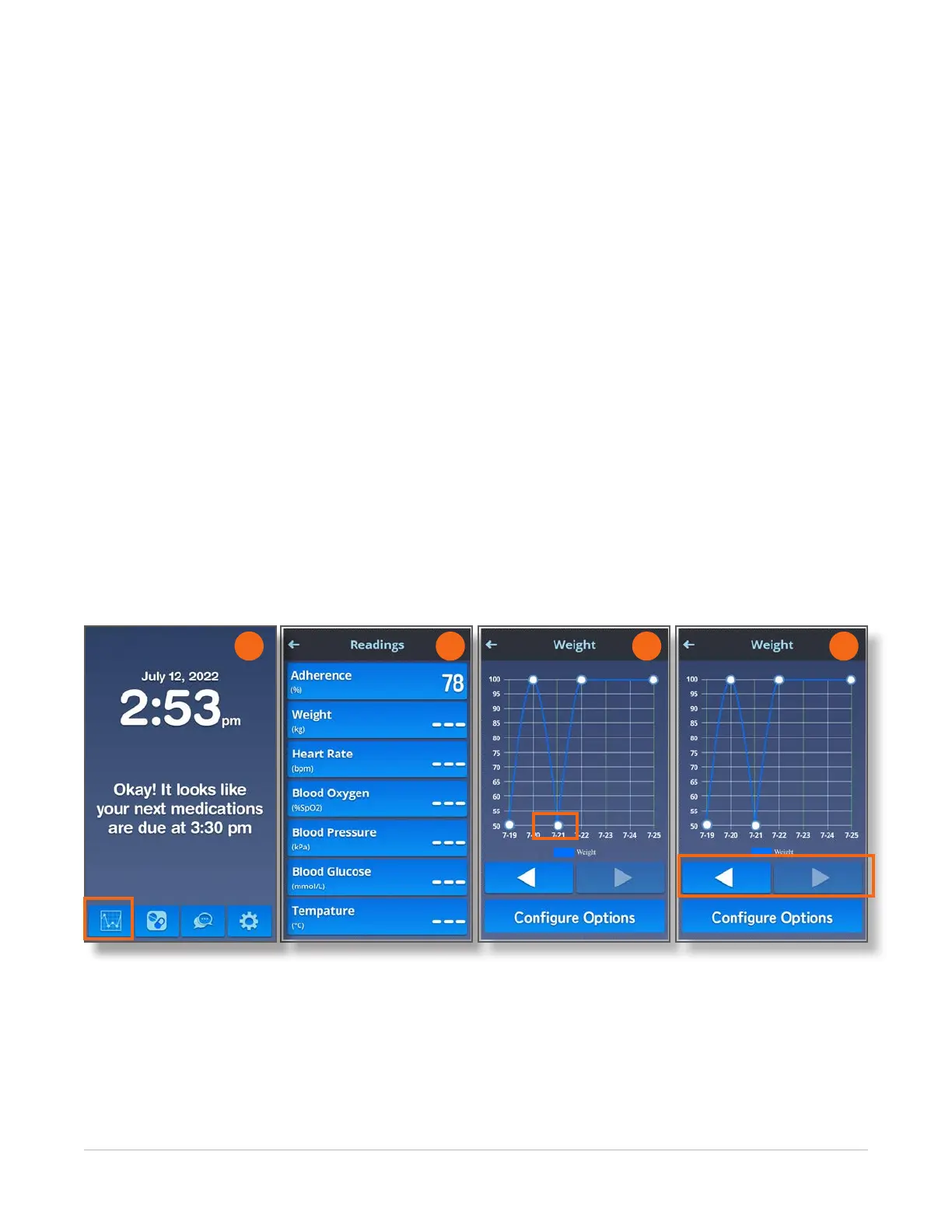
1. To view a graph of each of your readings for the current week, touch the Readings icon on the
Home screen.
2. Touch on the measure of interest (e.g., Adherence, Weight) on the Readings screen.
3. Touch the dot on the graph for any day to see the daily average, the highest reading, and the lowest
reading.
4. To see the readings for a previous week, touch the Back arrow (the arrow pointing to the left) to
step back one week at a time through your history.
To move forward, touch the Forward arrow (the arrow pointing to the right) to step forward one
week at a time.
2 3 4
1



 To Next Page