spencer 2022A user guide spencerhealthsolutions.com 74
Safety Symbols Guide
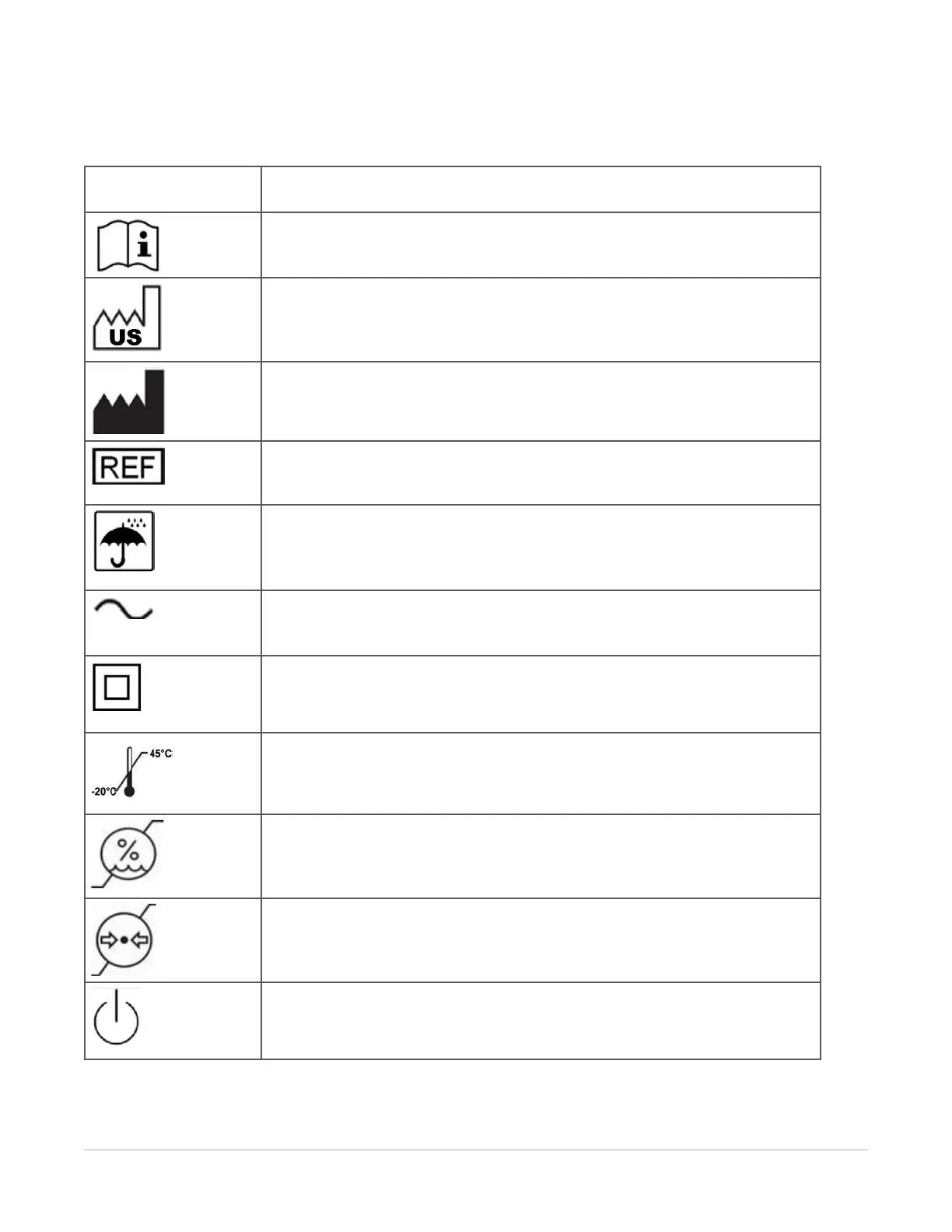
The following symbols may appear on the device product labels:
Symbol Title and Meaning
Operator’s Manual; Operating Instructions
Read the instructions for use.
Date of Manufacture
Indicates the country of origin and the date when the device was manufactured.
Manufacturer
Indicates the device manufacturer’s name and address.
Model/Catalog Number
Indicates the manufacturers model or catalog number.
Keep Dry
Indicates the device should be protected from rain or other damp conditions.
AC Power (Alternating Current)
Indicates the device is suitable for alternating current only.
Class II Equipment (Double Insulated)
To identify equipment meeting the safety requirements specified for Class II equipment.
Temperature Limitation
Indicates the temperature limits to which the device can be safely exposed.
Humidity Limitation
Indicates the range of humidity to which the device can be safely exposed.
Atmospheric Pressure Limitation
Indicates the range of atmospheric pressure to which the device can be safely
operated.
Stand-by Power Indicator



 To Next Page