spencer 2022A user guide spencerhealthsolutions.com 52
Disconnecting/Unpairing Bluetooth Devices
If you change a measurement device, you will need to disconnect (unpair) the original device from
spencer so you can add the new one.
The steps for unpairing a device are similar for all Bluetooth-enabled devices. See instructions on
spencer for specic details. HUH?
Disconnecting/Unpairing the Scale
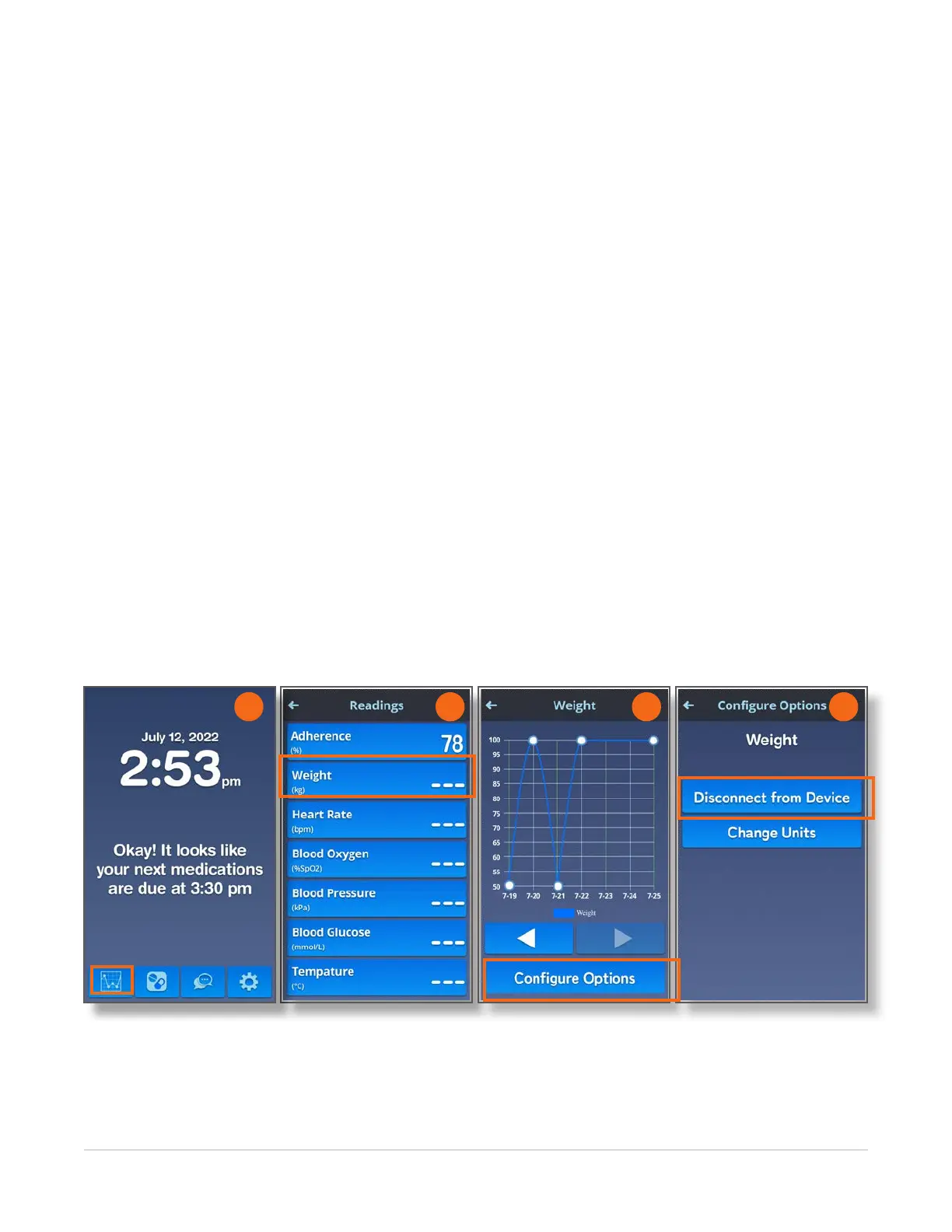
Home > Readings > Weight > Configure Options > Disconnect from Device
It may be necessary to unpair/disconnect a scale from spencer (e.g., when you get a new scale). Follow
these instructions to unpair/disconnectyour scale from spencer:
1. Navigate to the Home screen and touch the Readings icon.
2. On the Readings screen, touch the Weight button.
3. On the Weight screen, touch the Congure Options button.
4. On the Congure Options screen, touch the Disconnect from Device button.
NOTE: If you navigate to this screen by mistake, touch the Home icon to exit without disconnecting the
scale.
5. On the Unpairing screen, touch the OK button to unpair the device from spencer.
NOTE: Contact Spencer Health Solutions Customer Care if you are unable to disconnect your device
from spencer.
2 3 4
1
NEED UNPAIRING SCREEN
HERE
Huh?



 To Next Page