spencer 2022A user guide spencerhealthsolutions.com 26
Shutting Down spencer
Home > Tools > Shut Down
There are two ways to shut down spencer and one method is preferable to another. The preferred
method is to shut down spencer using the touch screen by following these instructions:
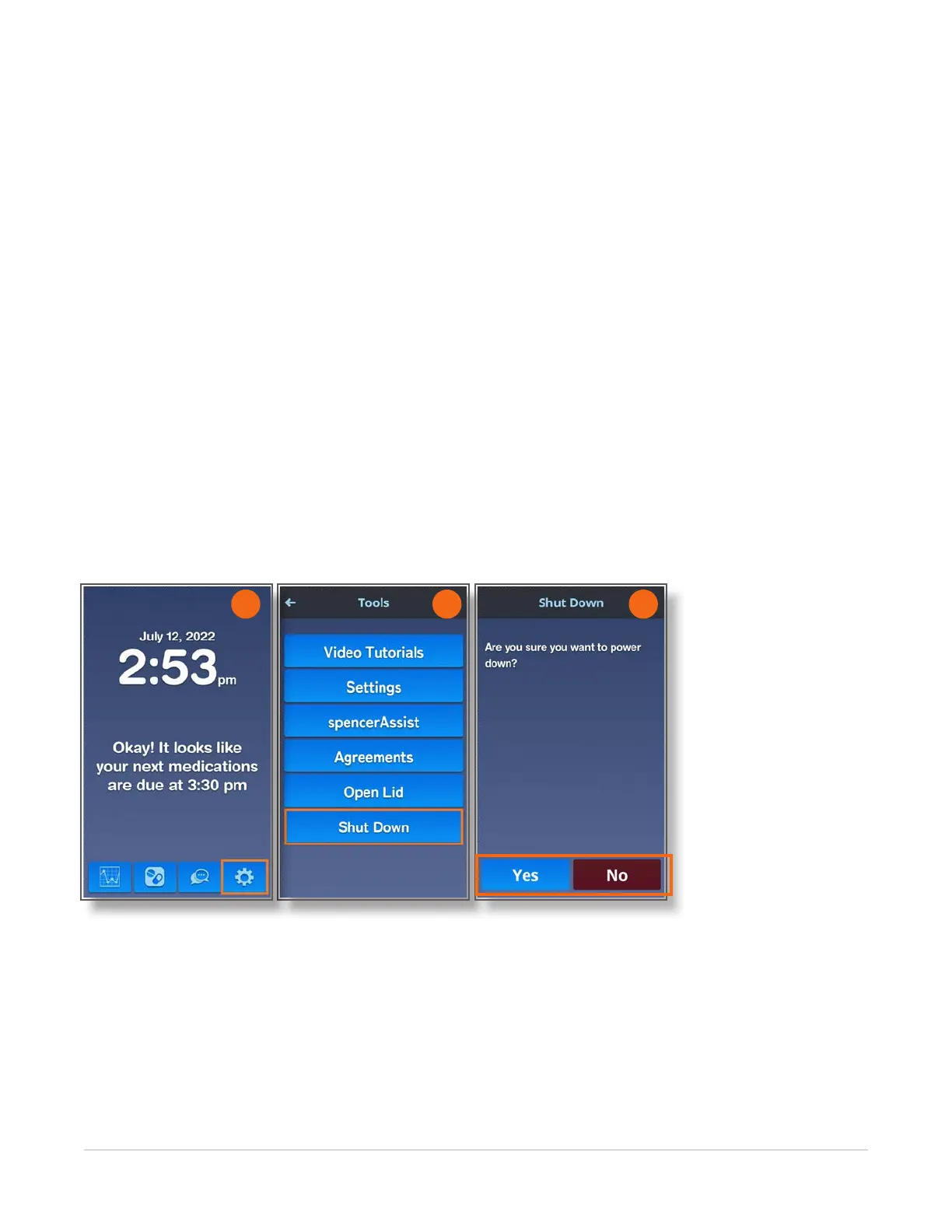
1. Navigate to the Home screen and touch the Tools icon.
2. On the Tools screen, touch the Shut Down button.
A conrmation screen displays asking if you are sure you want to power down.
3. Touch the Yes button to turn off spencer.
Touch the No button to return to the Tools screen without turning off spencer.
NOTE: The lid will not open if you use the Shut Down option. If you need to remove the rell, touch the
Open Lid button rst, remove the rell, close the lid, then touch the Shut Down button.
As a last resort, you can shut down spencer using the Power button in the back of the device. To do so,
press the Power button located on the back of the unit for at least ve seconds until the lid opens. The
device will shut down.
2 3
1



 To Next Page