spencer 2022A user guide spencerhealthsolutions.com 18
Using the Child Lock Feature
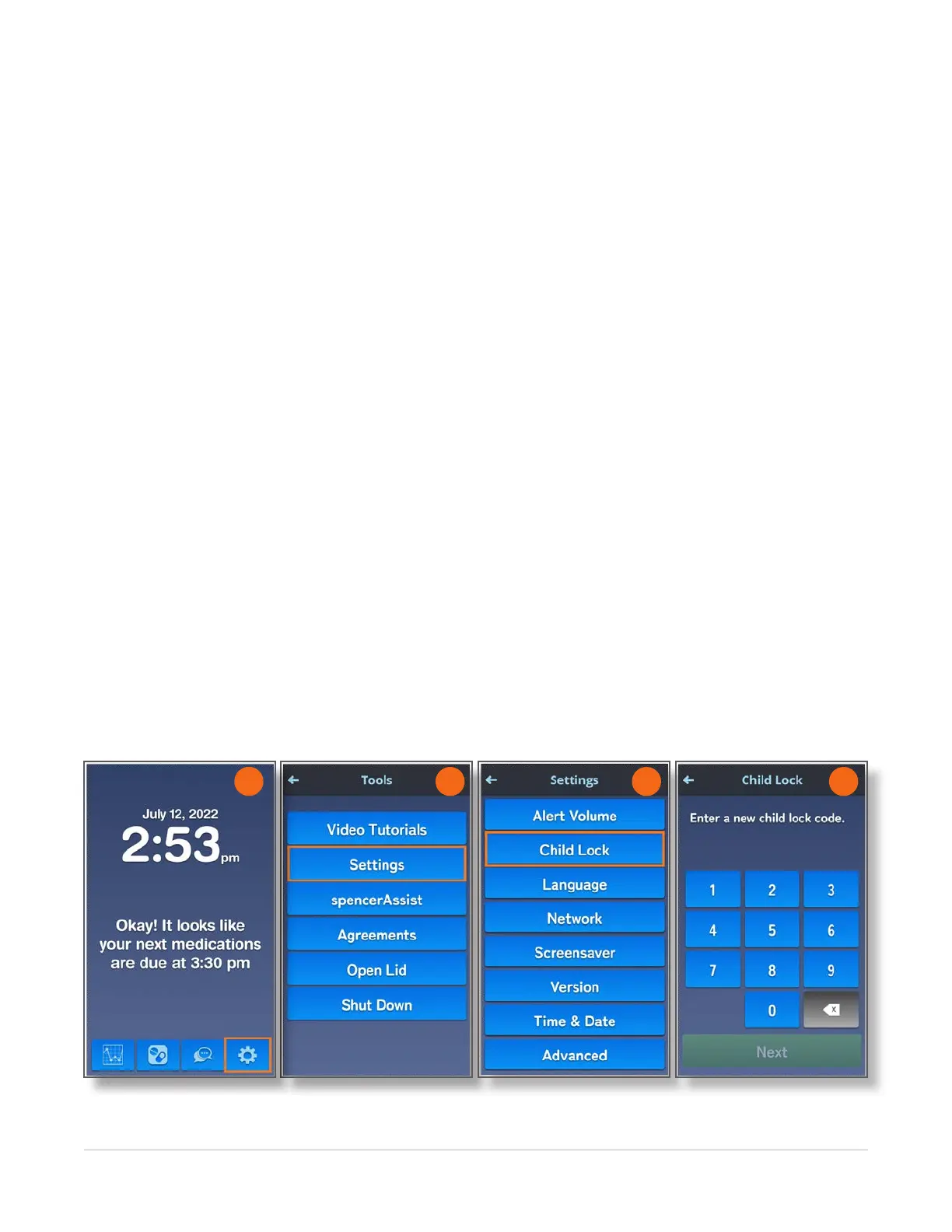
Home > Tools > Settings > Child Lock
The spencer device has an optional Child Lock feature that requires users to establish a four-digit code.
When the Child Lock feature is enabled, you must enter the Child Lock code to perform most functions
on spencer. For this reason, it is important that you remember the code that you set.
To turn on the Child Lock feature, follow these instructions:
1. Navigate to the Home screen and touch the Tools icon.
2. On the Tools screen, touch the Settings button.
3. On the Settings screen, touch the Child Lock button.
The Child Lock screen displays with a message asking you to enter a new Lock code.
NOTE: Be sure to use a code that you can easily remember. Examples of common codes include your
house number (if it is four digits), the rst or last four digits of your phone number, your birthday in the
form of the two-digit month and two-digit day, or the year of your birth.
4. Enter a four-digit code of your choice and touch the Next button.
If you enter a number by mistake, use the bottom right key to backup and delete the number.
5. Enter to same four-digit number again to make sure you entered it correctly.
6. Touch the Next button.
spencer displays the code you just entered.
NOTE: Write down this code and keep it in a safe place. If there are children in your house, do not tape
the code to spencer.
7. Touch the OK button to return to the Home screen.
2 3 4
1



 To Next Page