spencer 2022A user guide spencerhealthsolutions.com 51
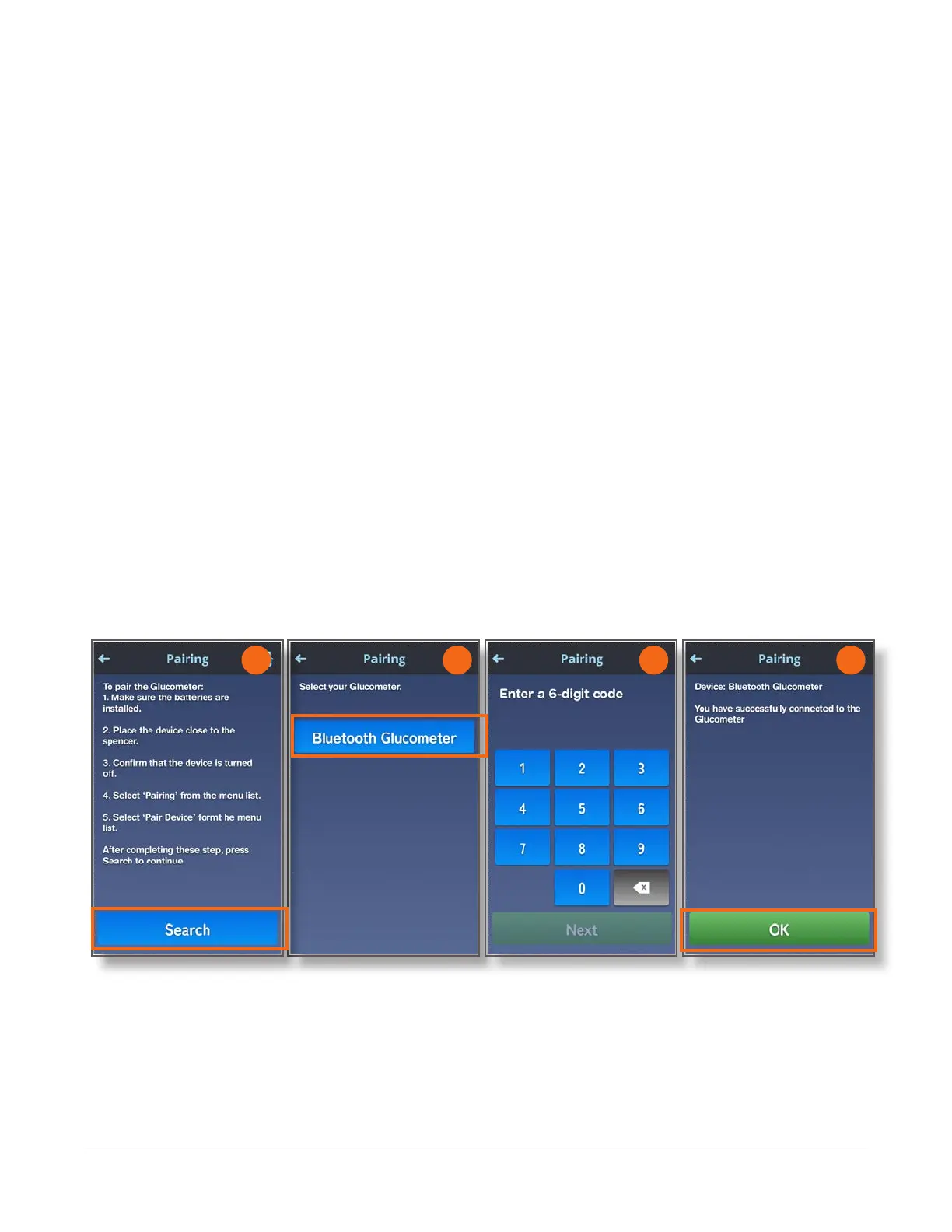
The Pairing screen displays.
5. Touch the Search button.
When your spencer device nds the glucometer, the name of the device displays.
6. Touch the name of the glucometer.
7. Enter the six-digit code displayed on your glucomenter into the Pairing screen and touch the Next
button..
NOTE: This code changes each time you connect the glucometer to spencer.
A message displays indicating that the glucometer is connected to your spencer device.
8. Touch the OK button to return to the graph screen.
If the device does not connect, a message displays asking you try again. Be sure to check the
batteries and make sure that the device is very close to spencer when you are establishing the
connection between them.
9. Click the OK button to go back to the pairing screen and try again.
NOTE: Contact Spencer Health Solutions Customer Care team at 866-972-3196 if you are unable to
connect your device to spencer.
6 7 8
5



 To Next Page