7 Special equipment
Inductive guidance (IZF)
Inductive guidance (IZF)
System description
General
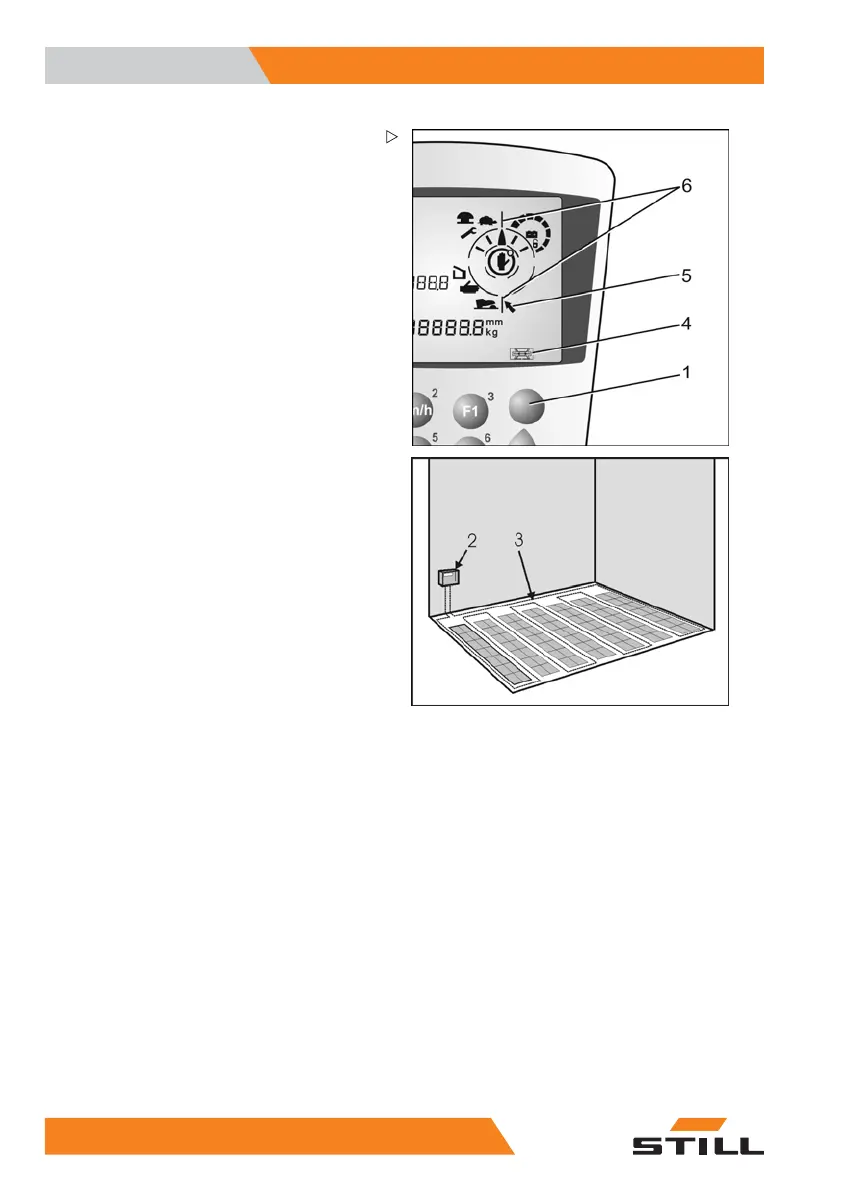
If your truck is guided using inductive guid-
ance, the shift (1) button must be pressed
before the truck is guided onto the induction
track and before leaving the track. This switch
in the operating panel is used to switch from
manual steering to automatic steering. All
other operation processes correspond to the
standard truck.
A frequency generator (2) provides an AC
supplytoawireinstalledinthefloor(3).
This AC supply is registered as a signal
by antennas that are installed in the truck,
and is used to guide the truck. A computer
drives the truck along the wire groove after
the signals are analysed. Extensive safety
circuits and a diagnostic program simplify
system servicing work. The operating devices
for inductive guidance are integrated into the
operating panel. The operating status display
indicates the active operating status (4) of the
system. After switching on the control system,
a self-test runs in the guidance system.
Entering the aisle
Guidance procedure
– Drive the truck towards the wire groove
(induction track) and stop in front of it.
– The angle to the wire groove must not be
greater than 60°.
– Set the steering to the straight-ahead
position.
– Select automatic steering by pressing the
"man/auto" (1) button.
– The "wire search" (5) symbol begins to
flash.
– Continue towards the wire groove. The
driving speed is automatically reduced.
– When the control system detects the
induction track via the first antenna, it
switches to automatic mode.
96
5213 804 2501 EN - 01/2016



 To Next Page