3 Overview
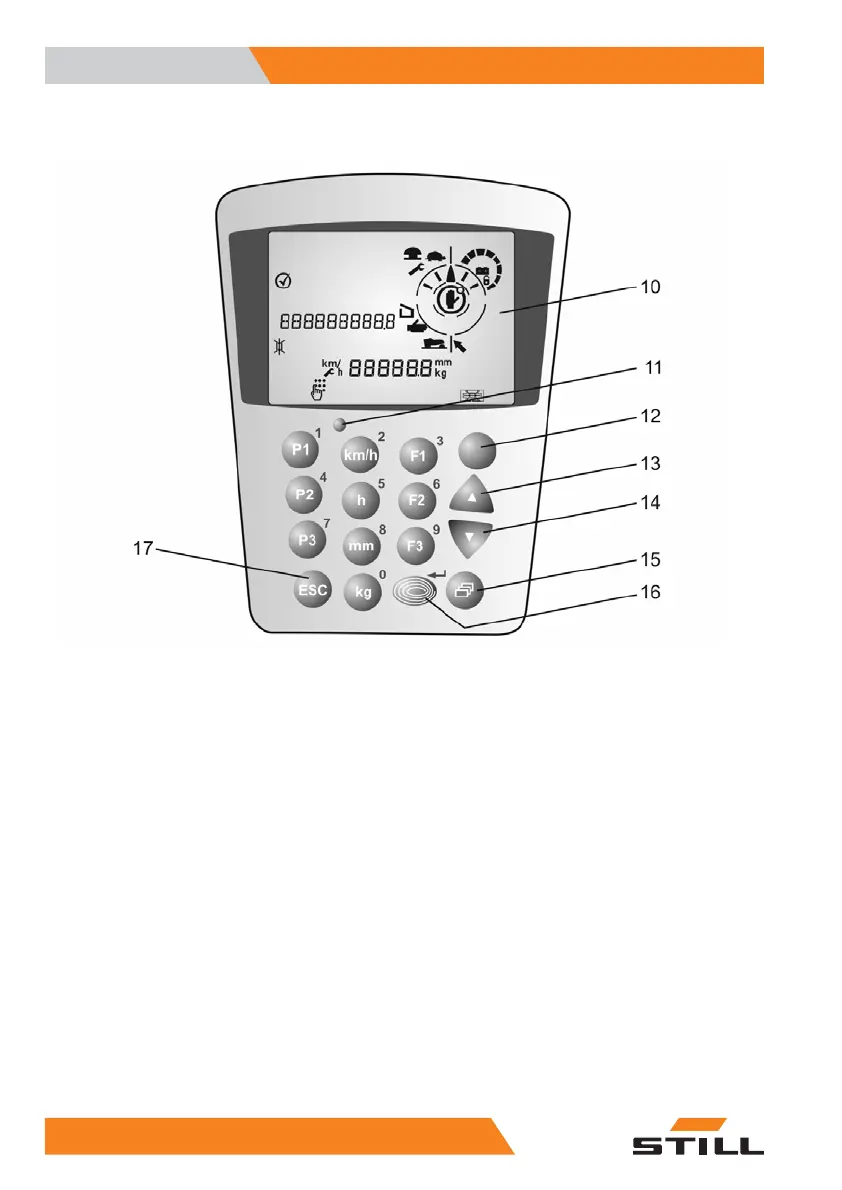
Display unit
Display unit
0 Entry of the number 0 or switch to weight
indicator in kg*
1 Entry of the number 1 or switch to drive
programme 1*
2 Entry of the number 2 or switch to speed
indicator in km/h
3 Entry of the number 3 or switch to function 1*
4 Entry of the number 4 or switch to drive
programme 2*
5 Entry of the number 5 or switch to operating
hours display in hrs
6 Entry of the number 6 or switch to function 2*
7 Entry of the number 7 or switch to drive
programme 3*
8 Entry of the number 8 or switch to lift height
indicator in mm
9 Entry of the number 9 or switch to function 3*
10 LCD display, see chapter LCD displays.
11 Brightness sensor
12 Selection and deselection button for IZF*,
special function*
13 Arrow button UP
14 Arrow button DOWN
15 Change menu button
16 Blue Q button
17 Cancel entry
*Option
32
5213 804 2501 EN - 01/2016



 To Next Page