Operation 4
Driving
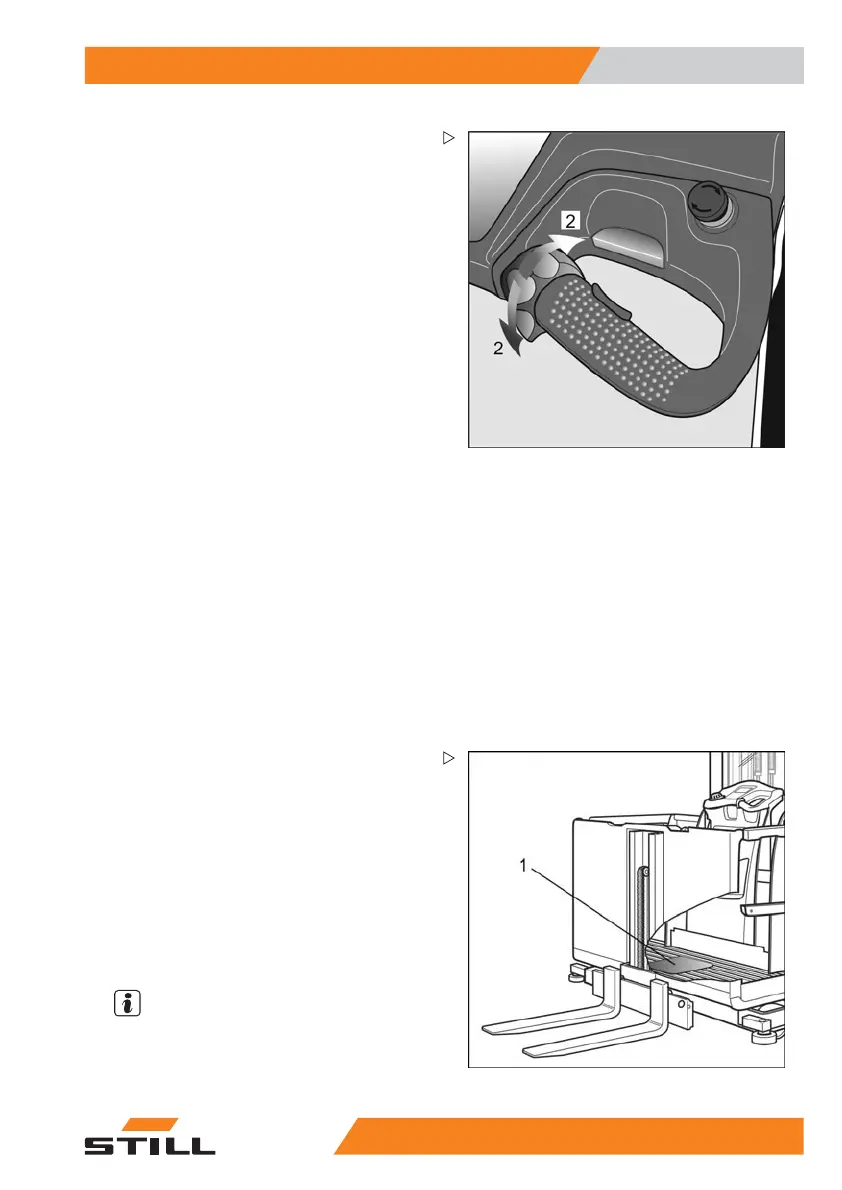
Drive switch
The drive direction and speed are selected
through decisive movement of the operat-
ing lever (2).It is possible to change from one
drive direction to another by moving the lever
in the opposite direction. The electronically
controlled braking and the subsequent ac-
celeration is called reversing. This initiates
electronically controlled braking and then ac-
celeration in the opposite direction. In this
case, no brake friction linings are used. This
form of braking can be precisely metered by
moving the drive switch. If the operating lever
of the drive switch is released when the drive
direction is reversed, the truck will remain sta-
tionary. As a rule, reversing should be used as
the service brake for regular tasks.
For lift heights where the fl
oor of the driver’s
cab is up to a height of 1.2 m ,
the cab barriers
may be left open when the tru
ck is being
driven.
Handhold sensor
A sensor is integrated into the handhold next
to the operating lever which detects contact
with the driver’s hand. In order to obtain a
drive enable status, the foot switch must be
actuated and contact must be made with the
handhold sensor.
Steering
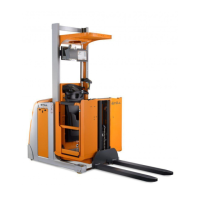
The foot switch (1) must be actuated to enable
steering. The left hand controls the steering
knob (3) or the steering wheel (4), and thus
determines the path of travel. The maximum
angle of rotation of the steered wheel is
approx. 95° on each side. This enables the
trucktobeturnedonthespot.
It is possible to mov
e diagonally. This makes it
possible to drive th
e truck with the load raised
or lowered.
NOTE
•
The steering knob (
3) has an angle of
rotation of approx
. 130° on each side
52
13 804 2501 EN - 01/2016 59



 To Next Page