Website: www.sunsynk.com E-mail: sales@globaltech-china.com
22
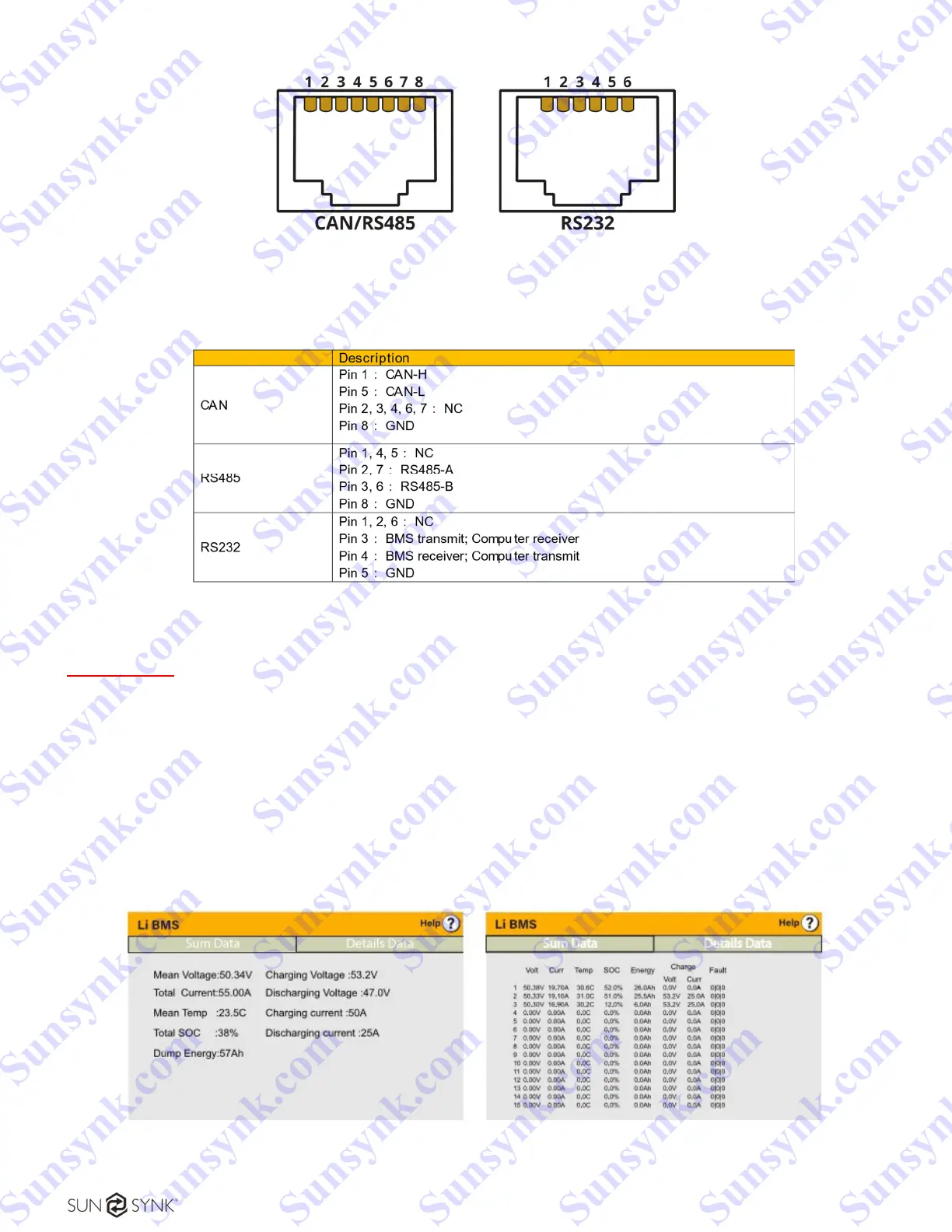
Figure 17 - CAN/RS485 and RS232 connections.
Table 2 - CAN/RS485 and RS232 pins description.
IMPORTANT:
The battery communication is separate from the parallel communication ports. Do not mix them up!
For the inverter and battery settings, please refer to the inverter handbook or the battery manufacturer.
After installing a lithium battery, check on the communications page by clicking on 'Li BMS' icon to see if
the BMS information is visible. If some information is not displayed correctly on the page, as shown in the
figures below, there is a communication error.
Figure 18 - Displayed information from the Li BMS.
Sunsynk.com Sunsynk.com Sunsynk.com Sunsynk.com
Sunsynk.com Sunsynk.com Sunsynk.com Sunsynk.com
Sunsynk.com Sunsynk.com Sunsynk.com Sunsynk.com
Sunsynk.com Sunsynk.com Sunsynk.com Sunsynk.com
Sunsynk.com Sunsynk.com Sunsynk.com
Sunsynk.com Sunsynk.com Sunsynk.com
Sunsynk.com Sunsynk.com
Sunsynk.com Sunsynk.com
Sunsynk.com
Sunsynk.com
Sunsynk.com Sunsynk.com Sunsynk.com Sunsynk.com
Sunsynk.com Sunsynk.com Sunsynk.com
Sunsynk.com Sunsynk.com Sunsynk.com
Sunsynk.com Sunsynk.com
Sunsynk.com Sunsynk.com
Sunsynk.com
Sunsynk.com





 To Next Page