Website: www.sunsynk.com E-mail: sales@globaltech-china.com
32
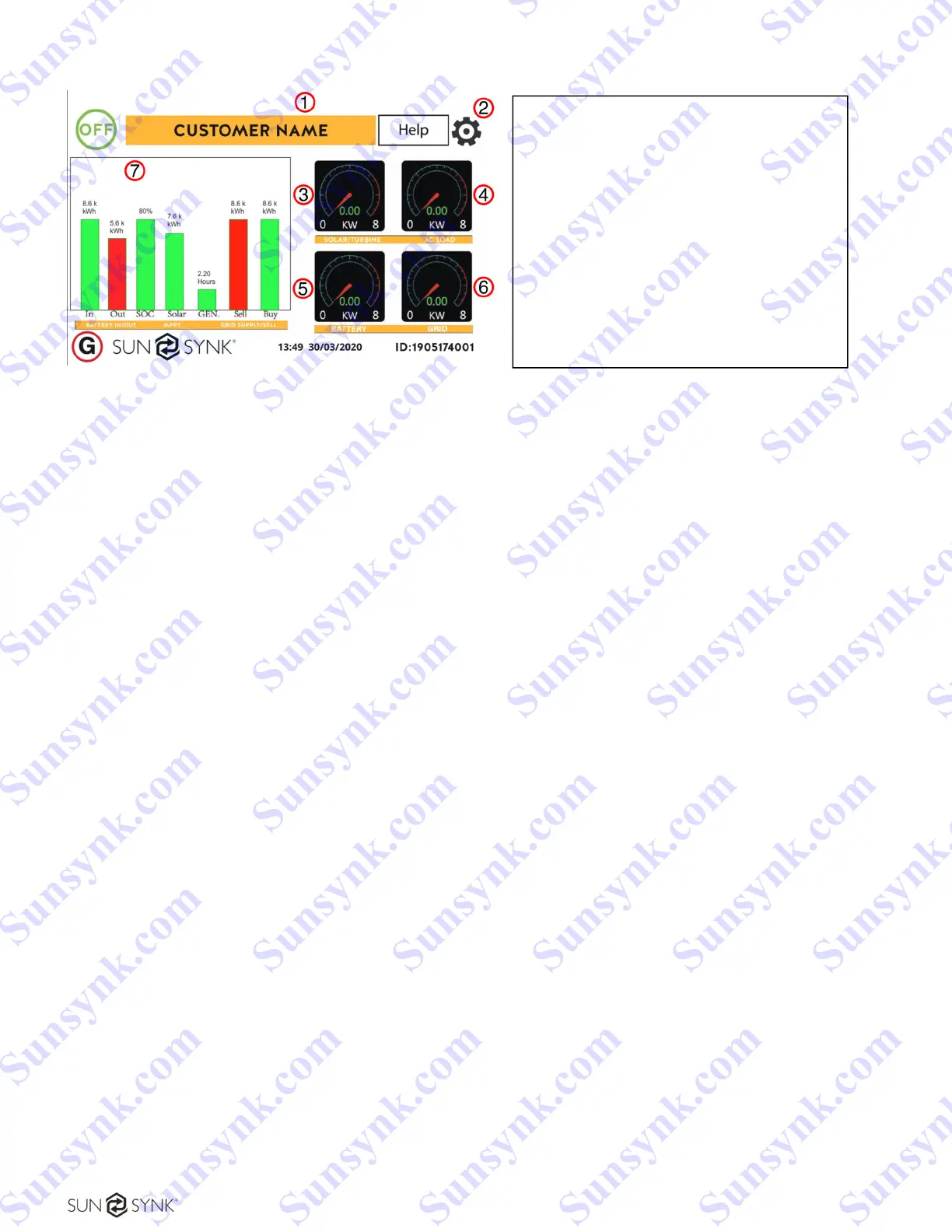
Daily readings Real time readings
Figure 30 - Home screen.
What this page displays:
Total daily power into the battery (kWh).
Total daily power out of the battery (kWh).
SOC (State of charge of the battery) (%).
Total daily solar power produced in (kWh).
Total hourly usage of the generator (Time).
Total daily power sold to the grid (kWh).
Total daily power bought from the grid (kWh).
Real-time solar power in (kW).
Real-time load power in (kW).
1. Customer name
2. Access settings menu page
3. Access solar history
4. Access system status page
5. Access system status page
Real-time battery charge power in (kW).
Real-time grid power in (kW).
Serial number.
Time date.
Fault condition.
Access stats pages.
Access status page.
Access fault diagnostic page.
Sunsynk.com Sunsynk.com Sunsynk.com Sunsynk.com
Sunsynk.com Sunsynk.com Sunsynk.com Sunsynk.com
Sunsynk.com Sunsynk.com Sunsynk.com Sunsynk.com
Sunsynk.com Sunsynk.com Sunsynk.com Sunsynk.com
Sunsynk.com Sunsynk.com Sunsynk.com
Sunsynk.com Sunsynk.com Sunsynk.com
Sunsynk.com Sunsynk.com
Sunsynk.com Sunsynk.com
Sunsynk.com
Sunsynk.com
Sunsynk.com Sunsynk.com Sunsynk.com Sunsynk.com
Sunsynk.com Sunsynk.com Sunsynk.com
Sunsynk.com Sunsynk.com Sunsynk.com
Sunsynk.com Sunsynk.com
Sunsynk.com Sunsynk.com
Sunsynk.com
Sunsynk.com





 To Next Page