OPERATION & MAINTENANCE MANUAL SWE155F
3.2.5 Multifunction Monitor System
3.2.5.1 Main Interface
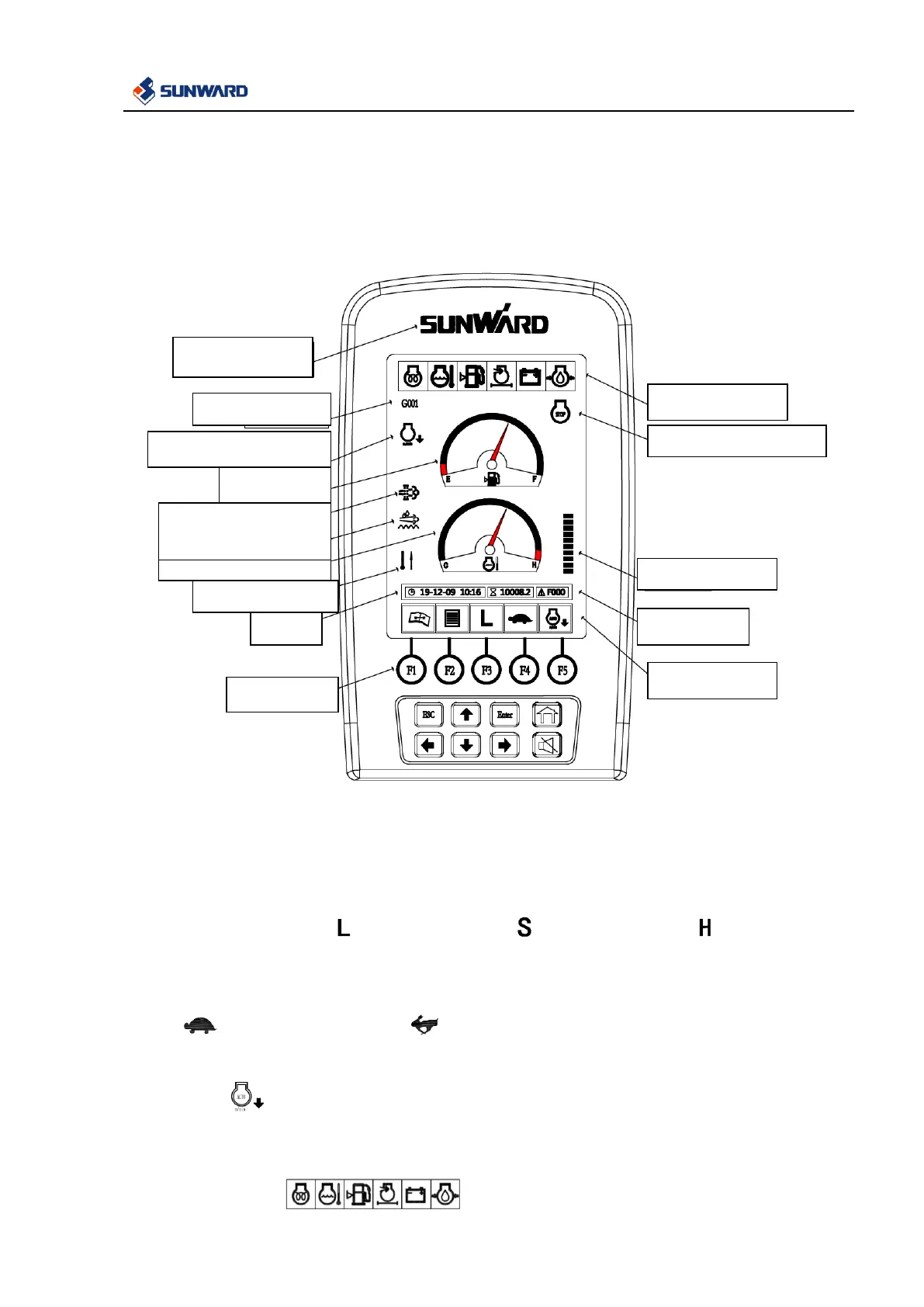
In this interface:
1. Press F1 to enter into maintenance information interface.
2. Press F2 to enter into menu interface.
3. Work mode is adjusted with the accelerator gear.
The icon of mode L is , The icon of mode S is ,The icon of mode H is .
Remark: L is light load mode, S is standard mode, H is heavy load mode.
4. Press F4, travel speed is switched between high speed and low speed, icon of low travel speed is
, icon of high travel speed is .
5. Press F5, work state is switched between automatic idle and non-automatic idle, icon of automatic
idle is , lighting on the main interface.
6. If the buzzer sounds, please press muffle. Buzzer will sound continuously if there are different kinds
of warning.
7. Warning icon: . When there is warning information, the corresponding
Engine regeneration
Post-processing


 To Next Page