Chapter 5 Page 75
Important! The
Activate Daytime Hours
option is activated
immediately in the KeyBox, however you must eSYNC
before the change is recorded in KIMnet.
Customizing access hours in a KeyBox
To change the programmed access hours in a KeyBox, complete this
procedure.
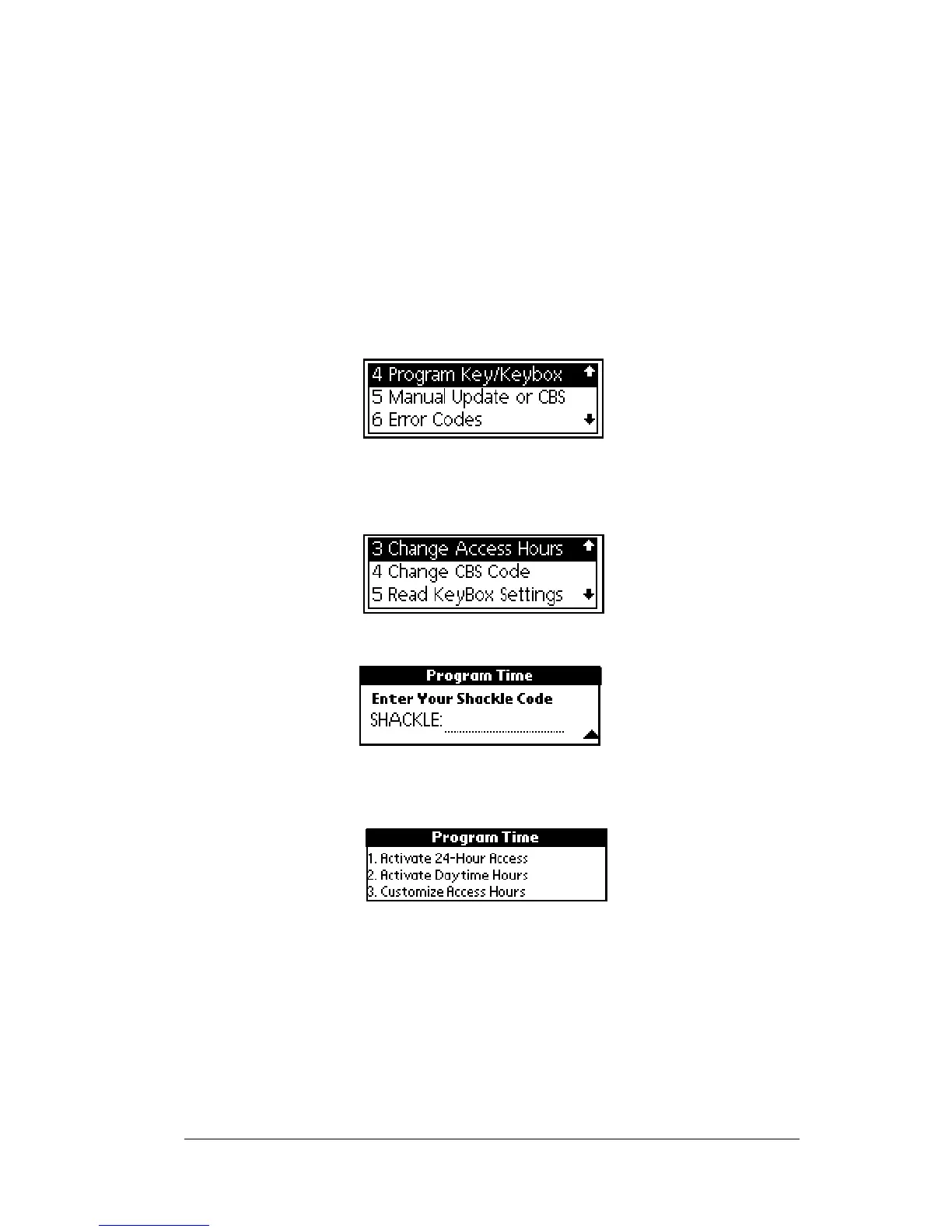
1. Close your eKEY shell.
2. Press the
on
button.
3. Highlight the
Program Key/Keybox
option.
4. Press
enter
.
5. Highlight the
Change Access Hours
option.
6. Press
enter
.
7. Enter the shackle code when prompted. The
Program Time
sub-
menu displays with three options.
8. Press 3 to select the
Customize Access Hours
option.
9. When prompted, enter an hour in the
START time field. Enter the
minutes after the colon. For example enter 9 or 09 for the hour and
15 for the minutes in the
START field if you want to set the start time
at 9:15
AM.Enter00fortheminutesifyouwantthetimetobeon
the hour. Press
enter
.



 To Next Page