Install IP Address PSX Module Installation and Cable Connection
DOC-001-11001 (Rev. 006)
43 DNX Quick Install & Setup Guide
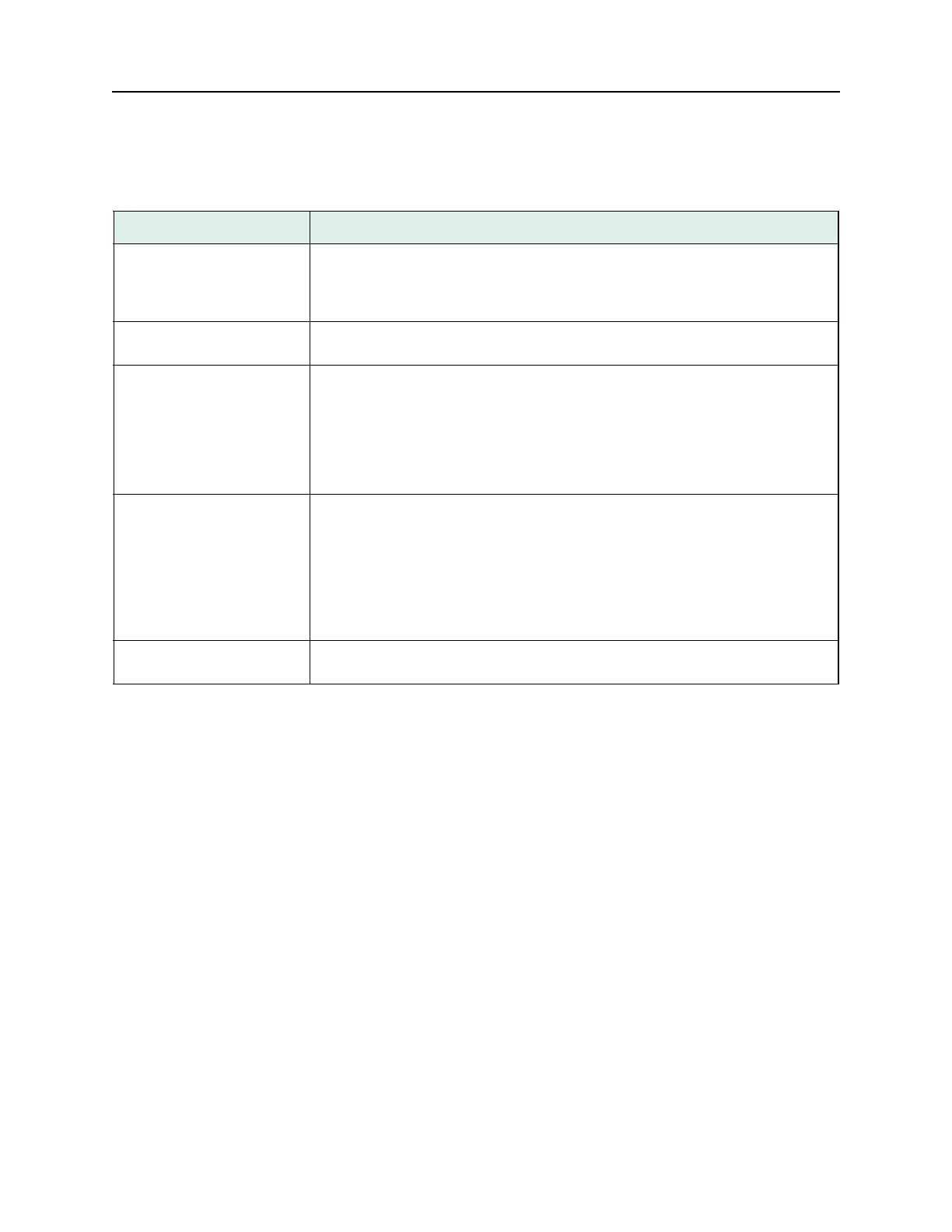
Table 4: Port IP Address Field Descriptions.
Field Description
IP Encapsulation:
(option
field)
The choices are
Ethernet II or 802.3. If your LAN is using standard TCP/IP you
should select Ethernet II for the encapsulation type. 802.3 encapsulation is used
most often on LANs running Novell Netware. Your selection should match that
used by other IP workstations and hosts on the LAN.
LAN IP Address: (text
field)
This parameter is used to specify the LAN IP address of the DNX. Consult your
network administrator to obtain a valid IP address for your DNX.
LAN IP Mask: (text field) The LAN IP mask is a 32-bit number represented in the same way as the IP
address. A default mask is automatically generated; however, it can be overwritten
to support subnetting. Subnetting allows you to allocate bits from the host portion
of the IP address as an extension to the address. Depending on the type of IP net-
work you are using (Class A, B or C), the subnet mask may be 24, 16 or 8 bits in
length. Typically, the first three octets of the address defines the network address.
The last octet defines the specific device.
Enable RIP: (option field) This parameter enables/disables RIP (Routing Information Protocol) on the LAN
port. If the DNX will always use the same IP address (router interface) to reach
other segments you should leave Enable RIP set to
No and manually configure the
router (gateway) information. You should enable RIP only if you want the DNX to
discover the devices available on the local LAN segment. Since RIP uses System
Manager resources which might otherwise be used to manage the DNX nest, you
should consider leaving RIP off and manually configuring a gateway address,
especially in a high traffic LAN environment.
Default Gateway: (option
field)
This is the IP address of the router or switch where DNX should send packets if
their destination is located on another LAN segment.



 To Next Page