Getting Started 1 - 7
Routing Cables
The scanner case has several channels to route the outgoing cables so that they are organized and don’t hinder the scanner’s
placement (see Figure 1-1 and Figure 1-3). After placing the cable connectors in the appropriate scanner ports, route the cables
through the nearest channel.
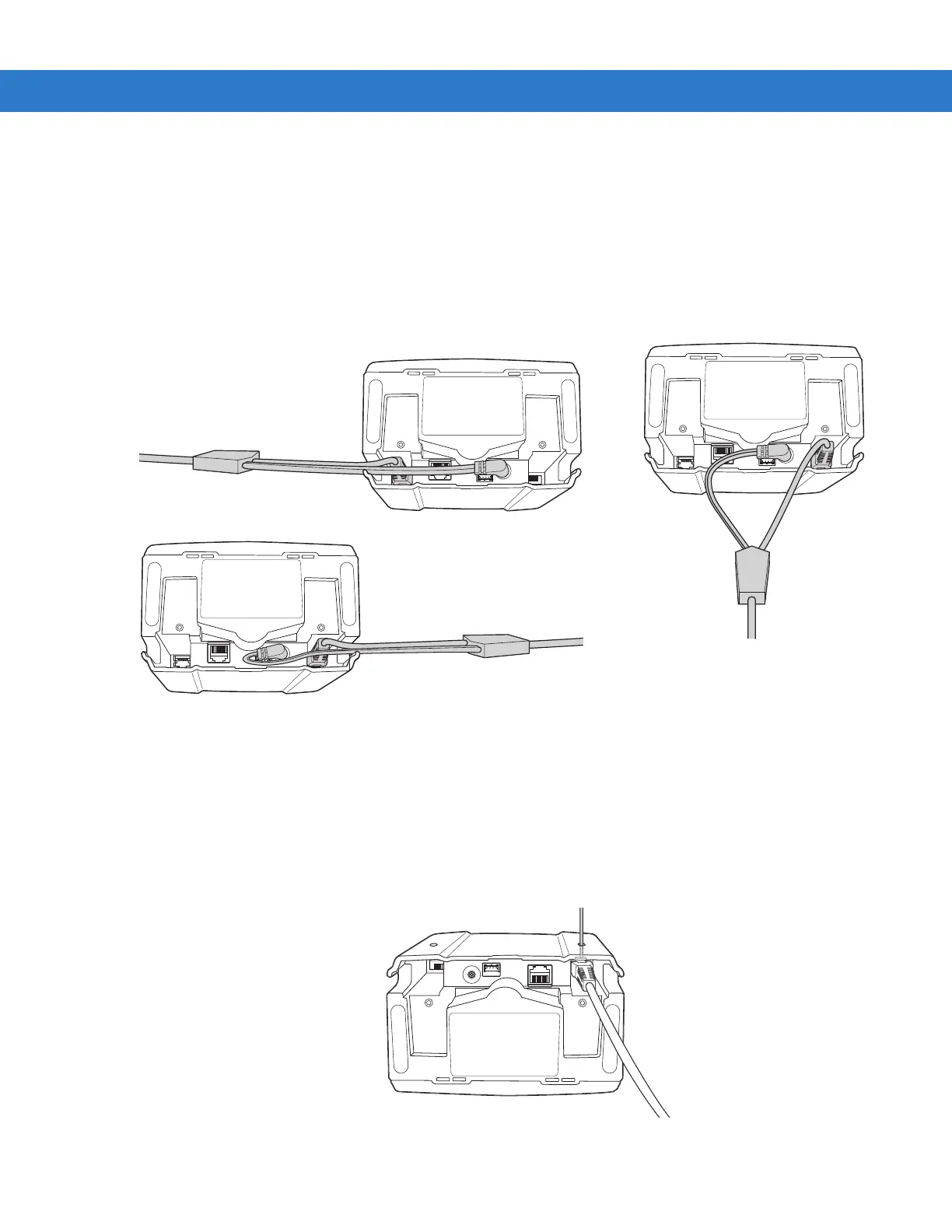
For a cable with a Y-connector (containing both power and interface connectors):
1. Connect the power and interface cables to the appropriate ports.
2. Route the cables according to the appropriate diagram in Figure 1-4.
Figure 1-4Cable Routing Options
Removing the Host Interface Cable
To remove the host interface cable:
1. Unplug the installed cable’s modular connector by depressing the connector clip and gently pulling back. The two small
holes on the back of the scanner case provide access to the connector clips. (See Figure 1-5.)
2. Follow the steps for Connecting the Host and Peripheral Cables on page 1-5 to connect a new cable.
Figure 1-5Unplugging the Cable Through the Cable Release Hole
Connections to power and hand-held
scanner ports, side exit: curl power cable
and route it back towards interface cable.
Connections to power and host ports,
side exit: keep power cable straight
and route it ahead with interface cable.
Connections to power and hand-held scanner
ports, back exit: curve power and interface
cables to exit from channels on either side of
the mounting bracket slot.



 To Next Page