4.7 TURNING THE PRODUCT ON AND OFF
Turn on the product only after completing the assembly.
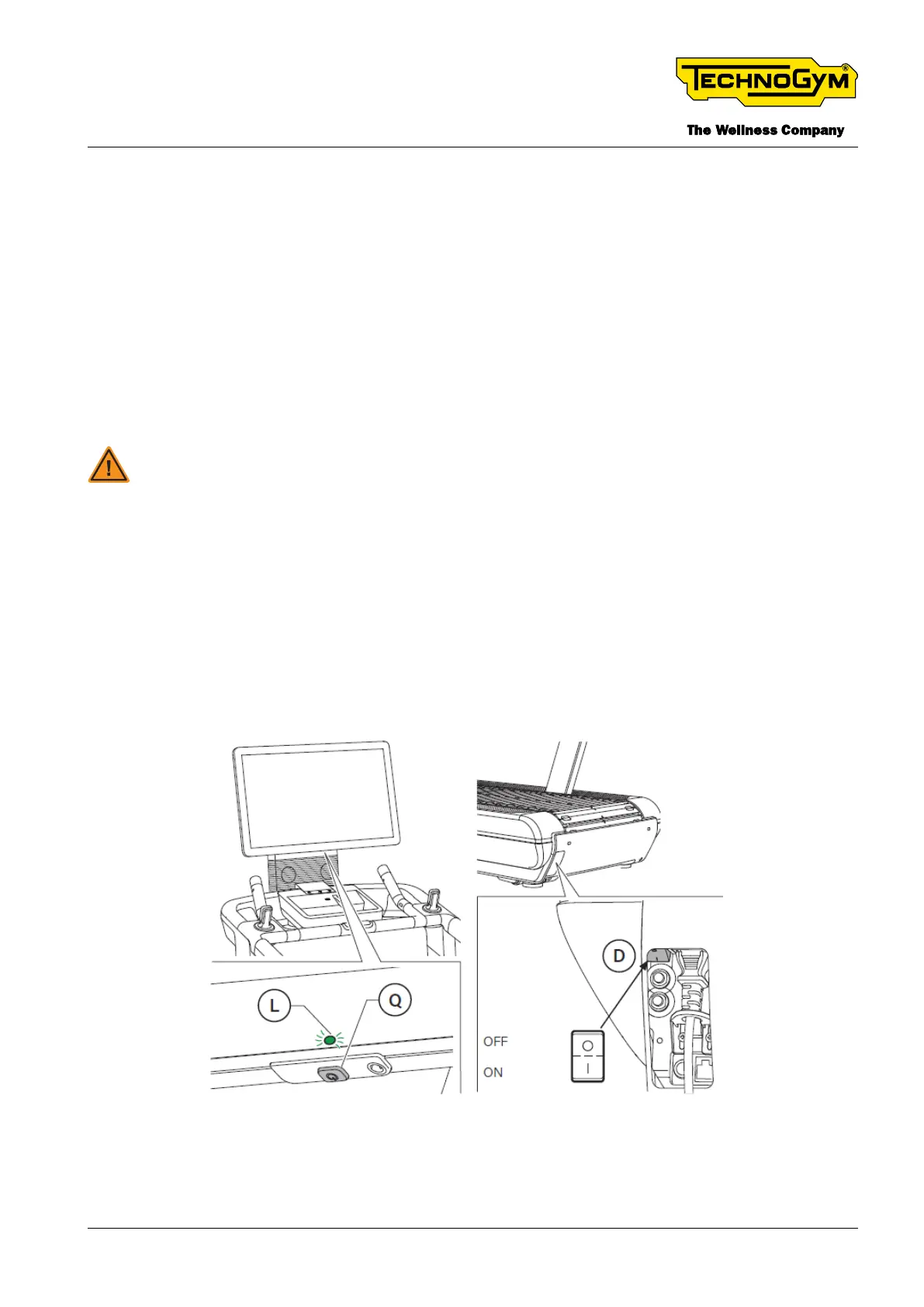
Turn on the product by pressing the main switch (D) to the I position (ON). After a quick self-check
(reset) the device is ready to be used.
Turn o the product by pressing the main switch (D) to the 0 position (OFF). Turn o the device only
at the end of the workout when it is in stand by.
Turn the product o, after exercising, only once the belt has stopped moving.
If the product is not expected to be used for a long time, as well as turning it o, the plug should
also be removed from the wall socket.
WARNING: The main switch turns the product ON/OFF but it does not isolate it from
the mains voltage, even if it is in the ‘0’ position (OFF). Take the power plug out of the
socket to isolate the product.
The display can be turned o and the product placed in stand-by mode even with the main switch
on.
To place the product in stand-by mode, hold down the button (Q) under the display.
When the display is o, the LED (L) lights up.
When the display is on, the LED (L) is o.
Fig. 21
TECHNOGYM RUN Technical Service Guide
Rev. 1.0
- 47 -
TSG-00284-EN - Uncontrolled copy if printed











 To Next Page