8 1. General Information
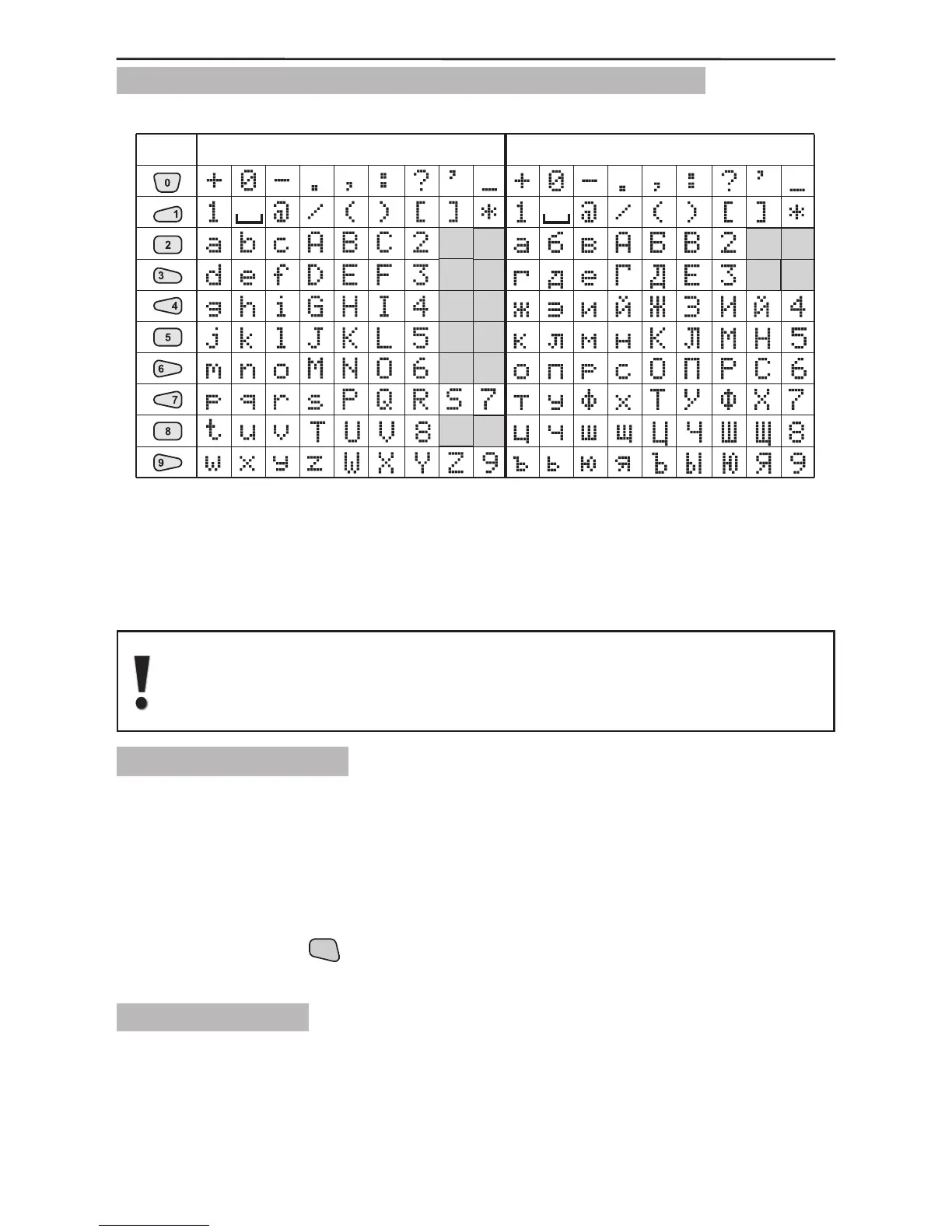
1.3.4 Symbols Used for Text Introducing from the Keypad
Use the keypad buttons numbered from 1 to 9 to introduce the symbols for entering
group and detector names, for adjusting the time and date, etc. In text editing and
entering mode the button is repeatedly pressed until the required letter, digit or symbol
is obtained. The available symbols of the pressed button are displayed in the top right-
hand corner when introduced.
Letters in Latin are displayed if the English version of the software is
selected, and in Cyrillic in the Bulgarian version.
Switching over between the different languages is described in §2.5, page
16.
1.3.5 Keypad Sounder
Beep - when pressing a button;
Long beep - reject an action;
One long beep followed by a few short ones - conrmation signal;
Short beeps - exit time is running;
Fast beeps - entry time is running, an important event such as Tamper, Fire, etc. has
occurred;
Double beep every 20 seconds - trouble indication. The double beep signal can be
stopped by holding the
button pressed for 2 seconds;
“Chime” - activated entry-exit zone.
1.3.6 Built-in Siren
The AVA Wireless Security System has a built-in siren 90dB which could be freely
programmed to become active in case of specic system events and continuity of siren
alarm. For details when programming the built-in siren parameters see §3.6.2 Built-in
Siren Parameters Programming, page 44.



 To Next Page