Addressable Fire Panel IRIS - Installation and Programming Manual 37
After choosing the Network button a new screen will be displayed. The Installer / User can set there the pa-
rameters of two submenus: Network Settings and Panels.
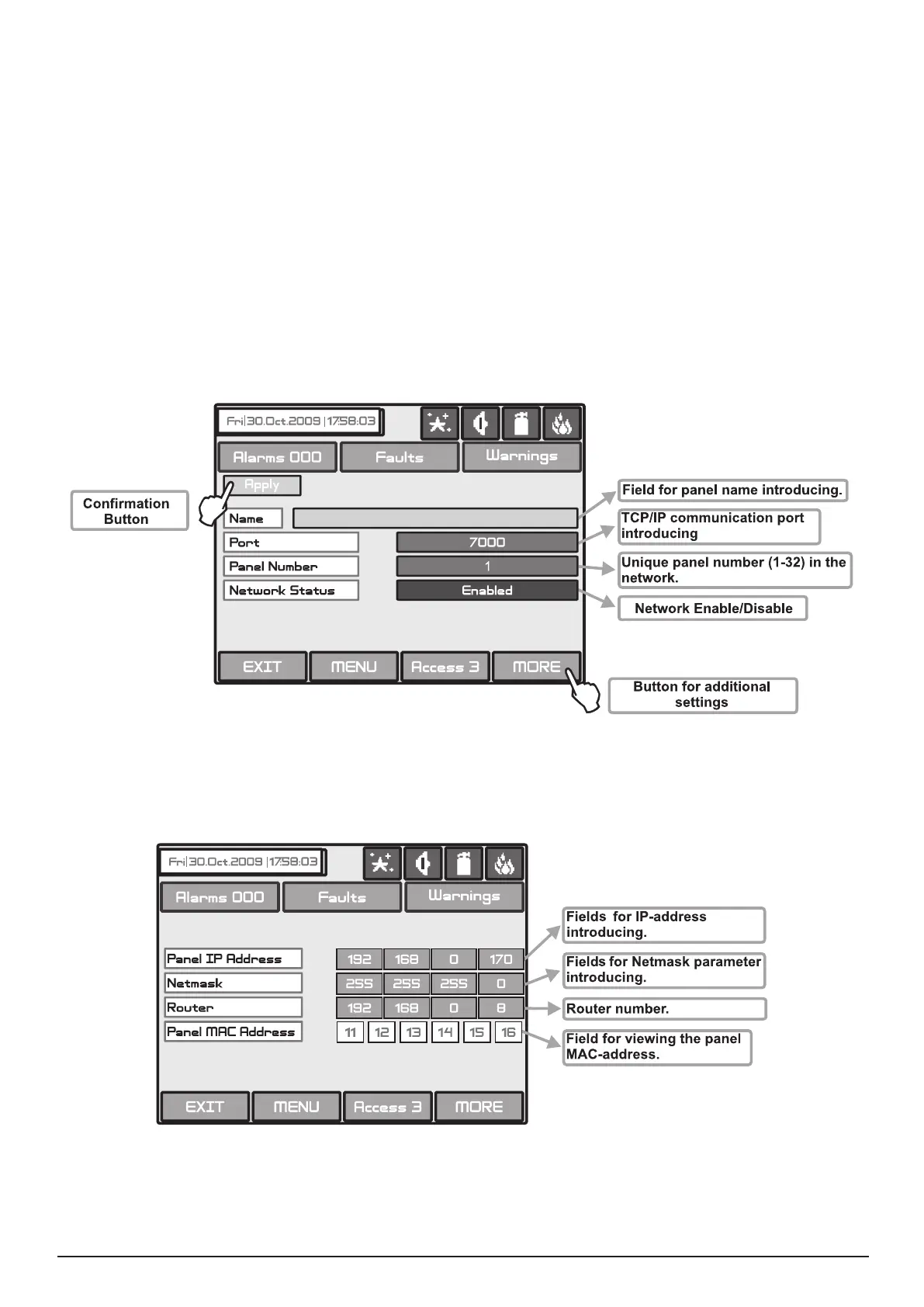
In this menu can be set parameters for the separate elds - see Fig. Screen 21.
• Name - Introduce the name of the panel - up to 40 digits.
• Port - TCP/IP port for communication with the panel is introduced. The panel automatically takes ports
Port+1, Ports+2. They have to be free for using from the panels. All the panels in the network have to be with
the one and the same port number. If a port change is needed and made the panel have to be reset by power
supply.
• Panel Number - An unique panel number (1-32) in the network is introduced. By this number the panels
can “recognize“ each other.
• Network Status - The network can be Enabled and Disabled.
All changed parameters are conrmed and saved by pressing the APPLY button in the upper left cor-
ner of the screen.
Fig. Screen 21 - General View of Network Settings Menu.
From Network Settings menu can be programmed additionally panel IP, Netmask and IP-number of the
Router, as and to be seen the panel MAC-address after choosing the MORE button - see Fig. Screen 21A.
Fig. Screen 21A



 To Next Page