26 Addressable Fire Panel IRIS - Installation and Programming Manual
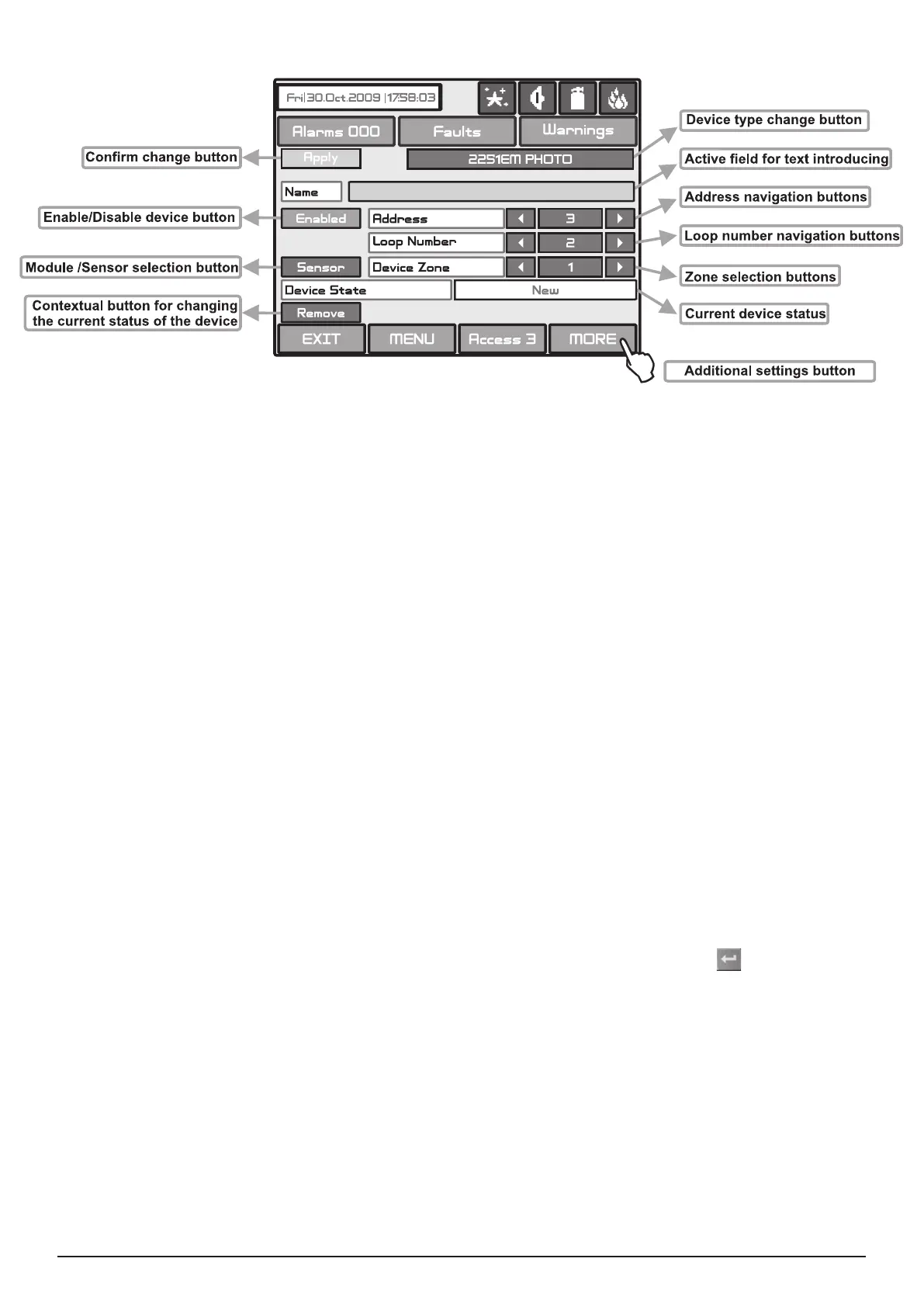
Fig. Screen 8.
On Fig. Screen 8 is given the general view of the submenu for new loop System Sensor devices conguration connected
to LOOP SS.
Description of the button functions (Fig. Screen 8):
• Conrm Change Button - Saves changes in the permanent memory.
• Button to enable/disable a device - Button for Enabling / Disabling devices.
• Module or sensor selection button - This button is used to switch over between module and detector addresses.
• Address Navigation Button - This button helps to scroll (in sequence or directly) the devices of one and the same
loop.
• Loop Number Navigation Button - These keys alternate the loop (in sequence or directly) of the screened devices.
• Zone Selection Button - These keys alternate the zone (in sequence or directly) to which the device belongs.
• Current Device Status - The current device status varies according to the device type.
- new device found in the system. You can save it by pressing the “Apply” button.
- the device is working properly.
- the device is not responding. You can delete it by pressing the “REMOVE” button.
- the device has been saved with a different type.
- there is no device on the current address.
• Button for Removing a device - Pressing the button deletes the device from the system conguration.
• Change Device Type Button - Press this button for the panel to provide a compatibility device list of which to choose
the most suitable one. The “SELECT NEW DEVICE TYPE” message will be portrayed Fig. Screen 9.
• Active Field for Text Introduction - Choosing this eld accesses the text introduction mode. The text must not exceed
40 digits together with the spaces - Fig. Screen 10. Entered information is conrmed with button
.
• Additional Settings Button - The additional adjustments vary according to the type of device. Setting the day and night
time mode, as and setting the levels of the alarm signal (FIRE) - Fig. Screen 11, is performed by pressing of the respec-
tive button and entering of the desired value by means of an additional keypad displayed on the screen.



 To Next Page