Addressable Fire Panel IRIS - Installation and Programming Manual 47
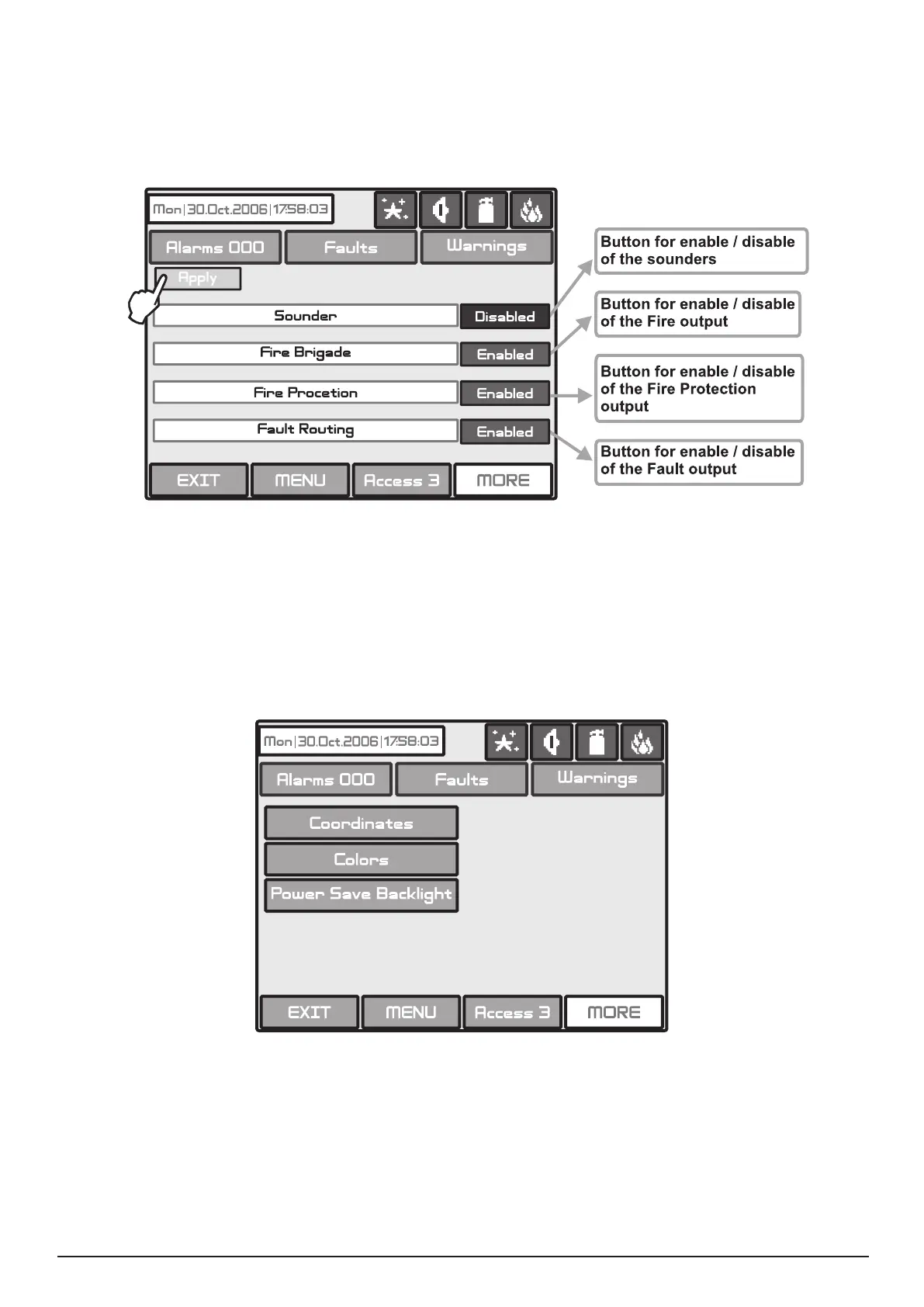
From the menu for disabling introduction - Fig. Screen 35, the user/installer can disable or enable the moni-
tored outputs of the IRIS light re panel - Sounder, Fire Brigade, Fire Protection and Fire Routing - Fig.
Screen 38. Use the APPLY button to conrm your choice.
In the case of disabled output, the panel generates an error for the respective output and the “Disable” and
“General Fault” LEDs are activated. The output is not activated by the activating event.
Fig. Screen 38.
4.9 Software version
By choosing “Software Rev” button from the general Maintenance Menu, in a separate screen you can see
the last version of the used software.
4.10 Display
The Installer/User can check and calibrate some parameters of the LCD display. From the general Mainte-
nance Menu (see Fig. Screen 26, page 41) you can enter the Display submenu - Fig. Screen 39.
Fig. Screen 39
It is possible that after a certain period of use the parameters of the Touch screen display may change, caus-
ing difculties in marking the sites. This would require it to be calibrated periodically, which can be done in
access levels 2 and 3.
ATTENTION! Calibrating the display must be done with a Touch screen pen (or PALM)!



 To Next Page