42 Addressable Fire Panel IRIS - Installation and Programming Manual
4.4 Daytime Mode
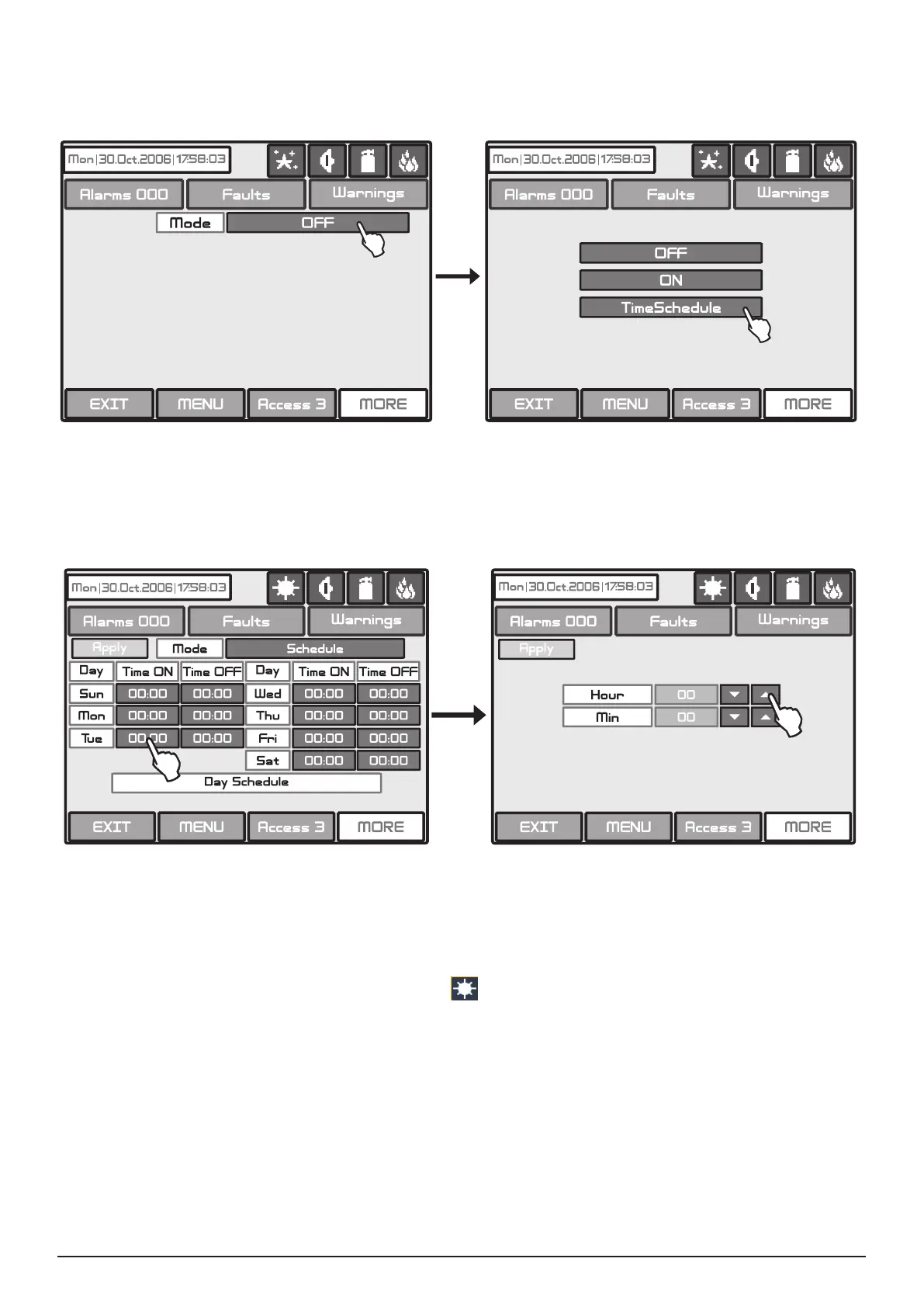
Choose the button “Day” from the Maintenance Menu to set the daytime schedule for detectors operation.
The Daytime operating mode can be enabled (ON), disabled (OFF) or to follow a time schedule (Schedule)
Fig. Screens 29.
Fig. Screens 29
In this mode the detectors use the alarm level which has been programmed as day mode. This is usually a
level of lower sensitivity. It lowers the risk of false alarms caused by dust, cigarette smoke, etc. Night time
mode is opposite to the daytime mode (higher level of sensitivity).
Fig. Screen 30
In Schedule mode the initial hour and minutes (the time when the daytime mode is activated) and the end
hour and minutes (the time when the night time mode is activated) are introduced. The times are set for every
day of the week. By default the station is in night time mode.
The Day time operating mode is indicated with icon
in the system status eld.
All changed parameters are conrmed and saved by pressing the APPLY button in the upper left cor-
ner of the screen.



 To Next Page