76
GPON ONT
5.6.2.4 Bridging Service Conguration
After the selection of the WAN interface associated to the service to create, Figure 5-21 and Figure 5-22 , use the Next button at Figure 5-22, to
progress to the next WAN Service setup window- Wan service Conguration, gure 5-68.
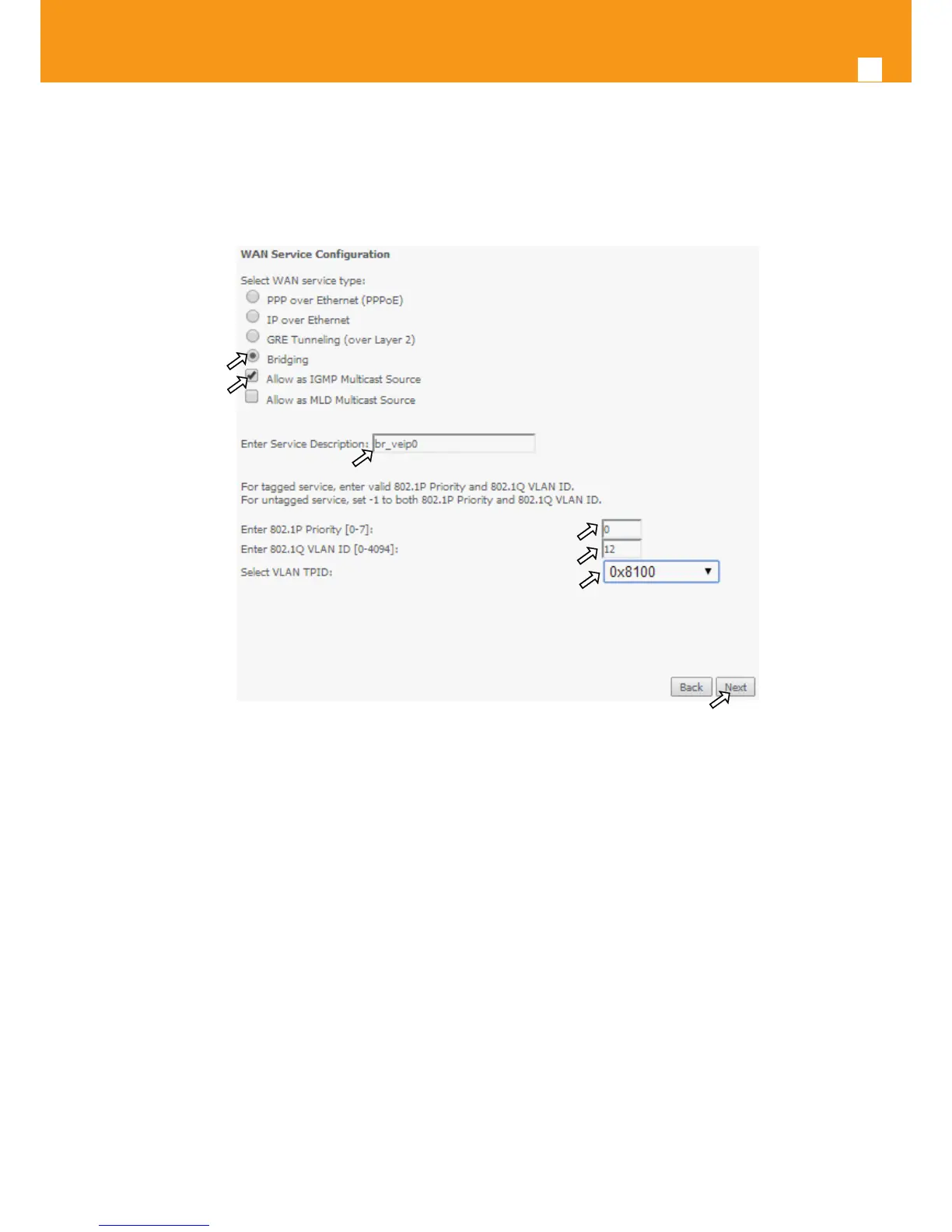
Figure 5-68: WAN service setup – type of service selection and service conguration – Bridging service
At this window execute the following steps:
STEP 1. Select the Bridging WAN service type, Figure 5-68-1;
Multicast source options are displayed for selection: IGMP or MLD
STEP 2. Select which multicast source protocol to use, if any, (IGMP or MLD) Figure 5-68-2;
STEP 3. At the Field Service Description enter a string for the service description ; the default service description is a string automatically
lled in when the type o device is selected(Step1) and composed by the type of Service followed by underscore and the WAN inter-
face name , e.g. br_veip0, Figure 5-68-3;
STEP 4. For tagged service, at the eld 802.1P priority, enter the pbit value (0-7) to mark the upstream trac according to the desired CoS
for the service to create; a higher value corresponds to a higher priority CoS, Figure 5-68-4;
For untagged service leave the led with the default value of -1;
STEP 5. For tagged service, at the VLAN ID eld enter the VLAN ID value (0-4094) of the VLAN used by the service, , Figure 5-68-5
For untagged service leave the eld with the default value of -1;
STEP 6. For tagged service select a TPID value from the selection combo box, , Figure 5-68-6.



 To Next Page