EN
77
0x8100, TPID default value; if selected a single tagged service is congured
0x88A8 or 0x9100, TPID used for the outer VLAN (S-VLAN) for double tagged services; if selected a double VLAN tagged service is
congured; in this case the inner VLAN (C-VLAN) tag TPID has the default value of 0x8100;
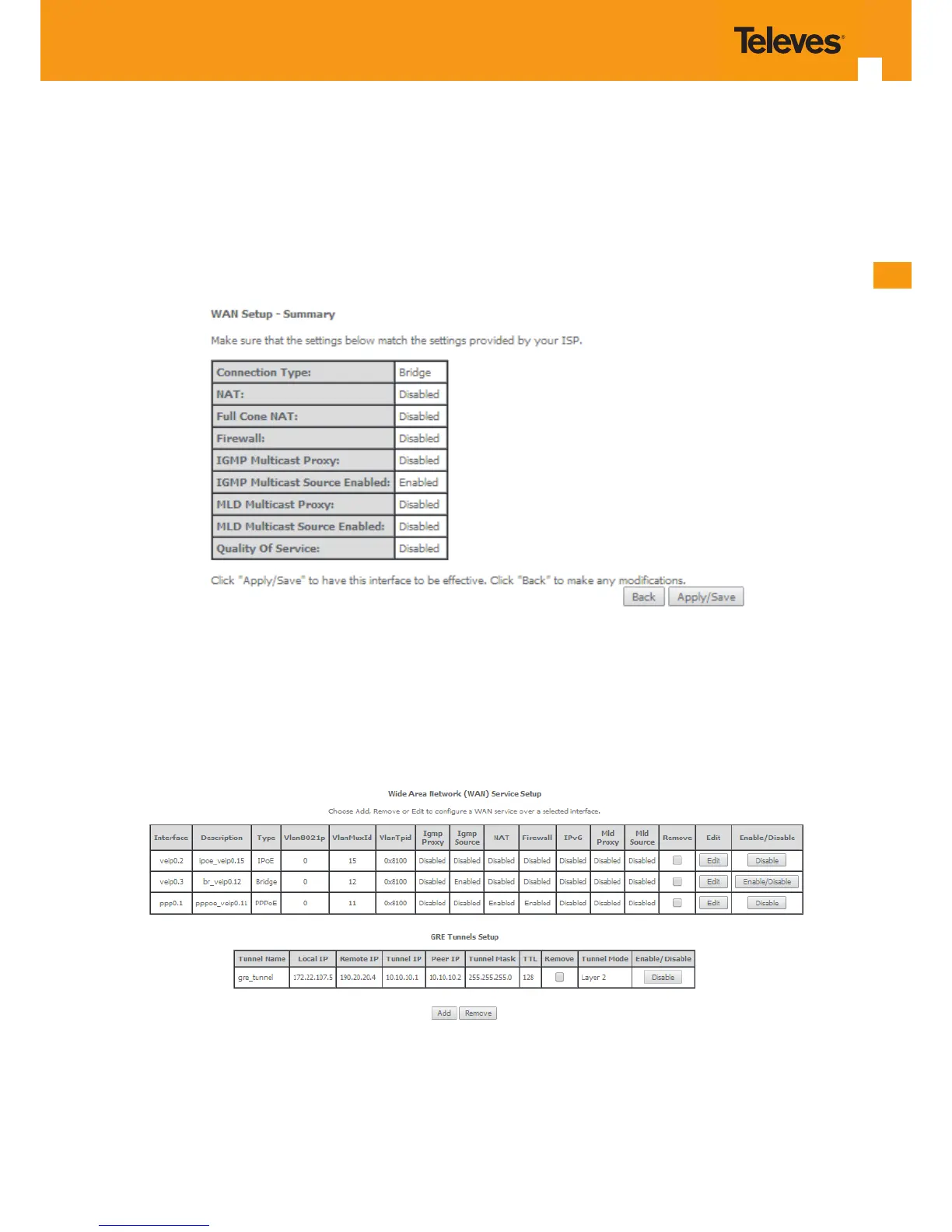
STEP 7. Once the WAN service setup parameters are congure use Next button, , Figure 5-68-7 on to progress to the WAN Service Setup Sum-
mary window, Figure 87. This table should eect the conguration for the WAN service setup parameters than have been entered.
Please verify the presented conguration match the settings provided by the ISP for this service.
Figure 5-69: WAN Service Setup Summary window
To nalize the conguration use the Save/Apply button, Figure 5-69. The next displayed window is initial window, the WAN Service Window, where
the service congured is displayed in the corresponding table, Figure 5-70.
Figure 5-70: WAN Service Setup Initial Window- service conguration displayed
It is now possible to view the congured WAN service parameters by Selecting the Device Info sub-menu item WAN, Figure 5-71.



 To Next Page