TLV-300E/TAV-900A Professional Digital TV Receiver User’s Manual
FAULT OUT/MAIN/FAULT OUT: You could choose fault output type to check. The fault output signal at
the front “Fault LED” and rear panel “FAULT OUT” BNC indicates fault condition. You could see TS
UNLOCK, TSWYNC ERR, TS FLAG ERR, TS CC ERR, TS CC ERR EACH PID, TS PAT ERR, DMX
PAT ERR, DMX PMT ERR, DEC NO VIDEO, DEC NO AUDIO, and DEC LIPSYNC sub-menus.
FAULT OUT/MAIN/THRESHOLD: Maximum tolerable error rate (default is 1.0X10⁻⁴). Fault out signal
will be generated when the error rate is greater than the threshold.
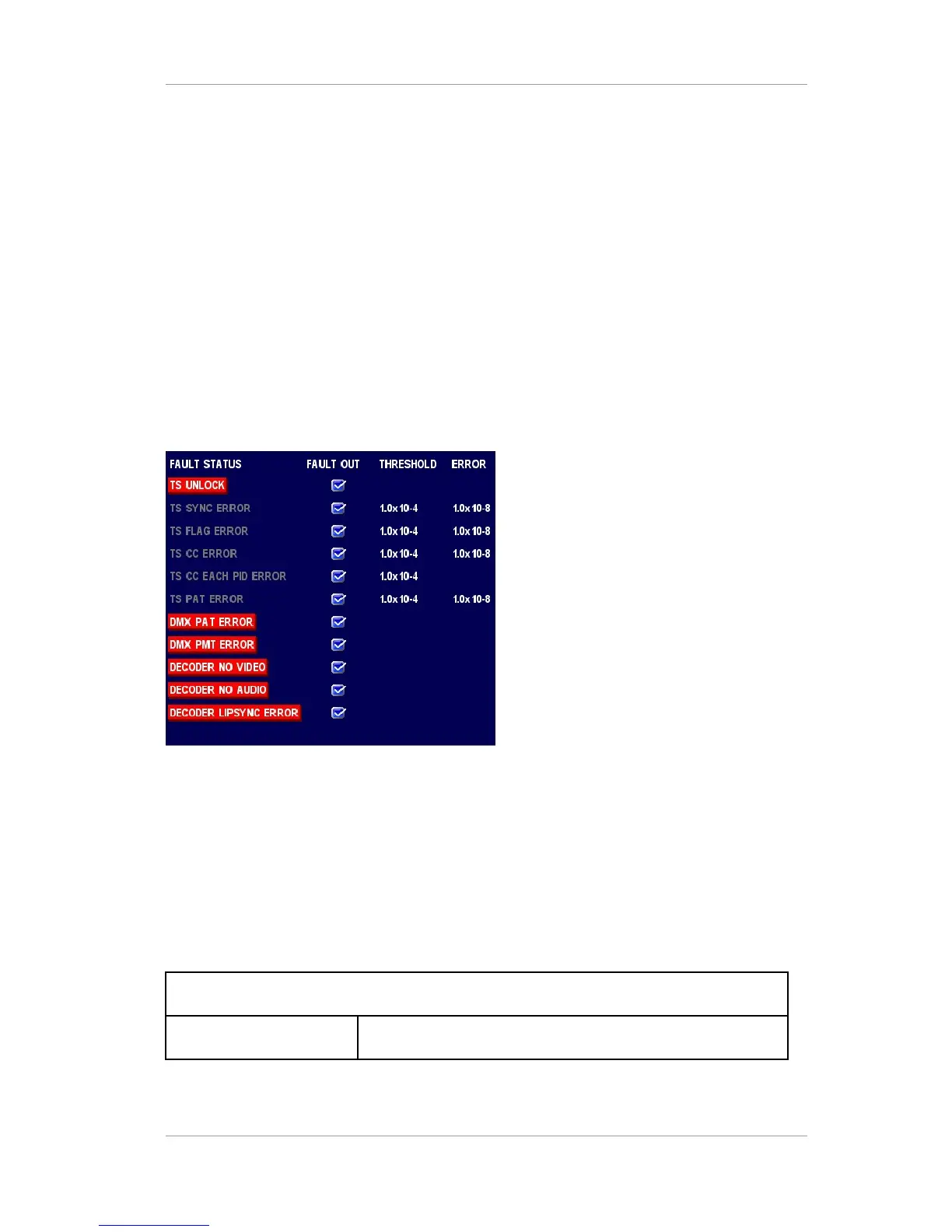
FAULT OUT/MAIN/OSD (On Screen Display): You could see error status on screen. If some errors detected
then, red box will be shown as figure below. This will be shown only on MAIN video. You could choose ON
or OFF.
FAULT OUT/SUB: Fault output monitoring for SUB data path. The sub-menus of SUB are same as MAIN
sub-menus
FAULT OUT/INPUT PORT: Fault output monitoring for all ports (RF-IN1/RF-IN2/BNC-1/BNC-2/
……/BNC-5). Each port has TSFLAG ERR THRESHOLD (1.0X10⁻⁴) sub-menu.
FAULT OUT/THRESHOLD INTERVAL: A fault time interval that calculates error rate (3sec, 5sec, 10sec).
Figure
10
On Screen Display for Fault indication
3.2.10 CONFIG/PRIORITY
Automatically selects input from 1
st
to 7
th
when you choose AUTO SELECTION on source sub-menu. Each
sub-menu has RF-IN1, RF-IN2, and BNC-1 through 5.
Table 23 CONFIG/PRIORITY sub-menu architecture
CONFIG
PRIORITY Choose automatic source selection priority
Version 2.0 41


 To Next Page