TLV-300E/TAV-900A Professional Digital TV Receiver User’s Manual
2.2 VERIFYING YPBPR OR RGB COMPONENT VIDEO OUTPUT (ONLY IF APPLICABLE DISPLAY IS
ATTACHED)
If you have attached YPbPr display or RGB display, follow this step.
Connect YPbPr type or RGBHV type display into Y/G, Pb/B, Pr/R and HD, VD BNC connector in the rear
panel. The display can be 1920x1080 interlaced resolution or 1280x720 progressive resolution; or enhanced
DTV ready monitor supporting 720x480 (576) progressive or interlaced resolution.
Turn on the unit and use DIAGNOSIS/DEFAULT menu to reset configuration. Then use CONFIG/MAIN/
VIDEO/DISPLY TYPE, CONFIG/MAIN/VIDEO/DISPLAY MODE and CONFIG/MAIN/VIDEO/FRAME
RATE menu to configure video output as your display connected.
Then, turn on the MAIN OSD using CONFIG/MAIN/OSD menu.
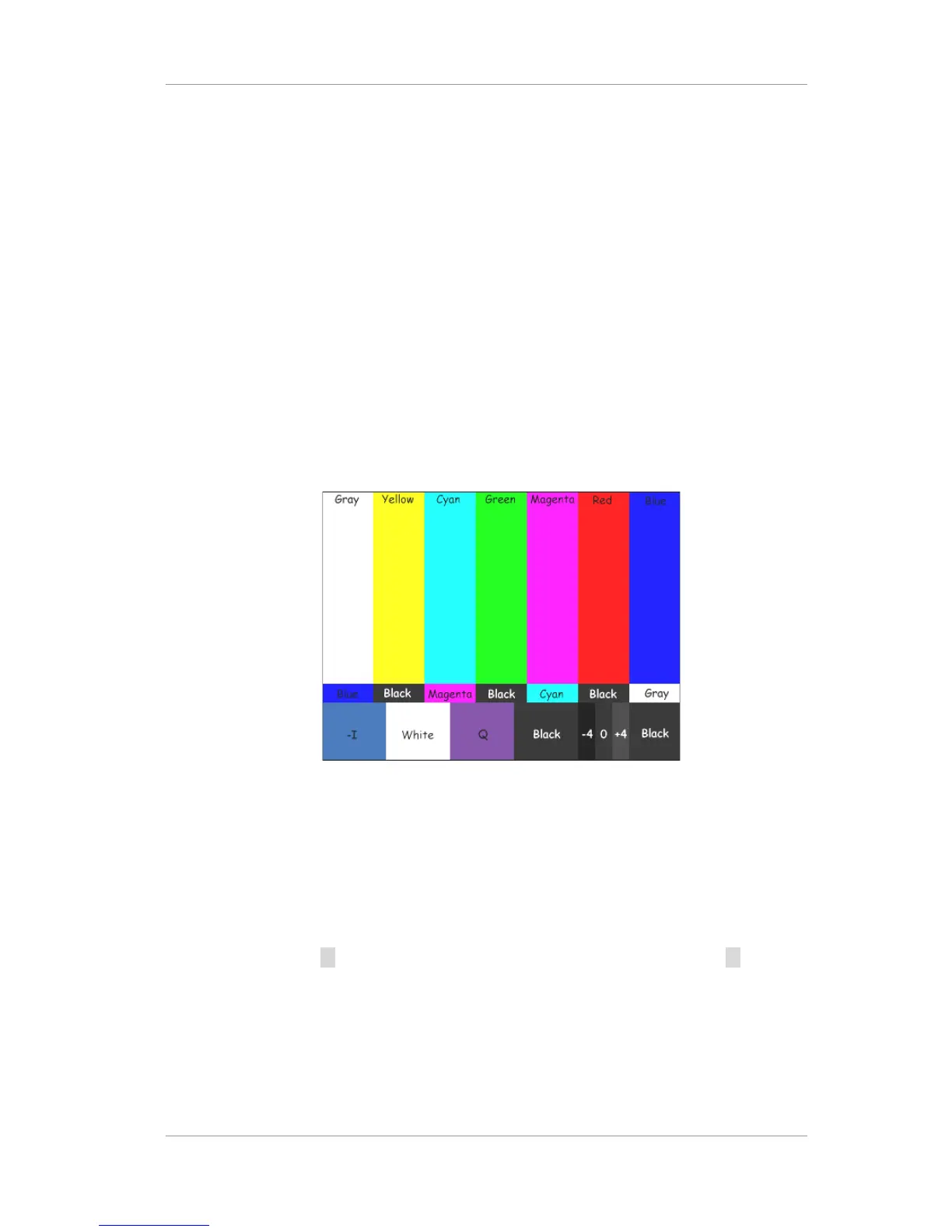
Use DIAGNOSIS/COLORBAR menu ON and OFF to display color bar signal out.
If COLOR BAR is not shown on the display, it means that your video connection has a problem.
Figure
9
Color Bar Pattern with flag
2.3 VERIFYING SDI VIDEO OUTPUT (ONLY IF APPLICABLE DISPLAY IS CONNECTED)
If you have attached SDI display, follow this step.
Attach SDI display into SDI OUTPUT 1 or SDI OUTPUT 2 Connector. SDI 1 and SDI 2 have identical
signal.
Turn on the unit and use button invoke main menu and select DEFAULT menu and press button and
select EXEC and press ENTER button to reset configuration. Then use CONFIG/MAIN/VIDEO/DISPLY
MODE and CONFIG/MAIN/VIDEO/DISPLY TYPE and CONFIG/MAIN/VIDEO/FRAME RATE menu to
configure video output as your display connected.
Then, turn on the MAIN OSD using CONFIG/MAIN/OSD menu.
Use DIAGNOSIS/COLORBAR menu select EXEC to turn ON and OFF to display color bar signal out.
Version 2.0 19


 To Next Page