116 TI-Nspire™ Reference Guide
Symbols
+
(add)
+
key
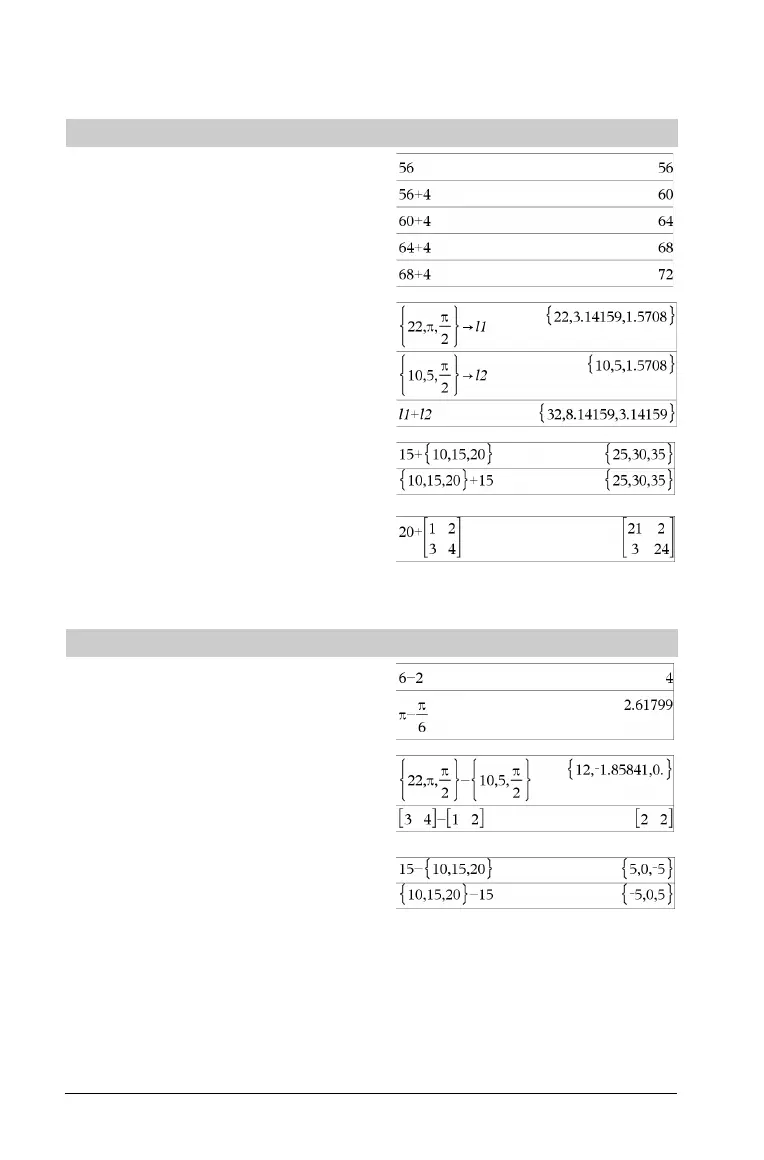
Va lu e1 + Va lu e2 ⇒ value
Returns the sum of the two arguments.
List1
+ List2 ⇒ list
Matrix1 + Matrix2 ⇒ matrix
Returns a list (or matrix) containing the sums of corresponding
elements in List1 and List2 (or Matrix1 and Matrix2).
Dimensions of the arguments must be equal.
Va lu e + List1 ⇒ list
List1 + Val ue ⇒ list
Returns a list containing the sums of Va lu e and each element in
List1.
Va lu e + Matrix1 ⇒ matrix
Matrix1 + Val ue ⇒ matrix
Returns a matrix with Va lu e added to each element on the diagonal
of Matrix1. Matrix1 must be square.
Note: Use .+ (dot plus) to add an expression to each element.
N(subtract)
-
key
Va lu e1 N Va l ue 2 ⇒ value
Returns Val u e1 minus Va lu e 2.
List1 N List2 ⇒ list
Matrix1 N Matrix2 ⇒ matrix
Subtracts each element in List2 (or Matrix2) from the corresponding
element in List1 (or Matrix1), and returns the results.
Dimensions of the arguments must be equal.
Va lu e N List1 ⇒ list
List1 N Va lu e ⇒ list
Subtracts each List1 element from Va l ue or subtracts Va lu e from
each List1 element, and returns a list of the results.

 To Next Page
 Loading...