82 TI-Nspire™ Reference Guide
complexValue 4Rect
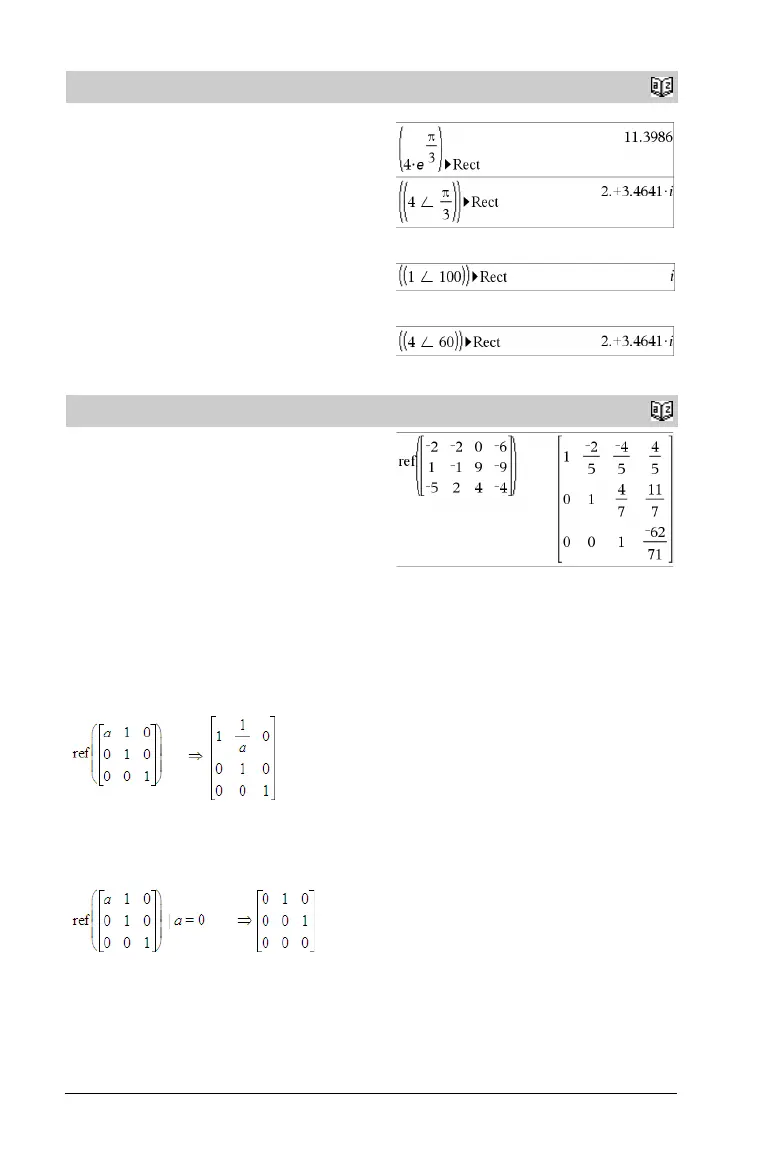
Displays complexValue in rectangular form a+bi. The complexValue
can have any complex form. However, an re
iq
entry causes an error in
Degree angle mode.
Note: You must use parentheses for an (r±q) polar entry.
In Radian angle mode:
In Gradian angle mode:
In Degree angle mode:
Note: To type ±, select it from the symbol list in the Catalog.
ref()
Catalog
>
ref(Matrix1[, To l]) ⇒ matrix
Returns the row echelon form of Matrix1.
Optionally, any matrix element is treated as zero if its absolute value
is less than Tol . This tolerance is used only if the matrix has floating-
point entries and does not contain any symbolic variables that have
not been assigned a value. Otherwise, Tol is ignored.
• If you use
/
·
or set the Auto or Approximate
mode to Approximate, computations are done using floating-
point arithmetic.
•If Tol is omitted or not used, the default tolerance is calculated
as:
5EL14 ·max(dim(Matrix1)) ·rowNorm(Matrix1)
Avoid undefined elements in Matrix1. They can lead to unexpected
results.
For example, if a is undefined in the following expression, a warning
message appears and the result is shown as:
The warning appears because the generalized element 1/a would not
be valid for a=0.
You can avoid this by storing a value to a beforehand or by using the
“|” substitution mechanism, as shown in the following example.
Note: See also rref(), page 87.
4
Rect
Catalog
>


 To Next Page
 Loading...