34 TI-Nspire™ Reference Guide
euler()
Catalog
>
euler(Expr, Var , depVar, {Va r0 , Var M ax }, depVar0, Var St e p
[, eulerStep])
⇒ matrix
euler(SystemOfExpr, Va r , ListOfDepVars, {Var 0, Va rM ax },
ListOfDepVars0, Va r St e p [, eulerStep])
⇒ matrix
euler(ListOfExpr, Var , ListOfDepVars, {Va r0 , Var Ma x},
ListOfDepVars0, Va rS te p [, eulerStep])
⇒ matrix
Uses the Euler method to solve the system
=
Expr(Var , depVar)
with depVar(Va r 0 )=depVar0 on the interval [Va r 0 ,Va r M a x]. Returns a
matrix whose first row defines the Va r output values and whose
second row defines the value of the first solution component at the
corresponding Va r values, and so on.
Expr is the right-hand side that defines the ordinary differential
equation (ODE).
SystemOfExpr is the system of right-hand sides that define the system
of ODEs (corresponds to order of dependent variables in
ListOfDepVars).
ListOfExpr is a list of right-hand sides that define the system of ODEs
(corresponds to the order of dependent variables in ListOfDepVars).
Va r is the independent variable.
ListOfDepVars is a list of dependent variables.
{Va r0 , Var M ax } is a two-element list that tells the function to
integrate from Va r 0 to Va r Ma x.
ListOfDepVars0 is a list of initial values for dependent variables.
Va rSt ep is a nonzero number such that sign(Va rSt ep ) =
sign(Var M ax -Var 0) and solutions are returned at Va r 0+i·Va r St e p for
all i=0,1,2,… such that Va r0 +i·Va rSt e p is in [var0,Va rM a x] (there may
not be a solution value at Var M ax ).
eulerStep is a positive integer (defaults to 1) that defines the number
of euler steps between output values. The actual step size used by the
euler method is Va r St ep àeulerStep.
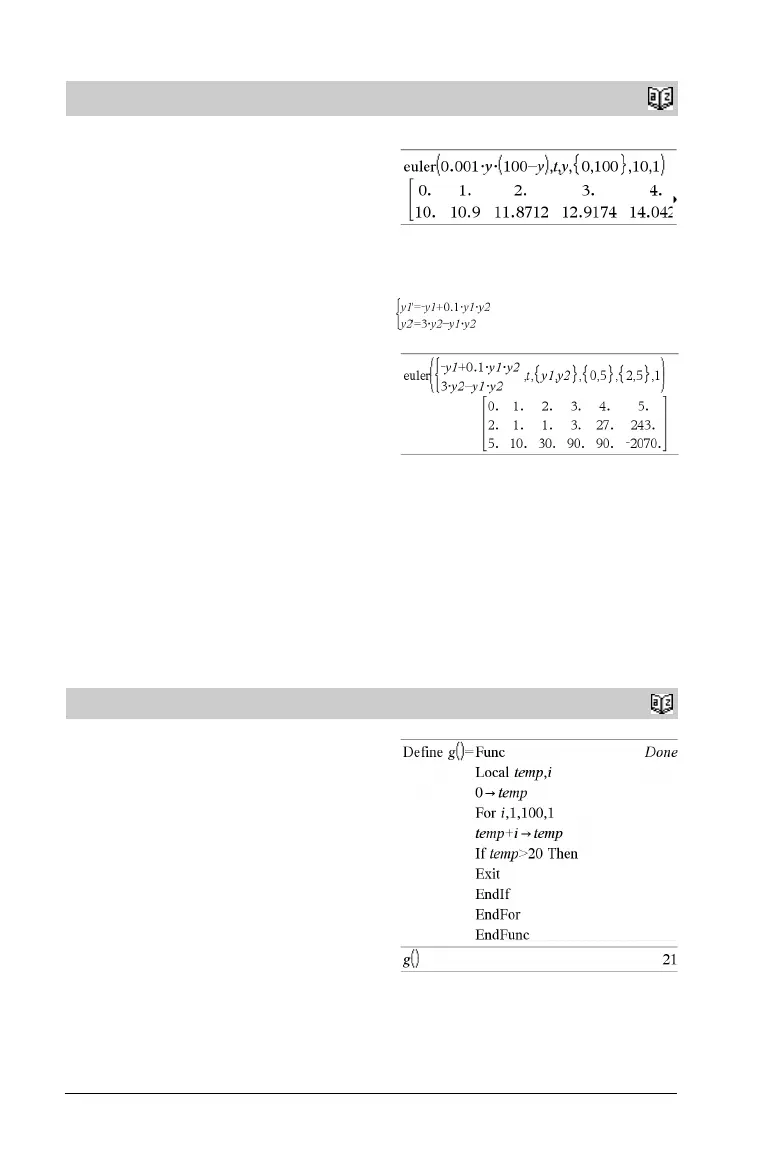
Differential equation:
y'=0.001*y*(100-y) and y(0)=10
To see the entire result, press £ and then use ¡ and ¢ to
move the cursor.
System of equations:
with y1(0)=2 and y2(0)=5
Exit
Catalog
>
Exit
Exits the current For, While, or Loop block.
Exit is not allowed outside the three looping structures (For, While,
or Loop).
Note for entering the example: In the Calculator application
on the handheld, you can enter multi-line definitions by pressing @
instead of · at the end of each line. On the computer keyboard,
hold down Alt and press Enter.
Function listing:
ep
a
Vard
-------------------


 To Next Page
 Loading...