TI-Nspire™ Reference Guide 31
E
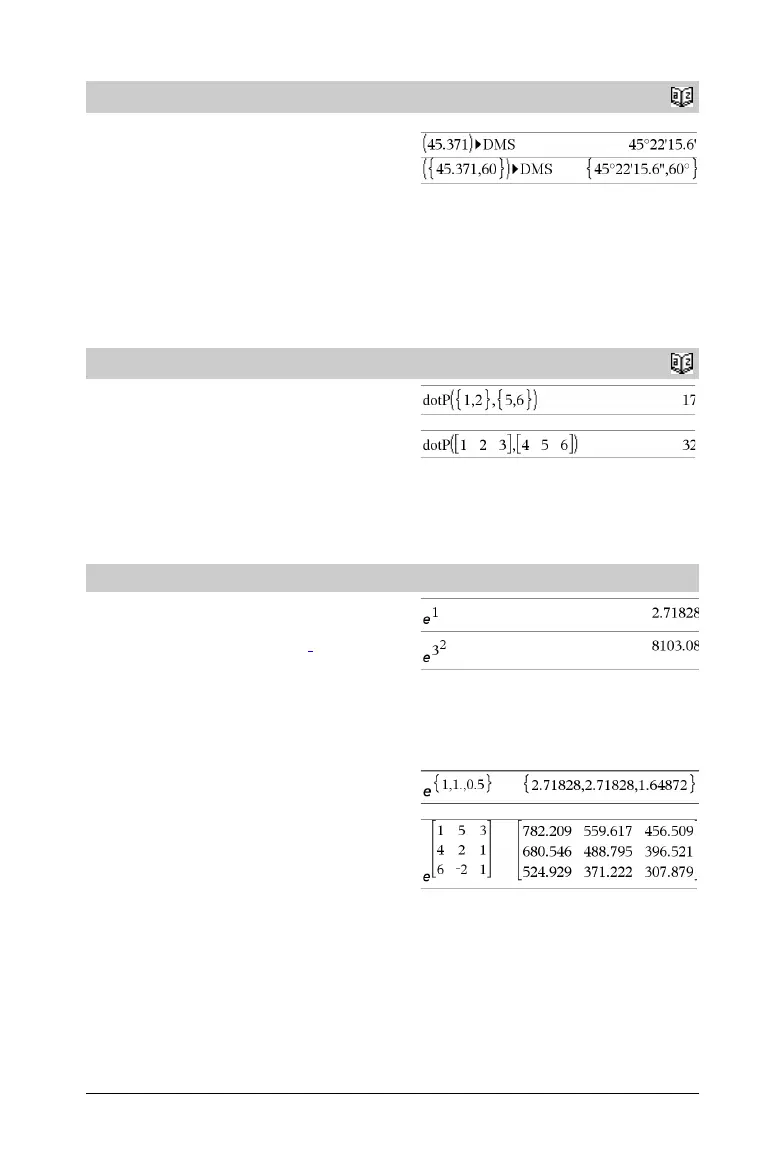
4DMS
Catalog
>
Va lu e
4DMS
List 4DMS
Matrix 4DMS
Note:
You can insert this operator from the computer keyboard by
typing @>DMS.
Interprets the argument as an angle and displays the equivalent DMS
(DDDDDD¡MM'SS.ss'') number. See ¡, ', '' on page 127 for DMS
(degree, minutes, seconds) format.
Note: 4DMS will convert from radians to degrees when used in
radian mode. If the input is followed by a degree symbol ¡ , no
conversion will occur. You can use 4DMS only at the end of an entry
line.
In Degree angle mode:
dotP()
Catalog
>
dotP(List1, List2) ⇒ expression
Returns the “dot” product of two lists.
dotP(Vector1, Vector2) ⇒ expression
Returns the “dot” product of two vectors.
Both must be row vectors, or both must be column vectors.
e^()
u key
e^(Va lu e 1) ⇒ value
Returns e raised to the Va l ue 1 power.
Note: See also e exponent template, page 2.
Note: Pressing u to display e^( is different from pressing the
character E on the keyboard.
You can enter a complex number in re
i q
polar form. However, use this
form in Radian angle mode only; it causes a Domain error in Degree
or Gradian angle mode.
e^(List1) ⇒ list
Returns e raised to the power of each element in List1.
e^(squareMatrix1) ⇒ squareMatrix
Returns the matrix exponential of squareMatrix1. This is not the
same as calculating e raised to the power of each element. For
information about the calculation method, refer to cos().
squareMatrix1 must be diagonalizable. The result always contains
floating-point numbers.


 To Next Page
 Loading...