Introduction
1-5
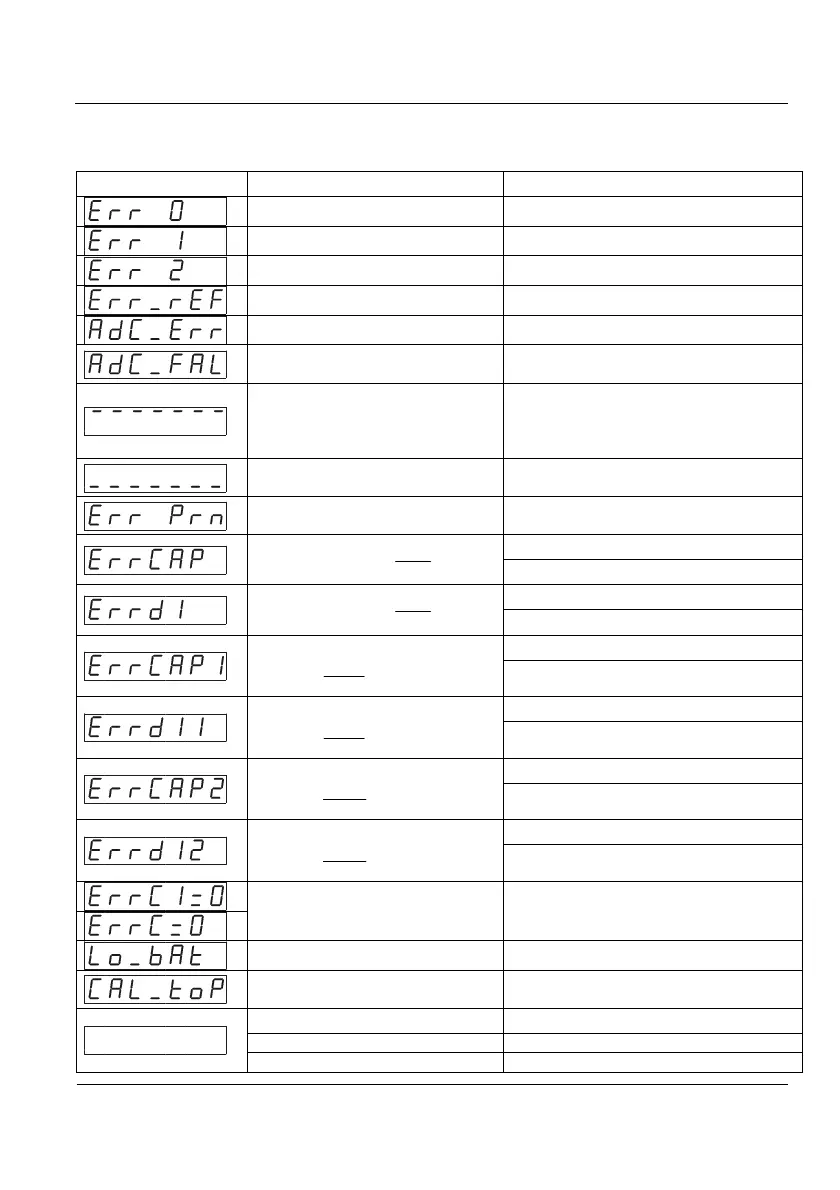
1.5 Error Messages
Main display Condition Solution
Scale is not empty Remove the weight
EEPROM failure Contact your technical service
Data memory failure Contact your technical service
No signal from the load cell Check connector and load cell cable
ADC error Check connector and load cell cable
ADC failure Contact your technical service
Weight exceeds the maximum
capacity
Enter signal exceeds the
maximum range
Remove weight
Check installation
Enter signal under the minimum
range
Check installation
Weight on the scale under the
minimum weight
Put a weight above the minimum value
(see 3.3.6)
Not accomplished:
100000≤
DIV
MAX
Check that MAX value is correct
Change DIV to acomplish the relation
Not accomplished:
100000≤
DIV
MAX
Check that DIV value is correct
Change MAX to acomplish the relation
Not accomplished:
100000
1
1
≤
DIV
MAX
Check that MAX1 value is correct
Change DIV1 to acomplish the relation
Not accomplished:
100000
1
1
≤
DIV
MAX
Check that DIV1 value is correct
Change MAX1 to acomplish the relation
Not accomplished:
100000
2
2
≤
DIV
MAX
Check that MAX2 value is correct
Change DIV2 to acomplish the relation
Not accomplished:
100000
2
2
≤
DIV
MAX
Check that DIV2 value is correct
Change MAX2 to acomplish the relation
Invalid zero value entered Change zero value
Power failure Check power supply
The maximum number of
calibrations has been reached
Contact your technical service
Unplugged Plug it in
Fuse has blown Replace fuse
Indicator failure Contact your technical service



 To Next Page