Configuration and Calibration
3-1
3 Configuration and Calibration
3.1 Introduction
Configuration and calibration modes have different parameters:
-Free access, they can always be read and modified.
-Protected, they can always be read but only modified under certain conditions (tagged
with a
in the diagrams).
Calibration and configuration modes can be activated by pressing the Setup key and
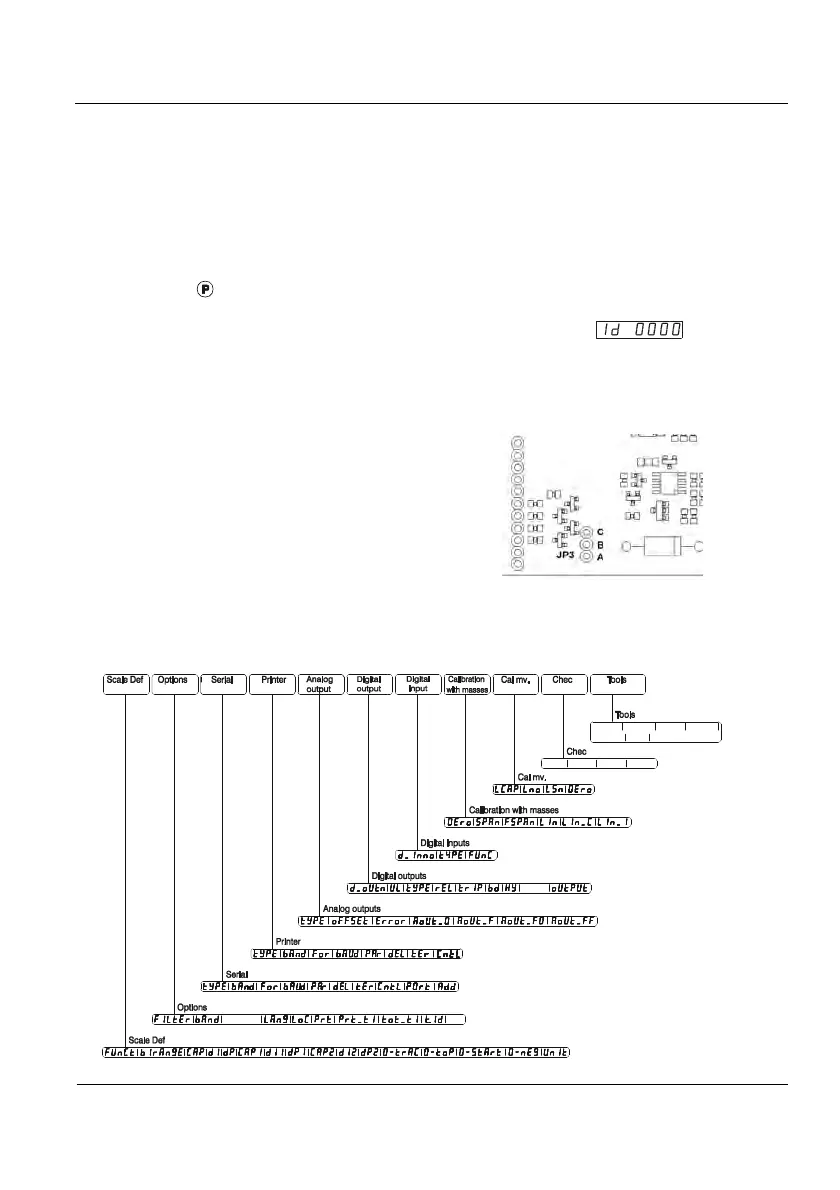
zero key simultaneously. Then the indicator requests the access code (
). If you do
not enter this code (and press Enter) or if you enter a wrong code, you access the menu but
without permission to modify the protected parameters.
The access code can be modified (see 3.3.10). Its value can be consulted by means
of printing the parameters. It is highly recommended to print the parameters after the process
of calibration of the indicator and keep it with the equipment documentation.
It is possible to prevent mechanically the
access to the protected parameters by means
of the JP3 jumper of the indicator main board.
If A and B pins are bridged, the system is
mechanically unprotected. If B and C pins are
bridged, the system is mechanically protected.
Figure 3.1.1 JP3 Detail
If a protected parameter is changed, the new value is recorded. The indicator displays
the number of calibrations made until then.
You will find the access code on page i.
Figure 3.1.2 shows the basic menu structure.
D_loc
Pin
H_res
init
Signal
P_cal Preset
t_del t_acc t_dis
Date
Hour
Ledint
tareloc
Figure 3.1.2 Basic Menu Structure



 To Next Page