Configuration and Calibration
3-22
3.9 Calibration with Masses
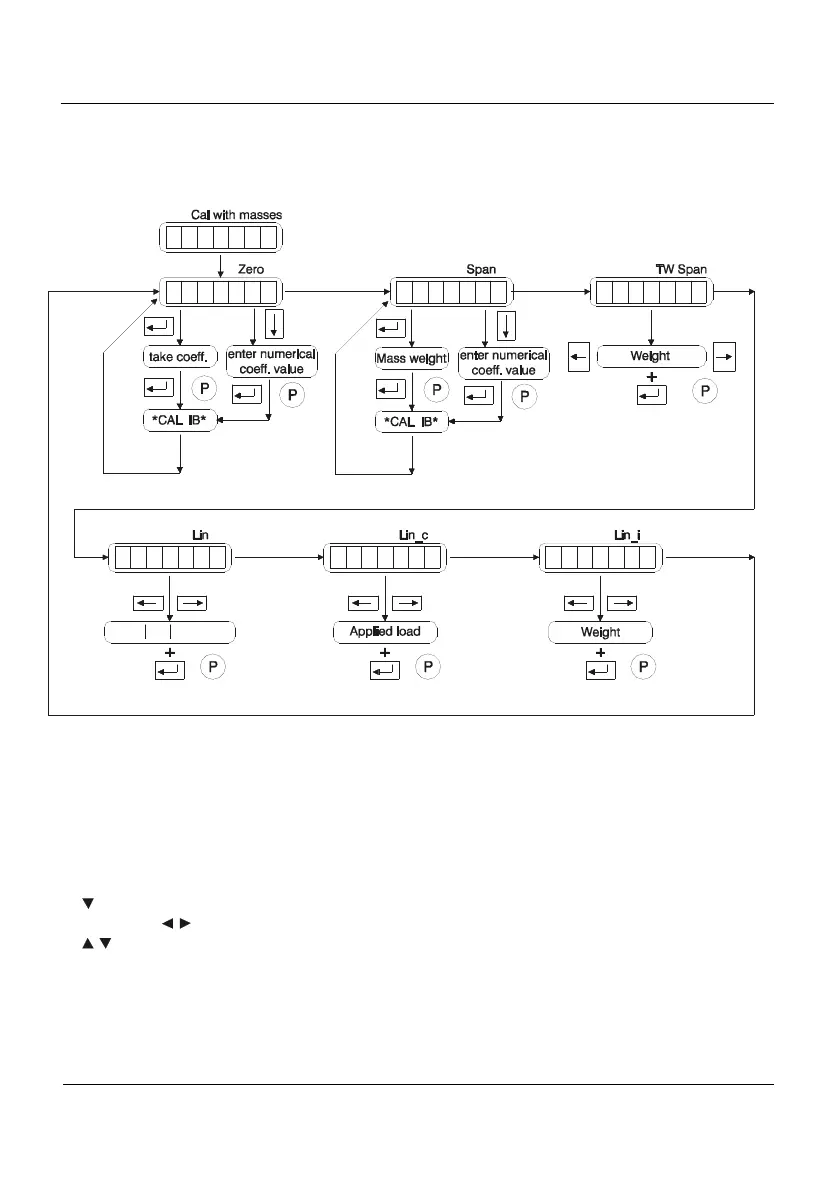
Within the calibration with masses level, parameters showed in Figure 3.9.1 can be
found.
c
s
s
ii
i
f
ll
l
0
a
p
p
nn
n
e
l
a
a
__
r
1
n
n
on
off
reset
c
1
o
Figure 3.9.1 Calibration with Masses
3.9.1 ZERO (0ero)
- Automatic zero adjustment: To automatically adjust the zero value make sure there
is not any weight on it and press the enter key. The indicator will show the present coefficient
value. On pressing enter again the message *CALIB* will be shown while the indicator
assesses the present value. Once accepted it will be stored. It is recommended to keep this
coefficient value or print it by means of printing the parameters.
- Manual zero adjustment: to manually introduce the zero value the Arrow Down key
(
) has to be pressed. Then we select the corresponding digit with the Arrow Left and Arrow
Right keys (
). The selected digit value is modified with Arrow Up and Arrow Down keys
(
). If a negative value has to be introduced it can only be done with the first left digit. The
negative sign appears after the number 9.
When we want to manually introduce the zero value in an indicator with a software
version previous to 1.3XX then the last digit has to be truncated.



 To Next Page