Configuration and Calibration
3-9
3.4 Communication Port
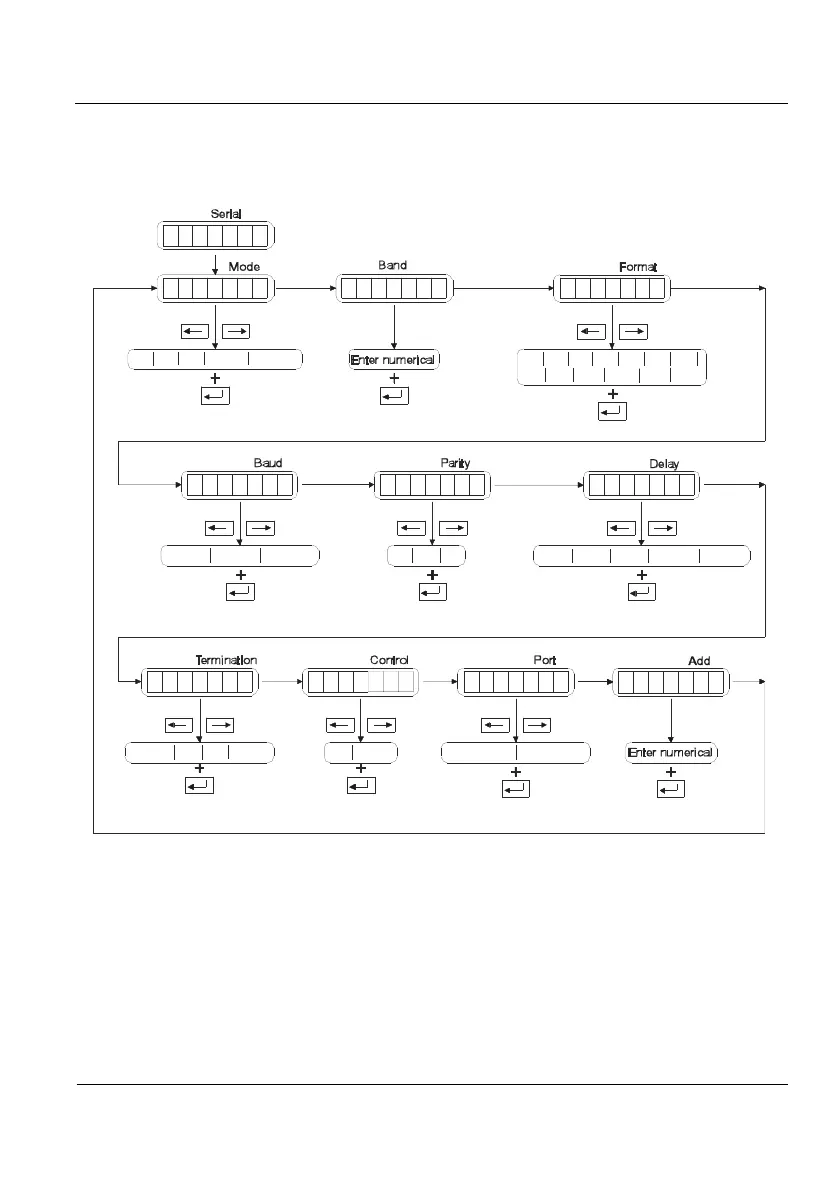
Within the communication port, parameters showed in Figure 3.4.1 can be found.
Ti
De st Auto
S
T
B
C
P
P
D
T
A
BF
E
Y
A
N
O
A
E
E
D
AO
R
P
U
T
R
R
L
R
D
NR
I
E
D
L
T
D
AL
F1 F2 F3 F4 F5 F6 F7
F8 F10F9 F11
4800
Crlf
9600 19200
Off
8n
250
7e
Cr Et None On Rs-485
rs-232Off
7o
500 1000 2000
Autot
F12 F13
Figure 3.4.1 Communication port
3.4.1 MODE (type)
Transmission mode.
These are the options:
DEMAND (de): Data transmission on external request through the serial port
STREAM (st): Continuous data transmission
TICKET (ti): On a print internal request (Print key)
AUTO (auto): It is automatically transmitted on acomplishing the condition for
automatic operations on ports (see 2.11). The transmission
format is the one specified in Format (see 3.4.3)



 To Next Page